

Resetting your Toyota Tundra maintenance light is simple and saves you time at the shop. This guide walks you through the exact steps for every model year. You will also learn why the light turns on and how to avoid common mistakes. Follow along to clear the reminder in just a few minutes.
Key Takeaways
- Quick reset process: You can clear the Toyota Tundra maintenance light in under five minutes using the dashboard controls.
- Model year matters: Older and newer Tundra models use different button sequences, so check your year first.
- Oil change reminder: The light usually tracks oil life, so reset it after every oil change or scheduled service.
- No tools needed: You do not need special equipment to reset the service light on most Tundra trucks.
- Safety first: Always park on level ground and keep your foot on the brake during the reset steps.
- Keep records: Write down your mileage after service so you can track the next maintenance window with ease.
- When to seek help: If the light stays on after a proper reset, have a mechanic check for underlying issues.
📑 Table of Contents
How to Reset Maintenance Light on Toyota Tundra
Your Toyota Tundra maintenance light is a helpful reminder, not a warning of disaster. It simply tells you that your truck is due for routine care. Most owners see it after an oil change or another scheduled service. The good news is that you can clear it yourself in just a few minutes. You do not need a mechanic or a pricey scan tool.
Many drivers feel nervous when a dashboard light stays on. That feeling is normal. But this light is designed to be user-friendly. Once you learn the steps, you can handle it anytime. This guide covers the process for most Tundra model years. You will also learn what triggers the light and how to keep your records straight.
Let us start with the basics. Toyota uses this reminder to track service intervals. The system counts mileage and driving conditions. When it reaches a set point, the light turns on. After you complete the service, you reset the counter. That is all there is to it. The steps are simple, and they work on most trims.
Before you begin, make sure your truck is ready. Park on a flat surface. Put the transmission in park. Keep your foot on the brake. Turn the engine off if your model requires it. Check your owner manual for any model-specific notes. A quick review now saves time later.
Why the Maintenance Light Turns On
The Toyota Tundra maintenance light usually appears for routine service. The most common reason is an oil change. The system also tracks tire rotations, air filter checks, and brake inspections. Some models group these tasks into one reminder. Others show separate messages. Either way, the goal is the same. It helps you stay on schedule.
Driving habits can change the timing. Short trips, heavy towing, and hot weather can wear components faster. The system may adjust its reminders based on these factors. That is why the light can appear a bit earlier than expected. It is not a fault. It is just the truck asking for attention.
Do not ignore the light for too long. Routine care keeps your engine healthy. It also protects your warranty and resale value. A clean service record shows that you maintained the truck well. That matters when you sell or trade it later.
Model Year Differences to Know
Not every Tundra uses the exact same reset method. Older models often rely on a trip meter button and a small display. Newer models use a menu on the dashboard screen. Some use a combination of the brake, ignition, and odometer controls. The core idea stays the same. You clear the reminder after service.
Here is a quick comparison of the common approaches:
- Older Tundra models: Use the trip button and ignition cycle to reach the reset screen.
- Mid-year models: Blend button presses with a small dashboard display and a confirmation step.
- Newer Tundra models: Use the vehicle settings menu on the touchscreen or instrument cluster.
If your truck has a touchscreen, look for a service or vehicle settings tab. If it has a simple cluster, you will likely use the trip and odometer controls. The exact labels may vary, but the flow is similar. Once you know your model year, the process becomes much easier.
Step-by-Step Reset Process
This section shows the most common method for the Toyota Tundra maintenance light. It works for many model years. If your truck uses a menu screen, the steps will feel slightly different, but the idea is the same. Follow along carefully and take your time.
Step 1: Start the reset sequence
Turn the ignition to the on position. Do not start the engine if your manual says to keep it off. Press the trip button until the odometer shows the total mileage. This step prepares the display for the reset screen.
Step 2: Enter the reset mode
Hold the trip button down. Watch the display for a maintenance or oil change message. On some models, you need to turn the ignition off and back on while holding the button. The screen should change to show a reset option or a flashing indicator.
Step 3: Clear the reminder
Press and hold the button again until the message clears. You may see the numbers reset to zero. You may also see a checkmark or a confirmation symbol. Release the button once the light status changes.
Step 4: Verify the reset
Turn the ignition off. Wait a few seconds. Start the truck and check the dashboard. The Toyota Tundra maintenance light should stay off. If it returns right away, repeat the steps once more. A second try often fixes a missed confirmation.
Quick Tips
- Keep your foot on the brake during the reset if your model asks for it.
- Use the exact button labels on your dashboard to avoid confusion.
- If the screen blinks, hold the button a little longer before releasing.
- Write down your current mileage before resetting so you can track the next service.
Using the Dashboard Menu on Newer Models
Newer Tundra trucks often place the reset option inside a menu. This approach is clean and simple once you know where to look. You usually navigate with steering wheel controls or touchscreen buttons. The path may look like this:
- Select the vehicle or settings menu.
- Choose service reminders or maintenance info.
- Pick the oil change or multi-service item.
- Confirm the reset and wait for the confirmation message.
Some models let you reset several reminders at once. Others ask you to clear them one by one. If your truck offers a service schedule view, check it after the reset. It should show the next due date or mileage. That view helps you plan ahead.
If you use the touchscreen, keep your eyes on the road when driving. Perform the reset only when parked. Safety always comes first. A parked truck and a calm pace make the process smooth.
Common Mistakes and How to Avoid Them
Most reset issues come from small skipped steps. The good news is that they are easy to fix. Here are the most common mistakes and simple ways to avoid them.
Mistake 1: Resetting before the service is done
The light is a reminder, not a suggestion box. If you clear it before the oil change or inspection, you lose the cue for next time. Always finish the service first. Then reset the light. That keeps your schedule accurate.
Mistake 2: Missing the confirmation
Some models need a long press to confirm the reset. If you release too soon, the counter may not clear. Watch the screen closely. Wait for the confirmation symbol or the message that says the reset is complete.
Mistake 3: Ignoring other service messages
The Toyota Tundra maintenance light may appear with other notes. You might see tire rotation reminders or cabin filter alerts. Check the full service list before you clear everything. That way, you do not miss a task that needs attention.
Mistake 4: Rushing the ignition steps
A few models use an ignition cycle during the reset. If you move too fast, the display may not enter the right screen. Slow down. Follow the on-screen prompts. A steady pace prevents repeated attempts.
Expert Insights
- Treat the reset as the final step of your service routine, not the first.
- If you tow often or drive in dusty conditions, plan service a bit earlier than the light suggests.
- Keep a simple log of dates and mileage. It makes future resets and service planning easier.
- Use genuine or high-quality parts when you service the truck to keep the system accurate.
When the Light Stays On
Sometimes the Toyota Tundra maintenance light stays on even after a proper reset. That can feel frustrating, but it usually points to a simple cause. First, repeat the reset once more. A missed confirmation is the most common reason. If the light still stays on, look for other clues.
Check for other dashboard messages. A separate warning may be active. You might also have a service task that was not completed. For example, the truck may still expect an oil change entry or a tire rotation note. Review the service screen if your model has one.
If everything looks correct and the light remains on, visit a trusted mechanic. A persistent light can sometimes signal a sensor issue or a service record error. A professional can read the system and clear it correctly. That visit is usually quick and affordable.
Do not keep driving for months with an active reminder. Routine care matters. If you are unsure, schedule a checkup. It is better to confirm the truck is healthy than to guess and wait.
Keeping Your Service Schedule Simple
A clear schedule makes the Toyota Tundra maintenance light easy to manage. You do not need a complicated system. A small notebook, a phone note, or a simple spreadsheet works well. Record the date, mileage, and service type each time you visit a shop or do the work yourself.
Here is a simple tracking list you can use:
- Date of service
- Current mileage
- Type of service, such as oil change or tire rotation
- Parts replaced, if any
- Next expected service interval
This habit helps you stay ahead of the reminder. You will know when the next visit is due. You will also have a clean record for resale time. Buyers and dealers appreciate clear service history. It shows that the truck was cared for properly.
You can also set a phone reminder for your next checkup. Match it to your usual driving habits. If you tow often, shorten the interval. If you drive mostly on highways, you may follow the standard schedule. Adjust the plan to fit your real use.
Final Thoughts on the Toyota Tundra Maintenance Light
The Toyota Tundra maintenance light is a simple tool that helps you stay on top of routine care. Once you know the steps, the reset takes only a few minutes. You can handle it at home without stress. Just remember to finish the service first, follow the right button sequence, and watch for the confirmation.
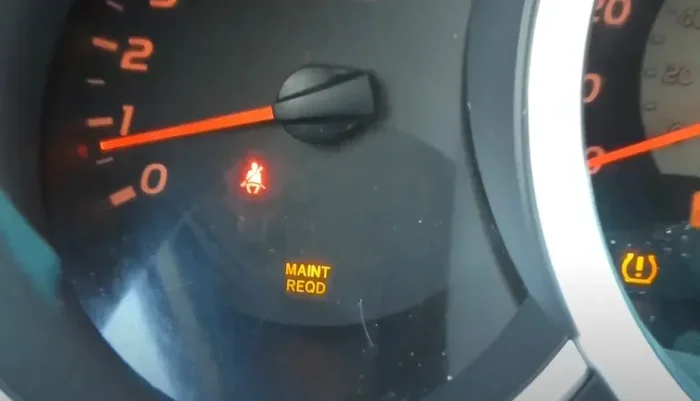
Visual guide about Toyota Tundra dashboard maintenance light
Image source: roborace.com
Take a moment to learn your model year method. Keep a small service log. Check for other reminders before you reset. If the light ever stays on after a proper attempt, ask a mechanic for help. These habits keep your truck healthy and your dashboard clean.
Now you know how to reset maintenance light on Toyota Tundra with confidence. Use this guide the next time the reminder appears. Your truck will thank you, and your next service trip will feel much easier.
Frequently Asked Questions
How do I reset the maintenance light on a Toyota Tundra after an oil change?
Complete the oil change first, then turn the ignition to the on position. Hold the trip button to reach the reset screen and press it again until the reminder clears. Turn the truck off and start it again to confirm the Toyota Tundra maintenance light stays off.
Why is my Toyota Tundra maintenance light still on after I reset it?
The most common reason is a missed confirmation during the reset. Repeat the button sequence slowly and wait for the confirmation symbol. If it still stays on, check for other service messages or visit a mechanic to rule out a sensor issue.
Do I need a scan tool to reset the service light on a Tundra?
In most cases, you do not need a scan tool. You can usually clear the reminder with the dashboard buttons or the vehicle settings menu. A scan tool is only helpful if the light stays on due to a deeper issue.
Can I reset the maintenance light before I change the oil?
You can, but it is better to reset it after the service. The light is a helpful reminder, so clearing it too early may cause you to miss the next service window. Finish the oil change or inspection first, then reset the system.
Does the reset method differ by Tundra model year?
Yes, the method can differ a bit by model year. Older trucks often use the trip button and ignition cycle. Newer models usually use the dashboard or touchscreen menu. Check your owner manual for the exact steps for your year.
How often does the Toyota Tundra maintenance light come on?
The timing depends on your driving habits and the service schedule in your truck. It often appears around an oil change interval or a multi-service reminder. Towing, short trips, and harsh conditions can make it show up sooner.