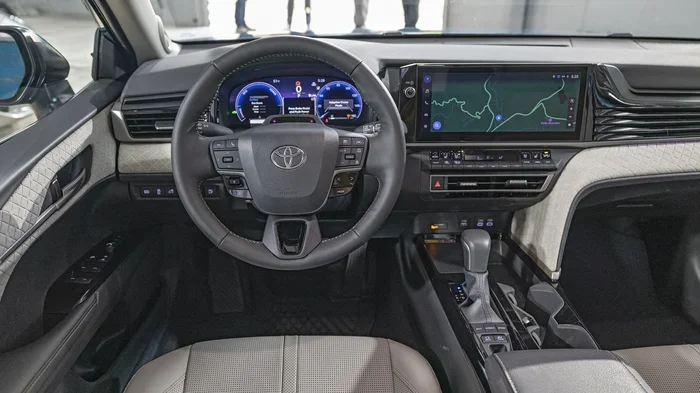

Turning on traction control is quick and easy on most Toyota Camry models. You usually just press a dedicated button near the steering wheel or gear shift. If the light stays on, a quick system reset or a fuse check often solves the problem. This guide walks you through every step so you can drive with confidence in wet or snowy conditions.
Key Takeaways
- Button Location: The traction control switch sits near the steering wheel or dashboard on most Camry trims.
- Light Behavior: A steady light means the system is off, while a flashing light often signals a sensor or system issue.
- Reset Steps: Turning the car off and on, or disconnecting the battery briefly, can clear false warning lights.
- When to Use It: Keep traction control active in rain, snow, ice, or loose gravel for better grip and stability.
- When to Turn It Off: Disable the system only when stuck in deep snow, mud, or sand where wheel spin helps free the car.
- Maintenance Matters: Worn tires, low pressure, or dirty wheel speed sensors can trigger false traction control warnings.
- Professional Help: If the light stays on after basic checks, a scan tool or dealership visit may be needed to fix the root cause.
📑 Table of Contents
- How to Turn on Traction Control Toyota Camry: The Basics
- Where to Find the Traction Control Button on a Camry
- How to Turn on Traction Control Toyota Camry Using the Switch
- Understanding Traction Control Lights on the Camry Dashboard
- How to Reset Traction Control Light on a Toyota Camry
- When to Use Traction Control and When to Turn It Off
- Common Traction Control Problems and Quick Fixes
- Expert Tips for Keeping Traction Control Working Properly
- Key Takeaways
How to Turn on Traction Control Toyota Camry: The Basics
Driving a Toyota Camry feels smooth and safe when every system works as intended. One of those key systems is traction control. It helps your tires grip the road when conditions get slippery. Many drivers wonder how to turn on traction control Toyota Camry settings, especially after seeing a warning light or buying a used model. The good news is that the process is simple once you know where to look.
Traction control works by monitoring wheel speed. If one wheel spins faster than the others, the system applies brake pressure or reduces engine power to regain grip. This happens in the background without you needing to do anything. Most Camry models turn this feature on automatically each time you start the car. You usually only need to press a button if the system was manually turned off or if a warning light appears.
Understanding the basics helps you avoid confusion. You do not need advanced mechanical skills to manage this feature. A quick look at your dashboard and a simple button press are often all it takes. Below, you will learn exactly where to find the switch, how to read the lights, and what to do if the system acts up.
Where to Find the Traction Control Button on a Camry
The first step in how to turn on traction control Toyota Camry models is locating the switch. Toyota places this button in a few common spots depending on the year and trim level. Knowing these locations saves time and removes guesswork.
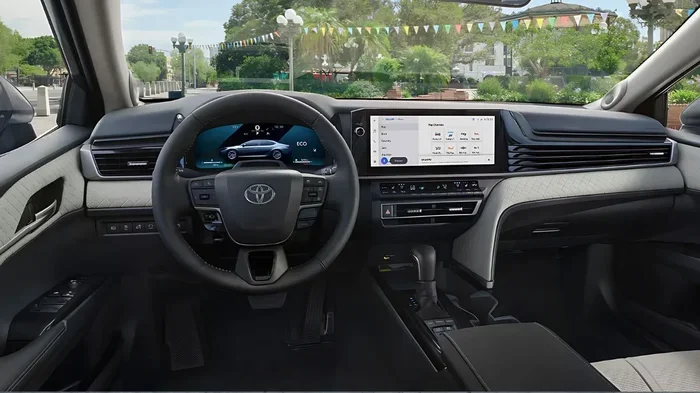
Visual guide about Toyota Camry dashboard controls
Image source: thetechnologyupdates.com
Common Button Locations
Most Camry models from the 2000s through the 2020s place the traction control switch in one of these areas:
- Lower dashboard panel: Near the driver side knee panel or just above the footwell.
- Steering column area: On the left side of the steering wheel, often near the turn signal stalk.
- Center console: Around the gear shift or near the audio controls.
- Dashboard upper panel: Close to the hazard light button or climate controls on some newer trims.
The button usually shows a car icon with squiggly lines underneath. Some models label it as TCL, TRAC OFF, or VSC OFF. The exact label depends on the model year and whether the car uses traction control alone or a combined stability system. If you cannot find the button right away, check your owner manual. It lists the exact spot for your specific Camry.
Button Types You May See
Not every Camry uses the same switch design. Here are the most common types:
- Simple push button: Press once to toggle the system off or on.
- Button with LED indicator: The light on the button shows whether the system is active or disabled.
- Combined stability control switch: Some models use one switch for both traction control and vehicle stability control.
If your Camry has a button with an LED, the light often stays on when the system is off. Pressing the button again usually turns the light off and reengages the system. This design makes it easy to check the status at a glance.
How to Turn on Traction Control Toyota Camry Using the Switch
Once you find the button, the process is straightforward. This section covers the standard steps for most Camry models. The exact sequence may vary slightly, but the core idea stays the same.
Step by Step Activation
Follow these steps to reengage traction control:
- Start the car: Turn the ignition to the on position or start the engine normally.
- Check the dashboard: Look for a traction control or TCL light. A steady light often means the system is off.
- Press the button: Press the traction control switch once. Listen for a soft click or watch for a status change.
- Watch the light: The warning light should turn off or change behavior if the system reengages.
- Test the status: Drive slowly in a safe area to confirm the system responds normally.
In many cases, the system turns back on immediately after you press the button. If the light stays on, do not panic. A persistent light may point to a sensor issue, a fuse problem, or a system fault rather than a simple off state. The next sections cover what to do in those situations.
What Happens After You Press the Button
When you reenable traction control, the car resumes monitoring wheel speed and adjusting power or brake pressure as needed. You may notice a brief change in engine response during slippery driving. That is normal. The system is doing its job to keep the tires grounded.
Some drivers worry that turning the system on will make the car feel sluggish. In everyday driving, the effect is barely noticeable. The system only intervenes when it detects wheel slip. On dry pavement, you should not feel any difference at all.
Understanding Traction Control Lights on the Camry Dashboard
Dashboard lights can be confusing if you do not know what each symbol means. Learning the difference between a normal status light and a warning light helps you decide whether to take action.
Steady Light vs. Flashing Light
Here is what the traction control light usually means on a Camry:
- Steady light on: The system is turned off manually or not active at the moment.
- Steady light stays on after startup: The system may be disabled or there may be a fault.
- Flashing light: The system is actively working to control wheel slip, or there is an intermittent issue.
- Light comes on with other warnings: A broader stability or brake system issue may be present.
If the light turns off shortly after you start the car, that is normal. The system performs a quick self-check at startup. A brief flash during the check is common and should not cause concern.
When the Light Means a Problem
A traction control light is not always about the switch. Sometimes the car is telling you that a component needs attention. Common causes include:
- Wheel speed sensor issues: Dirty or faulty sensors can send incorrect data.
- Low tire pressure: Uneven pressure can affect wheel speed readings.
- ABS system faults: Traction control often shares components with the anti-lock brake system.
- Loose or damaged wiring: Vibration over time can affect sensor connections.
If the light stays on for more than a few minutes of driving, it is wise to investigate further. Ignoring a real fault can reduce safety in bad weather.
How to Reset Traction Control Light on a Toyota Camry
Sometimes the system is fine, but the light stays on anyway. A reset can clear a temporary glitch. This is especially helpful after battery work, fuse changes, or minor electrical hiccups.
Simple Reset Methods
Try these basic steps before assuming the worst:
- Turn the car off: Shut off the engine and remove the key or shift to park if using a push button start.
- Wait a few minutes: Give the system time to fully power down.
- Restart the car: Start the engine again and check whether the light clears.
- Press the traction control button: If the system was manually turned off, press the button to reengage it.
- Check tire pressure: Inflate all tires to the recommended level and see if the light changes.
If the light disappears after a restart, the issue was likely temporary. If it returns, move on to a more detailed check. You may also find it helpful to review related reset guides for Toyota models, such as how to reset maintenance required on a Toyota Camry, since electrical resets sometimes overlap with warning light issues.
Battery and Fuse Checks
A weak battery or a blown fuse can cause odd electrical behavior. Traction control systems rely on stable voltage and clean sensor signals. Check these items if the light keeps returning:
- Battery terminals: Make sure the terminals are tight and free of corrosion.
- Battery voltage: A low battery can cause warning lights to behave strangely.
- Relevant fuses: Inspect the fuses linked to ABS, traction control, or dashboard systems.
- Recent electrical work: If a fuse was replaced or the battery was disconnected, the system may need a short drive cycle to recalibrate.
These checks are simple and often solve minor warning light problems. If you are not comfortable checking fuses, a quick visit to a mechanic can save time.
When to Use Traction Control and When to Turn It Off
Traction control is designed to help in slippery conditions. Still, there are times when drivers choose to disable it. Knowing the difference helps you make smart choices on the road.
Best Times to Keep It On
In most daily driving situations, leave traction control active. It provides extra confidence when the road is less than ideal. Keep it on during:
- Rain: Wet pavement can reduce grip, especially during sudden turns or stops.
- Snow and ice: Traction control helps prevent sudden wheel spin when accelerating.
- Loose gravel: Unstable surfaces can cause tires to slide if power is applied too quickly.
- Steep hills: Controlled acceleration can improve stability on inclines.
For most commuters, keeping the system on is the safest default setting. It works quietly in the background and only steps in when needed.
When Turning It Off Makes Sense
There are a few situations where wheel spin can actually help. In those cases, temporarily disabling traction control may be useful:
- Stuck in deep snow: A little wheel spin can help clear snow from around the tires and find grip.
- Mud or sand: Spinning wheels can sometimes dig out a stuck vehicle when used carefully.
- Controlled track use: Some drivers prefer manual control in closed-course settings.
If you do turn the system off, remember to turn it back on afterward. Driving on public roads with the system disabled can reduce stability in sudden weather changes.
Common Traction Control Problems and Quick Fixes
Even a reliable Camry can develop small issues over time. Most traction control problems are minor and solvable without major repairs. The key is to identify the cause early.
Tire and Sensor Related Issues
Tires and sensors are the most common starting points for troubleshooting. Problems in this area often trigger warning lights or reduce system performance. Watch for these signs:
- Uneven tire wear: Worn tires can reduce grip and confuse wheel speed readings.
- Mismatched tire sizes: Different tire circumferences can make the system think one wheel is slipping.
- Dirty sensors: Road grime can affect wheel speed sensor performance.
- Low tire pressure: Pressure changes can alter how the system interprets wheel speed.
Start with the tires. Make sure they match, are properly inflated, and have decent tread. If the tires look fine, the issue may be sensor or wiring related.
Electrical and System Faults
If tires and pressure are not the cause, look at the electrical side. Traction control depends on clean signals from multiple components. Common electrical issues include:
- ABS module problems: Since traction control often works with ABS, a fault there can affect the system.
- Bad wheel speed sensor: A failing sensor can send erratic data.
- Wiring damage: Pinched wires or corroded connectors can interrupt signals.
- Control module glitches: Rarely, the system software may need a diagnostic reset.
If basic checks do not solve the problem, a diagnostic scan tool can help pinpoint the fault code. That information makes it much easier to decide whether you need a sensor replacement, a wiring repair, or a module check.
Expert Tips for Keeping Traction Control Working Properly
A little routine care goes a long way. You do not need to be a mechanic to keep this system healthy. Simple habits help it stay ready when weather turns bad.
Routine Checks That Help
Use these habits to maintain reliable performance:
- Check tire pressure monthly: Proper pressure supports accurate wheel speed readings.
- Inspect tires for wear: Replace tires before they become dangerously worn.
- Keep sensors and hubs clean: Remove heavy mud or debris from the wheel area when possible.
- Test the button occasionally: Make sure the traction control switch moves smoothly and responds as expected.
- Address warning lights early: Do not wait until the next storm to investigate a persistent light.
These small steps help you avoid bigger problems later. They also make your Camry safer in rain, snow, and other low-grip conditions.
Driving Habits That Support the System
Your driving style matters too. Traction control works best when you give it a fair chance. Try these habits:
- Accelerate gently in slippery conditions: Smooth power application reduces wheel spin.
- Brake early and steadily: Gentle braking helps the ABS and traction systems work together.
- Avoid sudden direction changes: Smooth turns keep the tires planted.
- Reduce speed in bad weather: Lower speed gives the system more time to react.
Good driving habits do not replace the system, but they do help it perform better. Think of traction control as a partner, not a replacement for careful driving.
Key Takeaways
Before you finish, here is a quick recap of the most important points:
- Find the button first: It usually sits near the steering wheel, dashboard, or center console.
- Press once to reengage: Most Camry models turn traction control back on with a single press.
- Watch the dashboard light: A steady light often means the system is off, while a flashing or persistent light may signal a fault.
- Reset if needed: A simple restart, tire pressure check, or fuse inspection can clear temporary warnings.
- Keep it on for safety: Use traction control in rain, snow, ice, and loose surfaces.
- Turn it off only when necessary: Temporary disablement can help if you are stuck in deep snow or mud.
- Investigate persistent lights: If the warning stays on, check tires, sensors, and electrical components.
Learning how to turn on traction control Toyota Camry settings gives you more confidence behind the wheel. The system is designed to help, and managing it is easier than many drivers expect. With a quick button press, a few basic checks, and good driving habits, your Camry can stay steady even when the road gets slippery.
Frequently Asked Questions
How do I know if traction control is on in my Toyota Camry?
Check the dashboard for a traction control or TCL light. If the light is off or not glowing steadily, the system is usually active. Some models also show a button indicator that tells you whether the feature is enabled.
Why is my traction control light on after I started the Camry?
A steady light after startup may mean the system is turned off or there is a fault. It can also appear if tire pressure is low, a wheel speed sensor is acting up, or the ABS system has an issue. If the light stays on, check the tires and consider a basic reset.
Can I drive with the traction control light on?
Yes, but you should be more careful, especially in wet or slippery conditions. The car may still drive normally, but the system might not intervene if a wheel slips. It is best to find out why the light is on before relying on the system in bad weather.
Does turning off traction control make the Camry faster?
It may feel more responsive in very specific situations because the system will not reduce power during wheel spin. On normal roads, though, the difference is small and often not worth the safety trade-off. Most drivers should keep it on for everyday use.
What should I do if the traction control button does not work?
Try restarting the car first, then press the button again. If it still does not respond, check whether the button light changes or if another dashboard warning appears. A fuse issue, electrical glitch, or faulty switch may be the cause, so further inspection may be needed.
How often should I check traction control on my Camry?
There is no need to check it every day. A good habit is to glance at the dashboard lights during your monthly tire check or before long trips in bad weather. If a warning light appears, address it early so the system is ready when you need it.