
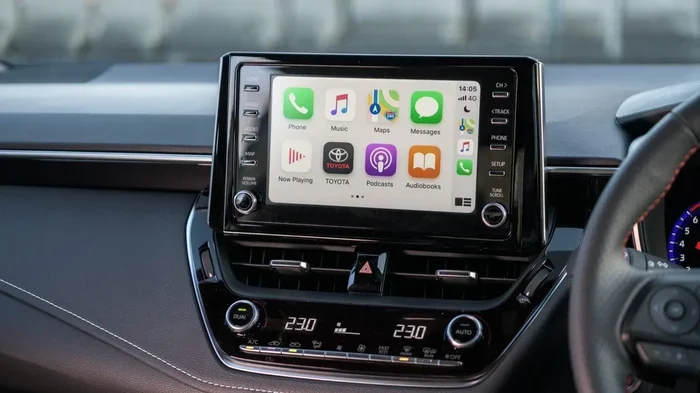
Yes, most modern Toyota Corolla models come with Apple CarPlay, but the feature depends on the model year and trim level. If your Corolla supports it, you can mirror your iPhone apps, maps, and music right on the dashboard screen. This guide breaks down exactly which Corollas have it, how to set it up, and what alternatives exist if your car does not.
Key Takeaways
- Model year matters: Apple CarPlay arrived in Toyota Corollas around 2019 and newer, with earlier trims often missing it.
- Trim level counts: Higher trims and select mid-level trims usually include the compatible touchscreen and software.
- Setup is simple: A Lightning cable and a quick settings check are usually all you need to get started.
- Wireless is rare: Most Corollas with CarPlay still use a wired connection, so keep your cable handy.
- Aftermarket options exist: If your Corolla lacks CarPlay, a compatible head unit can add the feature.
- Safety first: Use CarPlay responsibly, set up navigation before driving, and keep your phone mounted securely.
📑 Table of Contents
- Does Toyota Corolla Have Apple CarPlay
- Which Toyota Corolla Model Years Have Apple CarPlay
- How to Tell if Your Toyota Corolla Supports Apple CarPlay
- How to Connect Apple CarPlay in a Toyota Corolla
- What to Do If Your Toyota Corolla Does Not Have Apple CarPlay
- Tips for Using Apple CarPlay Safely and Effectively
- Final Thoughts on Does Toyota Corolla Have Apple CarPlay
Does Toyota Corolla Have Apple CarPlay
If you are asking does Toyota Corolla have Apple CarPlay, you are not alone. Many drivers want to see their maps, messages, and favorite music on the dashboard without fumbling with their phone. The short answer is that many newer Corollas do support Apple CarPlay, but not every model year or trim includes it. In this guide, we will walk through which Corollas have it, how to check your car, and how to get it working in just a few minutes.
Apple CarPlay turns your car screen into a safer, simpler extension of your iPhone. You can use navigation, make calls, send texts, and play audio with voice commands or a few taps. For a compact sedan like the Corolla, that convenience matters a lot. Let us dive into the details so you know exactly what to expect.
Which Toyota Corolla Model Years Have Apple CarPlay
The easiest way to answer does Toyota Corolla have Apple CarPlay is to look at the model year. Toyota began adding CarPlay compatibility to the Corolla line in later years, especially on trims with the right multimedia system. If your Corolla is from 2019 or newer, there is a strong chance it supports CarPlay, but you still need to confirm the exact trim and screen setup.
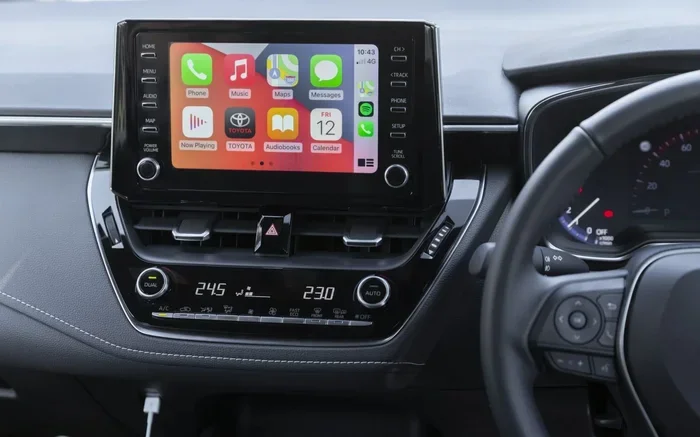
Visual guide about Toyota Corolla Apple CarPlay
Image source: mag.toyota.co.uk
Earlier Corollas often used older audio systems that did not include CarPlay. Some may still have Bluetooth audio, which lets you stream music, but they will not mirror iPhone apps on the screen. If you are shopping for a used Corolla, checking the model year is a smart first step before you worry about cables or settings.
2019 and Newer Corolla Models
For many buyers, the question does Toyota Corolla have Apple CarPlay gets a more positive answer starting around 2019. During this period, Toyota updated several multimedia systems and added smartphone integration on more trims. That said, the feature can still vary by region, package, and screen type.
If your Corolla has a newer touchscreen display, you are more likely to see CarPlay in the menu. Some base audio systems may only offer Bluetooth or simple USB playback. The safest move is to check your specific car rather than assume every 2019 and newer model has it.
Newer Corolla Hatchback and Sedan Variations
The Corolla comes in both sedan and hatchback forms, and both can support CarPlay when equipped correctly. The body style does not usually decide the feature. Instead, the audio system and trim level do. So if you are comparing a sedan to a hatchback, focus on the infotainment specs rather than the shape of the car.
If you want a quick way to narrow things down, look at the higher trim levels first. They are more likely to include the full smartphone integration package. Still, even within the same model year, there can be differences, so verify before you buy.
How to Tell if Your Toyota Corolla Supports Apple CarPlay
You do not need to guess when asking does Toyota Corolla have Apple CarPlay. There are a few easy ways to check your car yourself. The fastest method is to look at the touchscreen menu after turning the car on. If you see a CarPlay icon or an option to connect an iPhone, you are in good shape.
If the screen looks older or does not mention CarPlay, that does not always mean your car cannot use it. Sometimes the software just needs to be updated, or the right cable and connection method has not been tried yet. Let us go through the simplest checks you can do in minutes.
Check the Touchscreen Menu
Start by putting your car in accessory mode or turning the ignition on. Then look through the home screen or settings menu. If CarPlay appears, your system already supports it. If you only see Bluetooth, USB, and radio options, your car may not have the feature built in.
Another clue is the presence of a USB port labeled for data or smartphone use. Not every USB port works the same way. Some are only for charging. If your car has a port meant for media or phone integration, that is a good sign that CarPlay may be available.
Look at the Model Year and Trim
If you are not sure about your screen, check the trim level and model year. Higher trims are more likely to include CarPlay. Mid-level trims sometimes include it as part of a package, while base trims may skip it. This is why the question does Toyota Corolla have Apple CarPlay does not have a single yes-or-no answer for every car.
You can also check your owner manual or the original window sticker if you have it. Those documents usually list the multimedia features. If your car came with a newer infotainment system, CarPlay is much more likely to be part of the package.
How to Connect Apple CarPlay in a Toyota Corolla
Once you know your Corolla supports CarPlay, setup is usually straightforward. In most cases, you simply plug in your iPhone and follow the on-screen prompts. If your car uses a wired connection, a good Lightning cable makes a big difference. A weak or damaged cable can cause drops, lag, or failed connections.
Some drivers also want to know whether CarPlay works wirelessly in a Corolla. In many cases, Toyota Corollas with CarPlay still rely on a cable connection rather than wireless pairing. That means you should keep a cable in the car if you plan to use it often.
Step-by-Step Connection Guide
Here is a simple process you can follow:
- Start the car: Turn on the ignition or engine so the screen powers up.
- Plug in your iPhone: Use a Lightning cable and connect it to the correct USB port.
- Open CarPlay on your phone: If prompted, tap to allow the connection.
- Select CarPlay on the screen: Choose the app or icon if it does not appear automatically.
- Set your preferences: Pick your favorite apps, navigation, and audio options.
If the screen does not recognize your phone, try a different USB port, restart the car, or reconnect the cable. Sometimes the phone also needs a quick restart. These small steps solve a lot of connection problems.
Wired Versus Wireless CarPlay in the Corolla
When people ask does Toyota Corolla have Apple CarPlay, they often hope the answer includes wireless use. Wired CarPlay is more common in many Toyota models, and that usually means a cable is part of the experience. Wired connections can be more stable and easier to troubleshoot, though they are less convenient than wireless.
Wireless CarPlay can be nice because you do not need to plug in every time. But if your Corolla only supports wired CarPlay, that is still very usable. Just keep a reliable cable in the glove box or center console so you are not caught without it.
What to Do If Your Toyota Corolla Does Not Have Apple CarPlay
If your Corolla does not support CarPlay, do not worry. There are still several ways to improve your driving tech. First, check whether your existing system can be updated. Sometimes software changes improve functionality, even if they do not add CarPlay directly. If an update does not help, you can look at other options.
Many drivers also wonder about adding CarPlay through an aftermarket head unit. That is possible in some cars, but it depends on your current system and budget. A new screen can bring CarPlay, better graphics, and more app support. Just make sure the replacement unit is compatible with your Corolla.
Aftermarket Head Unit Options
An aftermarket stereo can be a practical solution if your current system feels outdated. A compatible unit may give you CarPlay, a brighter screen, and better usability. Before you buy, confirm the fitment for your exact Corolla model year. Installation can be simple in some cars and more involved in others.
If you are not comfortable installing it yourself, a professional shop can help. That adds cost, but it can save time and prevent wiring mistakes. If you only want CarPlay for navigation and music, this upgrade may be worth it.
Other Smartphone Integration Alternatives
If you are not ready for a new head unit, you still have options. Bluetooth audio can handle music streaming in many Corollas. You can also use your phone for navigation and then mount it safely within view. Some drivers prefer this setup because it keeps things simple and avoids extra hardware.
Another option is to use a phone mount and your car speakers through Bluetooth. It is not the same as having CarPlay on the dashboard, but it can still make driving easier. If your main goal is safer navigation and hands-free calls, this can be a workable temporary solution.
Tips for Using Apple CarPlay Safely and Effectively
Once CarPlay is working, the goal is to use it in a way that keeps you focused on the road. Set up your navigation before you drive whenever possible. Choose your audio apps ahead of time too. That way, you are not tapping around while moving.
It also helps to keep your phone charged and your cable in good shape. A reliable setup makes CarPlay feel smooth instead of frustrating. If your Corolla has CarPlay, a little preparation goes a long way.
Best Settings for Daily Driving
For everyday use, keep your most-used apps easy to reach. Maps, music, and calling are the big ones for most drivers. If your CarPlay home screen feels crowded, remove apps you do not need while driving. A cleaner layout helps you stay focused.
Voice control is another useful tool. You can ask for directions, send messages, or play a specific song without touching the screen as much. That makes the drive safer and less distracting. If you use CarPlay often, learning the voice commands can save time.
Common Connection Issues and Quick Fixes
Even when does Toyota Corolla have Apple CarPlay is answered with a yes, you may still run into small issues. Here are some common ones and easy fixes:
- Screen does not detect iPhone: Try another USB port or a different cable.
- CarPlay keeps disconnecting: Check the cable ends and restart both devices.
- Apps load slowly: Close unused apps on your iPhone and update the phone software.
- Music audio is low: Confirm the car audio source is set correctly and volume is up.
Most CarPlay problems are simple. A fresh cable, a restart, or a quick settings check often solves them. If problems continue, it may be worth checking whether your system needs a software update.
Final Thoughts on Does Toyota Corolla Have Apple CarPlay
So, does Toyota Corolla have Apple CarPlay? In many cases, yes, especially if your Corolla is newer and equipped with the right multimedia system. The exact answer depends on the model year, trim, and screen setup. If your car has it, setup is usually quick and the daily use is simple. If it does not, you still have practical options like a phone mount, Bluetooth audio, or an aftermarket upgrade.
The best next step is to check your own car before making any assumptions. Look at the screen, test the USB port, and confirm the trim details. Once you know what your Corolla supports, you can decide whether CarPlay is already there or whether you want to add it. Either way, a little setup can make every drive smoother and more convenient.
Frequently Asked Questions
Does every Toyota Corolla have Apple CarPlay?
No, not every Corolla includes Apple CarPlay. It depends on the model year, trim level, and multimedia system. Many newer Corollas support it, but some base models do not.
How do I know if my Toyota Corolla has Apple CarPlay?
Turn on your car and check the touchscreen menu for a CarPlay option or iPhone connection prompt. You can also review your owner manual or look at the trim details to confirm compatibility.
Can I add Apple CarPlay to a Toyota Corolla that does not have it?
Sometimes yes, by installing a compatible aftermarket head unit. This can add CarPlay and improve the screen, but fitment and installation vary by model year.
Does Toyota Corolla Apple CarPlay work wirelessly?
Many Corollas with CarPlay use a wired connection, so you may need a Lightning cable. Wireless CarPlay is not guaranteed on every model, so check your specific system.
Why is Apple CarPlay not connecting in my Toyota Corolla?
The most common reasons are a bad cable, the wrong USB port, or a phone setting issue. Try a different cable, restart the car and phone, and make sure CarPlay is enabled on your iPhone.
Is Apple CarPlay worth using in a Toyota Corolla?
Yes, if your Corolla supports it, CarPlay can make navigation, calls, and music much easier to use while driving. It is especially helpful if you already rely on iPhone apps for daily travel.