
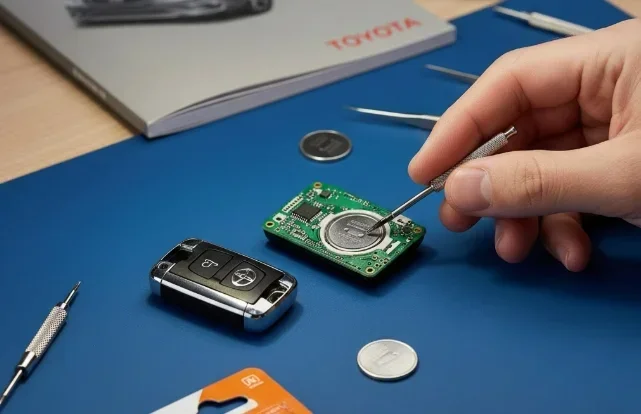
Replacing your car key battery is simple and saves you time and money. This guide walks you through exactly how to change the battery in Toyota key fobs without special tools. You will learn about battery types, easy steps, and quick fixes for common issues. Keep your key working smoothly with these straightforward tips.
How to change the battery in Toyota key fobs is a skill every Toyota owner should know. Your key fob is a small but powerful device. It unlocks your doors, starts your engine, and keeps your car secure. When the battery dies, your key stops working properly. You might notice a weak signal, unresponsive buttons, or a dim LED light. The good news is that you do not need a mechanic to fix this. You can do it yourself in just a few minutes.
Many people worry that replacing a key battery is hard. They think it requires special tools or technical skills. In reality, it is one of the easiest car maintenance tasks you can do. A new battery costs only a few dollars. The process takes less than five minutes for most models. This guide will show you exactly what to do. You will learn about different Toyota key types, the right batteries to buy, and step-by-step instructions. By the end, you will feel confident handling this task on your own.
Key Takeaways
- Know your battery type: Most Toyota keys use CR2032 or CR2016 batteries that are easy to find at any store.
- Use the right tools: A small flathead screwdriver or coin works best to open most key fob cases safely.
- Follow the right steps: Open the case, remove the old battery, and insert the new one with the correct polarity.
- Test before closing: Always check that your key works before snapping the case back together.
- Handle with care: Avoid forcing clips or bending the circuit board to prevent damage.
- Replace early: Change the battery at the first sign of weak signal or dim lights to avoid being locked out.
- Keep a spare: Store a backup key in a safe place in case your main key fails unexpectedly.
📑 Table of Contents
Understanding Your Toyota Key Fob
Before you start, it helps to know what kind of key you have. Toyota has made several types of key fobs over the years. Each one has a slightly different design. Some are simple remotes with a few buttons. Others are smart keys with push-button start features. The battery replacement process is similar for most of them, but there are small differences to watch for.
Common Toyota Key Types
Toyota key fobs generally fall into a few main categories. The basic remote key has buttons for lock, unlock, and sometimes trunk release. These are the most common and easiest to open. The smart key or proximity key looks more modern and sleek. It often has a hidden key blade inside for emergencies. Some newer models have keys with a built-in transmitter and advanced features. Knowing your key type helps you find the right battery and opening method.
You can usually identify your key by looking at the buttons and shape. A basic remote key is larger and has a visible key blade. A smart key is smaller and may not show the blade until you press a release. Check your owner manual if you are unsure. The manual often lists the exact battery type for your model year.
Battery Types Used in Toyota Keys
Most Toyota key fobs use coin cell batteries. The two most common types are CR2032 and CR2016. The CR2032 is a 3-volt battery that is widely available. It is used in many Toyota models from the 2000s to today. The CR2016 is also a 3-volt battery but slightly thinner. Some older or specific models use this one instead. A few keys may use CR1632 or CR2025, but these are less common.
Always check your current battery before buying a replacement. The battery type is usually printed on the top of the old cell. You can also look it up in your owner manual. Buying the wrong size can cause fit issues or poor performance. Stick to reputable brands for the best results. Popular choices include Panasonic, Energizer, and Duracell. These brands offer reliable power and long life.
Gathering the Right Tools
You do not need a big toolbox for this job. A few simple items are all you need. Having everything ready before you start makes the process smooth and stress-free.

Visual guide about Toyota key fob battery replacement
Image source: i.ytimg.com
Essential Tools
Here is what you will need:
- New battery: Make sure it matches your key fob type.
- Small flathead screwdriver: A tiny one works best for prying open the case.
- Coin: A penny or dime can work as a gentle prying tool.
- Soft cloth: Protects the key surface from scratches during opening.
- Tweezers (optional): Helpful for lifting small batteries out of tight spaces.
Some key fobs have a small slot for a coin. Others have a tiny screw that you need to remove first. Check your key carefully before you start. If there is a screw, use a small Phillips head screwdriver. Most Toyota keys, however, use a snap-fit design without screws. This makes the job even easier.
Step-by-Step Guide to Changing the Battery
Now let us walk through the process. Follow these steps carefully, and you will have a working key in no time. Take your time and avoid rushing. A little patience goes a long way.
Step 1: Prepare Your Workspace
Find a clean, flat surface with good lighting. A table or counter works well. Lay down a soft cloth to protect your key from scratches. Good lighting helps you see small parts and battery markings. Keep your new battery nearby so you do not lose track of it.
Step 2: Open the Key Fob
Look for a small gap or seam around the edge of the key. This is where the two halves meet. Insert your flathead screwdriver or coin into the gap. Gently twist or slide it to pop the case open. Do not force it. If you meet resistance, check for a hidden screw first. Some keys have a release button or a sliding cover for the key blade. Remove the blade if needed to access the battery compartment.
Once the case opens, you will see the circuit board and battery. Be careful not to drop small parts. The internal components are delicate. Handle everything with a light touch.
Step 3: Remove the Old Battery
Locate the battery on the circuit board. It is usually held in place by a small metal clip or spring. Use your finger, a screwdriver, or tweezers to lift the old battery out. Note which side is facing up. The positive side, marked with a plus sign, usually faces up. Take a moment to look at the battery orientation before removing it. This makes it easier to put the new one in correctly.
If the battery is stuck, do not use excessive force. Gently wiggle it loose. Avoid touching the circuit board with metal tools to prevent damage.
Step 4: Insert the New Battery
Take your new battery and check the markings. Match the orientation to what you saw with the old battery. The positive side should face the same direction. Place the battery into the compartment. Press it gently until it sits flat and secure. You should feel a slight click or resistance from the clip. Make sure the battery is centered and not tilted.
Double-check the polarity before moving on. A reversed battery will not work and could cause issues. If you are unsure, compare the old and new batteries side by side.
Step 5: Close the Key Fob
Align the two halves of the case carefully. Press them together starting from one end and working your way around. You should hear soft clicks as the clips snap into place. Make sure the case is flush and there are no gaps. If something feels off, open it again and check the alignment. Forcing the case can break the clips or damage the board.
If your key has a screw, replace it now. Tighten it gently. Do not overtighten, as this can strip the threads or crack the housing.
Step 6: Test the Key
Before you put everything away, test your key. Stand near your car and press the buttons. Try locking and unlocking the doors. If your key has a trunk button, test that too. For smart keys, try the push-button start feature. You should see a response from the car and feel a confirmation beep or light. If the key works, you are all set.
If the key does not work, do not panic. Check the battery orientation again. Make sure the battery is seated properly. Try pressing the buttons firmly. Sometimes a loose connection causes issues. If problems persist, try a different battery to rule out a defective one.
Common Issues and Quick Fixes
Even with careful steps, you might run into small problems. Here are some common issues and how to fix them quickly.
Key Still Not Working After Battery Change
If your key does not respond, the first thing to check is the battery orientation. A reversed battery is the most common cause. Open the case and verify the polarity. Also check that the battery is making good contact with the terminals. Clean any corrosion or dirt from the contacts with a dry cloth. Try a fresh battery from a different package. Sometimes a new battery is dead on arrival.
Buttons Feel Stiff or Unresponsive
Stiff buttons can happen if the case is not closed properly. Open the key and check that nothing is blocking the buttons. Make sure the internal membrane is seated correctly. If the buttons still feel off, inspect the case for cracks or damage. A damaged case can put pressure on the internal parts. In rare cases, the circuit board may need replacement, but this is uncommon.
Weak Signal or Short Range
A weak signal often means the battery is low or not seated well. Even a new battery can have a poor connection if it is tilted or loose. Open the key and press the battery down firmly. Check for any debris in the compartment. If the signal is still weak, the battery may be old or low quality. Try a battery from a trusted brand. Also remember that distance and interference can affect range. Stand closer to the car when testing.
Tips for Longer Battery Life
Replacing the battery is easy, but it is even better to make it last longer. Here are some simple tips to extend the life of your Toyota key battery.
- Keep the key dry: Moisture can damage the electronics and drain the battery faster. Avoid leaving your key in damp places.
- Store it safely: Keep your key in a cool, dry spot away from direct sunlight. Heat can shorten battery life.
- Avoid pressing buttons unnecessarily: Each press uses a small amount of power. Only use the buttons when needed.
- Replace batteries proactively: Do not wait until the key fails completely. Change the battery at the first sign of weakness.
- Use quality batteries: Cheap batteries may not last as long or perform as well. Stick to reputable brands.
These small habits can add months to your battery life. They also help keep your key in good condition overall.
When to Seek Professional Help
Most of the time, you can handle a battery change on your own. However, there are situations where it is better to get help. If your key is damaged, cracked, or has water inside, do not try to fix it yourself. A professional can assess the damage and advise on repair or replacement. If your key has a complex smart system and still does not work after a battery change, there may be a deeper issue. In that case, contact a Toyota dealer or a qualified locksmith.
You should also seek help if you lose your key or it stops programming correctly. Modern keys sometimes need reprogramming after battery changes or repairs. A dealer can handle this with the right equipment. This is especially true for push-button start systems and smart keys.
For general maintenance questions, you might also want to check related topics. For example, if you drive a hybrid model, you may wonder about how long does Toyota hybrid battery last. Understanding your car’s systems helps you stay prepared. Similarly, if you own a Prius, you might be curious about how long do batteries last in Toyota Prius. These resources give you a bigger picture of Toyota ownership.
Another common concern is key fob battery replacement for other brands. If you ever switch vehicles, you might need to learn how to change the battery in a Toyota key fob for a different model. The process is often similar, but checking the specifics saves time. Some owners also ask how to replace car key battery Toyota when they have multiple keys. Having this knowledge makes you more self-reliant.
Final Thoughts on Key Maintenance
Taking care of your key fob is a small task with big benefits. A working key keeps your day smooth and stress-free. You avoid lockouts, starting issues, and frustration. With the right battery and a few minutes of your time, you can keep your key in top shape. This skill also saves you money on service calls for a simple fix.
Remember to check your key regularly. Look for signs like slow response, dim lights, or reduced range. These are early warnings that the battery is running low. Replace it before it dies completely. Keep a spare battery in your home or car so you are always prepared. A little attention goes a long way in keeping your Toyota running smoothly.
If you ever need more guidance, your owner manual is a great resource. It has model-specific details and diagrams. Online videos can also help if you want to see the process in action. With practice, changing your key battery becomes second nature. You will feel confident and ready for any key issue that comes your way.
Frequently Asked Questions
What battery does a Toyota key fob use?
Most Toyota key fobs use a CR2032 or CR2016 coin cell battery. Check the markings on your old battery or your owner manual to confirm the exact type for your model.
How long does a Toyota key battery last?
A Toyota key battery typically lasts between one to three years depending on usage. Frequent button presses and smart key features can shorten battery life over time.
Can I change the battery in my Toyota key myself?
Yes, you can easily change the battery yourself with a small screwdriver or coin. The process takes just a few minutes and requires no special tools for most models.
What should I do if my key still does not work after changing the battery?
Check the battery orientation and make sure it is seated correctly. Clean the contacts and try a fresh battery. If the issue continues, the key may need professional service.
Do I need to reprogram my Toyota key after replacing the battery?
In most cases, you do not need to reprogram your key after a battery change. The key should work right away once the new battery is installed and tested.
Where can I buy a replacement battery for my Toyota key?
You can find replacement batteries at auto parts stores, hardware stores, pharmacies, and online retailers. Look for reputable brands like Panasonic, Energizer, or Duracell for reliable performance.