

Changing the battery on your Toyota key fob is a simple task you can do at home. You do not need a mechanic for this job. With the right tools, you can fix it in minutes. This guide shows you how to change the battery on Toyota key fob units safely. You will save time and money by doing it yourself.
Key Takeaways
- Identify Your Model: Different Toyota models use different battery types like CR2032 or CR2016.
- Use the Right Tool: A small flathead screwdriver or the mechanical key helps open the fob casing.
- Handle with Care: Be gentle when prying open the case to avoid breaking the plastic clips.
- Correct Polarity: Ensure the positive side of the battery faces up when inserting the new cell.
- Test Before Closing: Press the buttons to confirm the key works before snapping the case shut.
- Save Money: Doing this yourself costs less than visiting a dealership service center.
- Keep Spare: Always keep a spare key handy in case the new battery does not work immediately.
📑 Table of Contents
Introduction
Is your Toyota key fob acting strange? Maybe the range is short. Maybe the buttons feel unresponsive. This often means the battery is dying. It is a common issue for many car owners. The good news is you can fix it fast. You do not need to pay for service.
How to change the battery on Toyota key fob units is a skill every owner should know. It saves you a trip to the shop. It also keeps your car accessible. Modern key fobs are small computers. They need power to send signals. When power fades, the car cannot detect the key. Replacing the cell restores function.
In this guide, we will walk you through the process. We cover safety and tools. We also discuss common models. You will feel confident doing this task. Let us get started on restoring your key.
Tools You Need for the Job
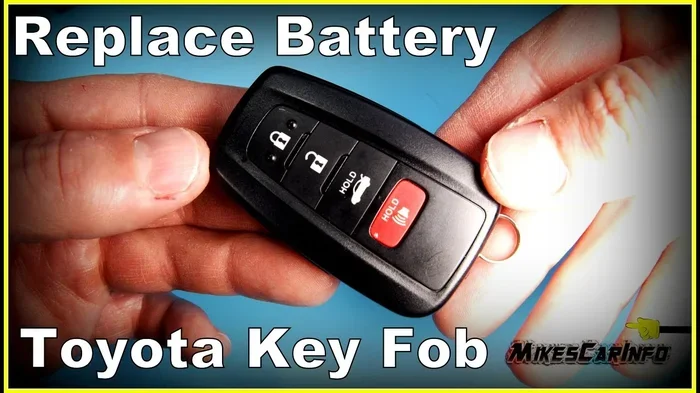
Visual guide about Toyota key fob battery replacement
Image source: i.ytimg.com
Before you start, gather your supplies. You do not need many tools. Simplicity is key here. Having everything ready makes the job smooth.
- New Battery: Check your manual for the type. Common types are CR2032 or CR2016.
- Small Screwdriver: A flathead screwdriver works best. Some fobs use a coin.
- Soft Cloth: Place this on your work surface. It prevents scratches on the key.
- Good Light: Ensure you can see small parts clearly.
You might wonder where to get the battery. Any electronics store sells them. You can also find them online. Make sure you buy the correct size. Using the wrong size will not work. The compartment will not close. Check your old battery before buying a new one.
Choosing the Right Battery Type
Toyota uses different batteries for different keys. Older models might use a watch battery. Newer smart keys often use lithium coin cells. The CR2032 is very common. It is flat and round. The CR2016 is thinner. Do not force the wrong battery in. It could damage the contacts.
If you are unsure, look at the old battery. The number is printed on the side. Match that number exactly. This ensures proper voltage. Your key fob needs specific power. Too little power means weak signal. Too much power is rarely an issue with these standard cells.
Opening the Key Fob Safely
This is the most delicate step. The plastic casing can break easily. You need to be gentle. Rushing here causes cracks. A broken case means you need a new key.
Locate the Seam
Look at your key fob closely. Find the line where the two halves meet. This is the seam. On some models, there is a small slot. This slot is for the mechanical key. On others, it is a plain edge. Run your fingernail along the edge. You will feel where it separates.
Use the Mechanical Key or Tool
Many Toyota keys have a physical key blade. You can pull this out. Use the tip of the key to pry the case. Insert it into the slot. Twist gently to create a gap. If your key does not have a blade, use a flathead screwdriver. Wrap the tip in tape. This protects the plastic. Insert the tool into the seam. Twist slightly to pop the clips.
Separate the Halves
Once you create a gap, work around the edge. Move the tool slowly. Listen for clicks. These are the plastic clips releasing. Do not force it. If it feels stuck, check for hidden screws. Some models have a tiny screw under a cap. Remove it if present. Once clips are free, lift the top cover.
Removing the Old Battery
Now you see the inside of the fob. You will see the circuit board. The battery sits on this board. It is usually held by a small metal clip. This clip keeps the battery in place.
Identify the Battery Polarity
Look at the battery before you touch it. Note which side is facing up. Usually, the positive side is up. It has a plus sign. You need to match this with the new battery. Taking a photo with your phone helps. You can refer to the photo later. This prevents mistakes.
Release the Battery Clip
The metal clip might be tight. Gently push the clip aside. Do not bend it too much. You might break the contact point. Once the clip moves, the battery lifts out. If it is stuck, use plastic tweezers. Metal tweezers can short the circuit. Be careful not to drop the battery. It is small and rolls easily.
Dispose of the Old Battery
Do not throw the old battery in the trash. It contains chemicals. Recycle it at a store. Many electronics shops have bins. This is better for the environment. Keep it away from children. Swallowing coin batteries is dangerous.
Installing the New Battery
You have the new cell ready. Now you put it in. This step is straightforward. Accuracy matters more than speed.
Match the Polarity
Place the new battery on the tray. Ensure the positive side faces up. Match the orientation of the old battery. If you took a photo, check it now. The battery should sit flat. It should not wobble. If it wobbles, the clip is not holding it. Adjust the clip gently.
Secure the Connection
Press the battery down lightly. Make sure it touches the contacts. You should feel a slight snap. The metal clip should hold it firm. Wiggle it slightly to test. It should not move much. A loose battery causes intermittent signal. You want a solid connection.
Testing the Key Fob Before Closing
Do not snap the case shut yet. Test the key first. This saves you from opening it again. If it does not work, you know immediately.
Press the Buttons
Press the unlock button. Press the lock button. If you have a panic button, try that too. Watch the car lights. Do they flash? Does the car beep? If the car responds, the battery works. If nothing happens, check the contacts. Ensure the battery is seated well.
Check the Range
Walk away from the car. Try the buttons from a distance. The range should be normal. If the range is still short, the battery might be dead. Try another new battery. Sometimes new batteries are faulty. It is rare but possible.
Closing the Key Fob Case
The key works. Now you close it up. This step seals the electronics. You want it secure.
Align the Halves
Bring the two halves together. Align the edges perfectly. Check the buttons. Make sure they line up with the holes. If the buttons are crooked, the case will not close. Adjust the internal components if needed. Ensure the mechanical key slot aligns too.
Snap the Case Shut
Press around the edges. Start from one side. Move to the other. You should hear clicks. These clicks mean the clips are locked. Run your finger along the seam. Feel for gaps. If there is a gap, press harder. Do not use excessive force. You might crack the plastic.
Reinsert the Mechanical Key
If your key has a blade, slide it back in. Push it until it clicks. Test the release button. The key should pop out smoothly. If it sticks, open the case again. Check for obstructions. The key blade must move freely.
Troubleshooting Common Issues
Sometimes things do not go as planned. You might face issues after replacement. Here are common problems and fixes.
Key Still Not Working
If the key fails, check the battery again. Is it upside down? Is the clip loose? Clean the contacts with a cotton swab. Dirt can block power. If the battery is new and contacts are clean, the fob might be damaged. Water damage can kill the circuit. In this case, you may need a new fob.
Car Does Not Recognize Key
Sometimes the key works but the car ignores it. This is a synchronization issue. Try holding the key against the start button. Some cars have a backup slot. Check your manual for this location. You might need to reprogram the key. This is more complex than a battery change.
Buttons Feel Stiff
If the buttons are hard to press, the case is misaligned. Open the case again. Check the rubber buttons. They might be pinched. Ensure they move freely. Close the case carefully. The buttons should click with a soft touch.
Maintenance Tips for Your Key Fob
You want your key to last. Good care extends its life. Here are tips to keep it working.
- Avoid Water: Keep the key dry. Water damages electronics.
- Keep it Clean: Wipe the outside with a cloth. Dirt builds up in buttons.
- Replace Early: Do not wait for failure. Change the battery at the first sign of weakness.
- Store Safely: Do not throw the key in a bag with keys. Metal objects can scratch it.
When to Replace the Battery
Most batteries last 2 to 3 years. It depends on usage. If you use the key often, it drains faster. Cold weather also affects battery life. If the range drops, change it. Do not wait until the key dies completely. Being locked out is stressful.
Backup Key Importance
Always have a spare key. Keep it in a safe place. If your main key fails, you have a backup. You can change the battery on the spare too. This ensures you are never stuck. A spare key is vital for emergencies.
Cost Comparison: DIY vs. Dealership
Many people ask about cost. Doing it yourself is cheap. Going to the dealer costs more. Here is a simple comparison.
| Method | Cost | Time | Convenience |
|---|---|---|---|
| DIY Replacement | $5 – $10 for battery | 10 – 15 minutes | High (At home) |
| Dealership Service | $50 – $150+ | 1 – 2 hours (plus travel) | Low ( Appointment needed) |
| Locksmith | $30 – $80 | 30 – 60 minutes | Medium (Mobile service) |
As you can see, DIY is the best option. You save significant money. You also save time. The only cost is the battery. You likely have the tools already. This makes it the smart choice for owners.
Final Thoughts on Key Care
Your key fob is essential. It gives you access to your car. It starts the engine. Taking care of it is part of car ownership. How to change the battery on Toyota key fob is a simple skill. It empowers you to handle small repairs.
Do not fear opening the case. Modern plastics are durable. If you are gentle, they survive. Keep spare batteries at home. This prepares you for the future. You will not panic when the signal weakens. You will just grab a new cell.
Remember to dispose of old batteries properly. Protect the environment. Protect your family from hazards. Your Toyota deserves good care. Start with the small things. A working key makes every trip better.
Frequently Asked Questions
What type of battery does a Toyota key fob use?
Most Toyota key fobs use a CR2032 or CR2016 lithium coin battery. You should check your specific model manual to be sure. Using the wrong size can damage the fob casing.
Can I change the battery without breaking the key?
Yes, you can change it safely if you are gentle. Use a plastic tool or the mechanical key to pry it open. Avoid using excessive force on the plastic clips to prevent cracks.
How long does a Toyota key fob battery last?
Typically, the battery lasts between 2 to 3 years. Heavy usage or extreme cold can shorten this lifespan. Replace it as soon as you notice a weaker signal range.
Do I need to reprogram the key after changing the battery?
Usually, you do not need to reprogram the key after a battery change. The chip memory stays intact when the power is removed. If the car does not recognize the key, try syncing it manually.
Where can I buy a replacement battery?
You can buy replacement batteries at electronics stores or online. Look for reputable brands to ensure longevity. Make sure the package specifies the correct voltage and size for your key.
What should I do if the key fob still does not work?
If the new battery does not fix the issue, check the internal contacts for dirt. You may need to clean them with a soft cloth. If problems persist, the fob circuit might be damaged and need replacement.