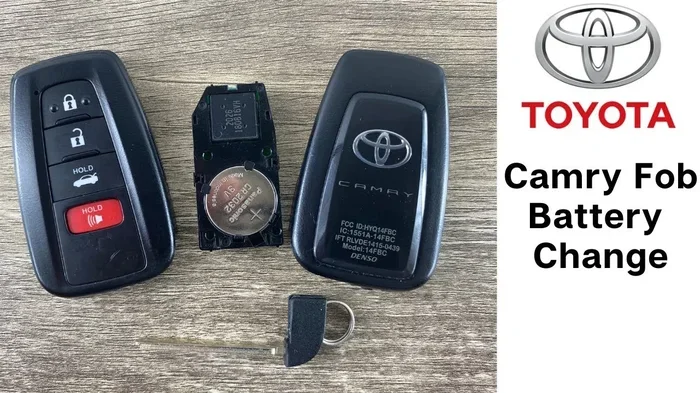

Replacing your Toyota Camry key fob battery is a quick and affordable DIY task that takes less than five minutes. You only need a small flathead screwdriver and a CR2032 coin cell battery to get started. This guide walks you through every step so you can restore your remote functions without paying a mechanic. Skip the dealership and handle this simple repair at home today.
Your car key does more than unlock doors. It starts your engine, opens the trunk, and sometimes even remote starts the vehicle. When the small coin cell inside starts to fade, you will notice slower response times or complete unresponsiveness. Learning how to change Toyota Camry key battery saves you time, money, and unnecessary trips to the service center.
Most drivers panic when their remote stops working. They assume the whole fob broke or that they need a costly replacement. In reality, the problem is usually just a dead battery. The good news is that this fix takes minutes and costs under five dollars. You can handle it in your kitchen, garage, or driveway with minimal tools.
This guide covers everything you need to know. We will walk through the exact steps, share pro tips, and help you avoid common mistakes. Whether you drive a newer model or an older version, the process stays nearly the same. By the end, you will feel confident handling this simple maintenance task on your own.
Key Takeaways
- Gather the right tools: You need a small flathead screwdriver and a CR2032 battery for most Toyota Camry models.
- Open the fob carefully: Use gentle pressure along the seam to avoid cracking the plastic casing.
- Match the battery polarity: Always align the positive side up to prevent circuit damage.
- Test before closing: Press the buttons to confirm the remote and keyless entry work properly.
- Replace every two to three years: Low battery symptoms include reduced range and unresponsive buttons.
- Keep a spare battery handy: Store a fresh CR2032 in your glove box for emergencies.
- Avoid forceful prying: Excessive pressure can break the internal circuit board or snap plastic tabs.
📑 Table of Contents
- Why Your Toyota Camry Key Fob Needs a Battery Change
- Tools and Materials You Need Before Starting
- Step-by-Step Guide: How to Change Toyota Camry Key Battery
- Troubleshooting Tips After Replacing the Battery
- How to Avoid Common Mistakes During the Swap
- Quick Tips for Long-Lasting Key Fob Performance
- Expert Insights: When to Seek Professional Help
- Final Thoughts on Replacing Your Toyota Camry Key Battery
Why Your Toyota Camry Key Fob Needs a Battery Change
Modern car keys rely on small electronic circuits. These circuits send radio signals to your vehicle when you press a button. The CR2032 coin cell powers that signal. Over time, the battery loses its charge. Cold weather, frequent use, and natural aging all speed up the decline.
Common Signs Your Key Battery Is Dying
You do not need a diagnostic tool to spot a weak battery. Your key fob will tell you clearly. Watch for these warning signs:
- Reduced range: You must walk closer to the car before the doors unlock.
- Intermittent response: Buttons work sometimes but fail other times.
- Multiple presses needed: You press the unlock button two or three times before the car reacts.
- Dashboard warnings: Some models flash a key battery alert on the instrument cluster.
Ignoring these signs leads to frustration. You might get locked out or struggle to start your car. Replacing the battery early prevents those headaches. It also keeps your key fob functioning at full strength.
How Long Does a Toyota Key Battery Last?
Most CR2032 batteries last between two and four years. Heavy usage shortens that window. If you use remote start daily or live in extreme temperatures, expect closer to two years. Light usage can push the lifespan toward four years. Keeping a spare battery in your car helps you stay prepared.
Tools and Materials You Need Before Starting
You do not need a toolbox full of gear. This job requires just a few simple items. Gathering everything first keeps the process smooth and stress-free.
Visual guide about Toyota Camry key fob battery
Image source: assets.howtune.com
Essential Items for the Job
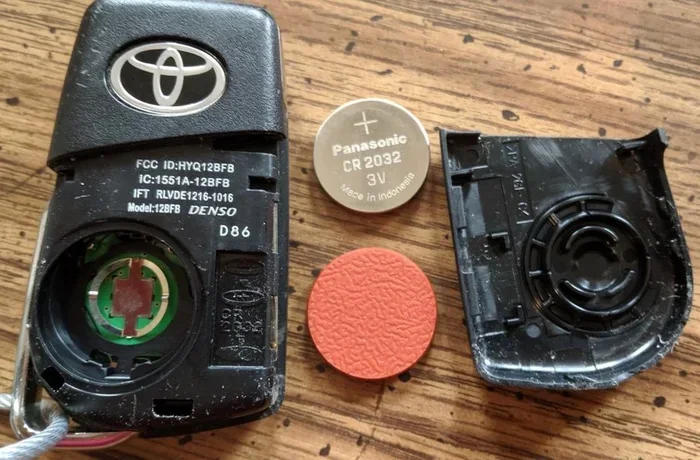
- CR2032 coin cell battery: This is the standard size for most Toyota Camry key fobs.
- Small flathead screwdriver: A precision screwdriver or even a thin coin works well.
- Soft cloth or towel: Place it under the key to prevent scratches and protect the circuit board.
- Clean, flat workspace: A table or counter gives you room to work safely.
Some key fobs have a small release latch or a hidden screw. Check your specific model before you begin. If your fob looks slightly different, the steps may vary by a small margin. The core process remains the same across most generations.
Step-by-Step Guide: How to Change Toyota Camry Key Battery
Now comes the hands-on part. Follow these steps in order. Take your time and avoid rushing. A careful approach prevents damage and ensures a clean replacement.
Step 1: Locate the Seam and Open the Fob
Run your finger along the edge of the key fob. You will feel a thin seam where the two plastic halves meet. Insert the tip of your flathead screwdriver gently into that seam. Twist the handle slightly to create a small gap. Do not force it. The plastic clips release with light pressure.
Some Toyota models use a small sliding latch or a release button on the back. If your fob has that design, press the latch first and pull the mechanical key blade out. That blade often doubles as a pry tool for the battery cover.
Step 2: Remove the Old Battery
Once the casing opens, you will see the circular battery sitting in a small tray. Note which side faces up. Usually, the positive side with the writing faces you. Use your finger or the flathead screwdriver to lift the battery out. It should pop free with minimal effort.
If the battery feels stuck, check for a tiny metal clip holding it in place. Gently bend the clip aside with the screwdriver tip. Never use excessive force. A bent clip can cause poor contact with the new battery.
Step 3: Insert the New CR2032 Battery
Take your fresh CR2032 battery and match the orientation of the old one. The positive side typically faces up. Press the battery into the tray until it sits flat and secure. You should feel a slight click or firm resistance.
Double-check the placement before moving on. Reversed polarity will not damage the circuit, but the fob will not work. A quick visual check saves you from reopening the case later.
Step 4: Close the Key Fob and Test It
Align the two halves of the casing. Press them together evenly along the edges. You should hear soft clicks as the plastic clips lock into place. Run your finger around the seam to confirm the fob is fully closed.
Now test the buttons. Stand near your car and press unlock, lock, and trunk release if your model has it. The doors should respond instantly. If your key includes a remote start button, try that too. A quick test confirms the replacement succeeded.
Step 5: Dispose of the Old Battery Properly
Do not toss the old battery in the regular trash. Coin cells contain materials that require proper recycling. Drop it off at a local electronics store, auto parts shop, or municipal recycling center. Many retailers offer free battery recycling bins near the entrance.
Troubleshooting Tips After Replacing the Battery
Sometimes the new battery sits in correctly, but the key still acts up. Do not panic. A few simple checks usually solve the problem.
Key Fob Still Not Working? Check These First
- Battery orientation: Remove the battery and verify the positive side faces up.
- Loose contacts: Press the battery down firmly. Sometimes the metal tabs need a gentle nudge.
- Dirty contacts: Wipe the battery tray with a dry cloth. Dust or moisture can block the signal.
- Button debris: Check for dirt under the buttons. Clean gently with compressed air or a soft brush.
If the fob still fails after these checks, the internal circuit may have an issue. In that case, a dealership or locksmith can diagnose the problem. Most of the time, however, a fresh battery resolves everything.
When to Reprogram Your Key Fob
Replacing the battery rarely requires reprogramming. The fob keeps its pairing with the car. However, if you notice strange behavior after the swap, a quick reset might help. Some owners find that holding the lock and unlock buttons together for a few seconds clears minor glitches. If you want a detailed walkthrough, you can read our guide on how to reprogram a Toyota keyless fob for step-by-step instructions.
How to Avoid Common Mistakes During the Swap
This job is simple, but small errors can cause headaches. Learning what to avoid keeps your key fob in great shape.
Mistakes That Damage Key Fobs
- Prying too hard: Excessive force cracks the plastic or snaps internal clips.
- Mixing battery types: Only use a CR2032. Other sizes will not fit or power the circuit correctly.
- Touching the battery contacts: Oils from your fingers can reduce conductivity over time. Handle the battery by the edges.
- Forgetting to test before closing: Always verify the buttons work before snapping the case shut.
- Using damaged tools: A worn screwdriver can slip and scratch the circuit board.
A careful approach takes seconds longer but prevents costly repairs. Treat the fob gently, and it will serve you well for years.
Quick Tips for Long-Lasting Key Fob Performance
A new battery lasts longer when you care for the fob properly. Small habits make a big difference over time.
Smart Habits to Extend Battery Life
- Keep the fob dry: Moisture causes corrosion on the contacts. Wipe it down if it gets wet.
- Avoid extreme heat: Leaving the key in a hot car dashboard speeds up battery drain.
- Use buttons sparingly: Each press sends a signal. Reserve remote functions for when you truly need them.
- Store a spare battery: Keep a CR2032 in your glove box or center console for emergencies.
- Clean the fob occasionally: A soft cloth removes dirt and grime that can work into the seams.
These habits cost nothing but add up to better reliability. Your key fob will respond faster and last longer between replacements.
Expert Insights: When to Seek Professional Help
Most battery swaps go smoothly. Yet some situations call for extra help. Knowing when to step back saves time and prevents damage.
Red Flags That Need a Technician
- Cracked casing: A broken shell can expose the circuit to moisture and dirt.
- Corroded contacts: White or green buildup on the metal tabs requires careful cleaning or part replacement.
- Physical damage after a drop: Internal components can shift or break from a hard impact.
- Key blade stuck: If the mechanical key will not slide out, the mechanism may need repair.
If you notice any of these issues, visit a dealership or a trusted locksmith. They can replace the fob shell, clean the circuit, or program a new unit if needed. For routine battery changes, though, you can confidently handle the job at home.
If you ever need to open the hood to check other car components, our guide on how to open the hood of a Toyota Camry covers the safe steps. And if you want to learn more about Toyota maintenance schedules, check our article on how often to change synthetic oil in a Toyota for helpful timing tips.
Final Thoughts on Replacing Your Toyota Camry Key Battery
Changing the battery in your key fob is one of the easiest car maintenance tasks you can tackle. It costs very little, takes almost no time, and prevents annoying lockouts or start issues. Once you know how to change Toyota Camry key battery, you will feel ready to handle this job whenever the need arises.
Keep a CR2032 in your car, follow the steps carefully, and always test the fob before closing it up. With a little care, your key will stay reliable for years. Take pride in handling small repairs yourself. It builds confidence and keeps more money in your pocket.
Frequently Asked Questions
How much does a Toyota Camry key battery cost?
A CR2032 coin cell battery typically costs between one and five dollars at most stores. You can find them at auto parts shops, electronics retailers, and online. Buying a small pack of two or four often lowers the per-unit price.
Can I change the Toyota Camry key battery without a screwdriver?
Yes, many fobs open with a coin, your fingernail, or the mechanical key blade itself. The goal is to gently pry the seam without cracking the plastic. If the clips feel tight, use a thin flat tool and apply light, steady pressure.
Do I need to reprogram the key fob after changing the battery?
Usually no. The fob stays paired with your car after a simple battery swap. If the buttons act strange afterward, try a quick reset by holding the lock and unlock buttons together for a few seconds. Reprogramming is rarely necessary.
What happens if I put the battery in backwards?
The key fob simply will not work until you flip the battery to the correct orientation. Reversed polarity does not usually damage the circuit, but the buttons will not send signals. Remove the battery, check the positive side, and reinstall it correctly.
How often should I replace the battery in my Toyota key fob?
Most drivers replace the battery every two to three years. Heavy remote use, extreme temperatures, and frequent button presses can shorten that timeline. If you notice reduced range or delayed responses, swap the battery sooner rather than waiting for a complete failure.
Where can I buy a replacement battery for my Toyota Camry key?
You can find CR2032 batteries at grocery stores, drugstores, hardware shops, and auto parts retailers. Online stores also sell them in single packs or multi-packs. Look for a reputable brand to ensure reliable performance and a longer shelf life.