
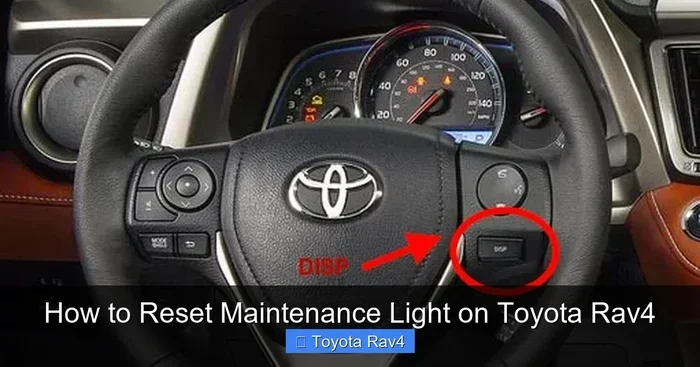
Seeing the maintenance required light on your dashboard can be annoying, but you can fix it fast. This guide shows you exactly how to remove maintenance required on Toyota Rav4 using simple steps. You do not need special tools or mechanic help. Just follow our clear instructions to reset your light and drive with peace of mind.
Your Toyota Rav4 is a tough and reliable vehicle. It works hard for you every day. But sometimes, a small light pops up on your dashboard. This light says maintenance required. Many drivers panic when they see it. They think something is broken. Most of the time, it is just a reminder. You can fix it yourself in minutes. In this article, we will show you how to remove maintenance required on Toyota Rav4 without stress.
We will walk you through every step. You will learn why the light turns on. You will also learn what to do if the light stays on. Our goal is to make this process simple for you. You do not need to be a car expert. You just need a few minutes and your car keys. Let us get started and clear that light today.
Key Takeaways
- Simple Reset Process: You can clear the light using just your ignition key and odometer button.
- No Tools Needed: This fix takes minutes and requires no extra equipment or mechanic visits.
- Regular Reminders: The light comes on as a mileage reminder, not always a repair warning.
- Model Variations: Steps may vary slightly between older and newer Rav4 models.
- Safety First: Always park safely and turn off the engine before starting the reset.
- Keep Records: Track your oil changes and service dates to stay on schedule.
- When to Worry: If the light returns quickly, check for real mechanical issues.
📑 Table of Contents
Understanding the Maintenance Required Light
Before you reset anything, you should know what this light means. The maintenance required light is not the same as a check engine light. It is a simple mileage counter. Toyota built this feature to remind you about routine service. Usually, it comes on every 5,000 miles or so. This is a common reminder for oil changes and basic checks.
Many people confuse this light with serious engine problems. That is not usually the case. Your car is just asking for a scheduled tune-up. Once you complete the service, you can reset the light. If you skip the reset, the light will stay on. It may also flash for a few seconds when you start the car. This is normal behavior for the reminder system.
Why Does the Light Turn On?
The light turns on because of your odometer reading. Toyota programming tracks how far you drive. When you hit a set mileage mark, the system alerts you. This helps you stay on top of car care. Regular oil changes keep your engine healthy. Clean filters and fluids also improve performance. The reminder system is a helpful tool, not a warning of failure.
Difference Between Maintenance Light and Check Engine Light
It is important to know the difference. The check engine light means your car detected a fault. That could be a sensor, a leak, or an emissions issue. The maintenance light is only a service reminder. You can reset it after you change your oil. If your check engine light is on, you should read the codes first. You can learn more about that in our guide on how to reset the check engine light on Toyota.
How to Remove Maintenance Required on Toyota Rav4
Now let us dive into the main steps. This process works for most Toyota Rav4 models. The steps are quick and easy. You will use your key and the odometer button. Make sure you follow each step in order. Skipping a step can cause the reset to fail.
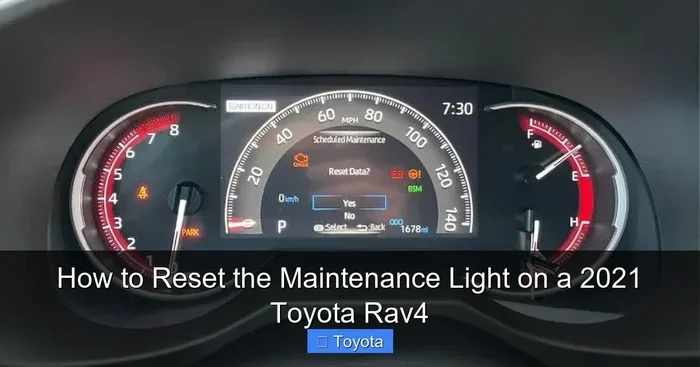
Visual guide about Toyota Rav4 maintenance light reset
Image source: aautomotives.com
Step-by-Step Reset Instructions
Here is the basic method for most Rav4 vehicles. Sit in the driver seat and close all doors. Make sure the car is in park. Follow these steps carefully:
- Insert your key into the ignition.
- Turn the key to the ON position. Do not start the engine.
- Look at the odometer display on your dashboard.
- Press and hold the odometer reset button.
- Keep holding the button while you turn the key OFF.
- Turn the key back to ON while still holding the button.
- Watch the maintenance light on the dashboard.
- Release the button when the light turns off.
- Start the engine to confirm the light is gone.
This method resets the mileage counter. The light should disappear right away. If it does not, try the steps one more time. Sometimes it takes a steady hand and patience. The key is to hold the button through the key turn.
Reset for Newer Toyota Rav4 Models
Newer Rav4 models may use a slightly different screen. Some cars have a multi-information display. You might need to use the steering wheel controls. Here is what to do on those models:
- Turn the ignition to ON without starting the engine.
- Use the arrow buttons on the steering wheel.
- Find the vehicle settings menu on the screen.
- Look for the maintenance or oil reset option.
- Select the reset option and confirm your choice.
- Turn off the car and restart it to check the light.
These digital systems are common in recent years. The menu options may look different by year. If you are unsure, check your owner manual. It will show the exact menu path for your model.
What to Do If the Light Won’t Reset
Sometimes the reset does not work on the first try. That can be frustrating. But there are a few simple fixes. First, make sure you held the button long enough. Second, check that the key turned fully to ON. Third, try the process again with a fresh start.
If the light still stays on, you may have a real service need. The system might be locked until service is recorded. Some models require a full oil change first. After the service, the reset will work properly. If you just changed the oil and the light remains, double-check your steps. You can also look at our article on how to clear Toyota maintenance light for extra help.
Common Reasons the Reset Fails
Here are a few reasons the light may not clear:
- The button was released too early.
- The key was not in the correct ON position.
- The car battery was low or disconnected recently.
- The vehicle actually needs an oil change or service.
- The odometer button is not pressed firmly.
Check these points before you worry. Most failures are just small timing issues. A second attempt usually solves the problem.
Quick Tips for a Smooth Reset
A few small habits can make this easier. Keep your key and button press steady. Do not rush through the steps. A calm pace works best. Also, make sure your dashboard lights are visible before you start. You want to see the maintenance light change clearly.
It helps to do this right after an oil change. That way, the light resets at the right time. You can also keep a simple service log. Write down the date and mileage each time you service the car. This makes future resets easier to track.
Helpful Reminders
- Park on level ground before you begin.
- Keep the car in park with the brake on.
- Use the correct key, not a spare that may not turn well.
- If your Rav4 has a push button start, follow the menu method.
- Check your manual if your model year is unusual.
Common Mistakes to Avoid
Many drivers make the same small mistakes. Avoiding them saves time. One common mistake is turning the engine on too soon. That can interrupt the reset sequence. Another mistake is pressing the button too lightly. The system may not register the command.
Some people also confuse this light with a serious warning. That can lead to unnecessary stress. Remember, this is usually just a mileage reminder. If you are ever unsure, compare the symptoms with other warning lights. For example, if you need to open the hood for a check, you can read our guide on how to open hood on Toyota Corolla for a similar process on another Toyota model.
Mistakes That Can Delay the Reset
- Starting the engine before the light resets.
- Turning the key too far into the start position.
- Releasing the odometer button too soon.
- Ignoring a true service need before resetting.
- Trying the reset with a weak battery.
Watch for these issues and you will likely succeed on the first or second try.
When to Seek Extra Help
Most of the time, this is a quick DIY job. But there are times when you may need more help. If the light comes back right after you reset it, something may be wrong. That could mean your car needs real service. It could also mean the reset did not fully clear the counter.
If you see other lights on the dashboard, pay attention. A flashing light or a loss of power is not normal. In that case, have a mechanic check the vehicle. You may also want to verify other Toyota reminders and settings. For example, some drivers also adjust their clock after service. You can see our guide on how to change time on Toyota Rav4 2026 if your display needs updating too.
Signs You Should Not Ignore
- The maintenance light returns after a short drive.
- You see new warning lights on the dash.
- The engine sounds different or runs rough.
- There are leaks, smells, or unusual noises.
- Your oil change is overdue by a large margin.
These signs mean it is time to look deeper. A reset is helpful, but it is not a cure for real problems.
Keeping Your Rav4 in Good Shape
Resetting the light is only one part of car care. The bigger goal is keeping your Rav4 running well. Regular oil changes matter a lot. So do tire checks, brake inspections, and fluid top-offs. A little routine care goes a long way. It also makes the maintenance light less stressful because you stay ahead of schedule.
If you want to know how long your Rav4 can last with good care, check out our article on how many miles can a Toyota Rav4 last. Good maintenance habits can help your vehicle stay dependable for years.
Simple Service Habits
- Change oil at the recommended intervals.
- Replace filters when they get dirty.
- Check tire pressure every month.
- Listen for unusual sounds during drives.
- Keep a small notebook or phone note for service dates.
These habits help you avoid surprise warnings. They also make resale value stronger. A well-kept car is easier to sell later.
Final Thoughts on Resetting the Light
Now you know how to remove maintenance required on Toyota Rav4 without a trip to the shop. The process is simple when you follow the right steps. Most drivers can do it in just a few minutes. Remember that this light is usually a helpful reminder, not a crisis. Reset it after service and keep up with regular care.
If the light ever feels confusing, take a breath and check the basics. Verify your key position, button press, and service status. With a little patience, you can keep your dashboard clean and your mind at ease. Your Rav4 is built to last, and a few simple habits will help it stay that way.
Frequently Asked Questions
How do I know if the maintenance light is just a reminder?
The maintenance light usually comes on at set mileage intervals, often around 5,000 miles. It is mainly a service reminder for oil changes and routine checks. If your car runs normally, it is likely just a reminder.
Can I reset the maintenance light without changing the oil?
Yes, you can reset the light, but you should still follow your service schedule. Resetting the reminder does not replace the need for an oil change. It is best to reset the light after you complete the service.
Why does the maintenance required light keep coming back?
The light may return if the reset did not fully clear the counter. It can also come back if your car is due for service again. If it returns quickly, check that you followed the reset steps correctly.
Do all Toyota Rav4 models use the same reset method?
Most models use a similar odometer button method, but newer cars may use menu settings. The exact steps can vary by year and trim. If your car has a digital display, try the steering wheel menu option.
Will resetting the light cause any problems?
No, resetting the maintenance light is safe when done correctly. It only clears the service reminder counter. It does not change engine settings or fix mechanical issues.
What should I do if the light stays on after resetting?
Try the reset steps again and make sure you hold the button long enough. If the light still stays on, your car may actually need service. You should also check for other warning lights on the dashboard.