Replacing your Toyota RAV4 key battery is a quick and easy task you can do at home. Most key fobs use a standard coin cell battery that lasts one to two years. You only need a small flat tool and five minutes to swap it out. This guide walks you through every step so your remote and push-button start keep working smoothly.
Key Takeaways
- Simple process: You can replace the battery in under five minutes with basic household tools.
- Right battery type: Most Toyota RAV4 key fobs use a CR2032 or CR2016 coin cell battery.
- Fob variations matter: Smart keys, remote keys, and older models open differently.
- Gentle pressure prevents damage: Forcing the casing can crack the plastic or break internal clips.
- Test before reassembly: Always check the buttons work before snapping the cover back on.
- Keep spares handy: Store a fresh battery in your glove box for quick swaps later.
- When to seek help: If the key still fails after a battery change, inspect the fob or visit a dealer.
📑 Table of Contents
- How to Replace Toyota RAV4 Key Battery Quickly
- Why Your Toyota RAV4 Key Battery Matters
- How to Open Your Toyota RAV4 Key Fob Safely
- How to Replace Toyota RAV4 Key Battery Step by Step
- Common Mistakes to Avoid During Battery Replacement
- When to Replace the Battery and When to Seek Help
- Final Thoughts on Keeping Your Key Reliable
How to Replace Toyota RAV4 Key Battery Quickly
Your Toyota RAV4 key does more than unlock doors. It starts the engine, triggers the alarm, and sometimes holds your stored seat settings. When the battery runs low, you may notice a weaker signal or a dashboard warning. Learning how to replace Toyota RAV4 key battery saves time and keeps you moving. The job is simple, cheap, and safe when you follow a clear process.
Most drivers wait until the key stops working. That is a mistake. A weak battery can still unlock doors but fail to start the car. Push-button models need a strong signal to detect the fob inside the cabin. Remote keys need enough power to send a clear code to the car. A fresh battery prevents those frustrating moments in a parking lot.
This guide covers every common RAV4 key type. You will learn which battery fits your fob, how to open it safely, and how to test the result. We also share quick tips, common mistakes, and answers to frequent questions. Read on to get your key back to full strength in minutes.
Why Your Toyota RAV4 Key Battery Matters
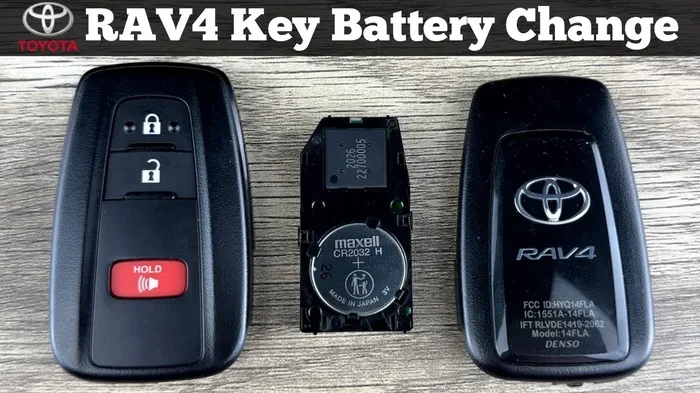
Visual guide about Toyota RAV4 key fob battery
Image source: i.ytimg.com
The key fob is a small computer. It sends radio signals to your car and receives feedback. A tiny coin cell powers that communication. When the battery weakens, the signal range drops. You may need to stand closer to the door. The car may not detect the fob for push-button start. Some models show a key battery warning on the dashboard.
A good battery keeps everything smooth. You press a button and the doors respond. You sit in the driver seat and the engine starts. The alarm stays armed until you want it to open. All of that depends on a small power source that lasts one to two years. Heat, cold, and heavy use can shorten that life.
Key fobs also store settings in some trims. Your remote may remember window positions or seat adjustments. A dying battery can cause glitches in those features. Replacing the cell early prevents small issues from growing. It also avoids the stress of being locked out or stranded.
Signs Your Key Battery Is Dying
Watch for these common clues:
- Shorter range: You must walk closer to the car for the remote to work.
- Intermittent response: Buttons work sometimes and fail other times.
- Dashboard warning: The car displays a key battery alert on the cluster.
- Push-button start issues: The engine does not detect the fob inside the cabin.
- Locking and unlocking delays: Doors take longer to respond to your commands.
These signs do not always mean a dead battery. Sometimes the fob antenna or car receiver needs attention. Still, a fresh battery is the first and cheapest step. If the problem continues after the swap, you can check other causes.
Which Battery Does Your RAV4 Key Use
Most Toyota RAV4 key fobs use a CR2032 coin cell. Some older remote keys use a CR2016. Smart keys with a built-in key blade may use the same CR2032. The exact type depends on the model year and fob design. Check the old battery before buying a new one. The label on the cell shows the code clearly.
CR2032 and CR2016 look similar but differ in thickness. CR2032 is 3.2 millimeters thick. CR2016 is 1.6 millimeters thick. Using the wrong size can cause poor contact or a loose fit. Always match the original battery code. A reputable hardware store, pharmacy, or online retailer carries these cells.
Tools You Need for a Smooth Swap
You do not need special equipment. A small set of household items works well. Gather these before you start:
- New battery: CR2032 or CR2016, matched to your fob.
- Small flat tool: A thin screwdriver, guitar pick, or butter knife.
- Soft cloth: Protects the plastic from scratches.
- Good light: A desk lamp or phone flashlight helps you see small parts.
- Clean surface: A towel or tray keeps tiny pieces from rolling away.
Keep the old battery nearby until the new one works. That way, you can compare the size and orientation. Orientation matters because the positive and negative sides must touch the right contacts.
How to Open Your Toyota RAV4 Key Fob Safely
Opening the fob is the trickiest part for beginners. The casing snaps together with small clips. Too much force can crack the shell. A gentle approach works best. Start by finding the seam around the edge. Some fobs have a small release slot near the key blade. Others open with a careful pry at the side.
Place the fob on a soft cloth. Use your flat tool at the seam. Apply light pressure to lift the clip. Move slowly along the edge. Listen for a soft click as the cover loosens. If the fob has a removable key blade, pull it out first. The blade often hides a release tab. Once the blade is out, the case opens more easily.
Step-by-Step Opening for Common Fob Types
Remote key with a fold-out blade:
- Pull the key blade out fully.
- Look for a small slot near the blade housing.
- Insert your flat tool and press gently.
- Pry the cover open along the seam.
- Lift the top half carefully.
Smart key with push-button start:
- Find the small release button or slot on the side.
- Press or slide to release the mechanical key if present.
- Use a thin tool at the edge to break the seal gently.
- Work around the edge to release all clips.
- Open the cover without bending the shell.
Older remote fob without a blade:
- Locate the thin seam around the body.
- Slide the tool into the gap.
- Apply light leverage to pop the clip.
- Repeat at the opposite side if needed.
- Separate the halves with care.
If the cover feels stuck, stop and reassess. Forcing it can break the clips. A bit of warmth from your hands can soften a tight seal. Never use heat tools or harsh chemicals. Simple patience protects the fob.
Quick Tips for a Clean Opening
- Work slowly: Small clips release one at a time.
- Use the right tool: A thin, smooth edge reduces scratches.
- Keep parts in order: Place screws or blades in a small tray.
- Avoid bending: Flat pressure works better than twisting.
- Check for hidden tabs: Some models hide a release under a logo or trim piece.
A careful opening makes the rest of the job easier. You will see the battery and circuit board clearly. That visibility helps you place the new cell correctly.
How to Replace Toyota RAV4 Key Battery Step by Step
Once the fob opens, the battery swap is straightforward. The cell sits in a small tray or rests on a contact pad. Note the orientation before you remove the old battery. The positive side usually faces up, but your fob may differ. A quick photo with your phone helps during reassembly.
Remove the old battery with a light touch. If it sits in a tray, slide it out. If it rests on contacts, lift it gently. Do not bend the metal tabs. Clean the area if you see dust or residue. A dry cloth works well. Avoid liquids near the circuit board.
Place the new battery in the same position. Match the positive and negative sides exactly. Press it flat so the contacts touch well. A loose battery causes weak signals. After seating the cell, replace the cover. Align the halves before pressing them together. Listen for clips to snap into place.
How to Seat the Battery Correctly
- Match the label: Follow the plus and minus marks inside the fob.
- Press evenly: Flat pressure ensures good contact.
- Check movement: The battery should not shift when you tap the case.
- Avoid force: If the cover resists, reopen and realign the parts.
- Keep it dry: Moisture causes corrosion on contacts.
A secure fit keeps the signal strong. If the battery moves, the fob may work inconsistently. Take a moment to confirm the cell sits flat and firm.
Testing Before You Close the Fob
Test the buttons before snapping the cover back on. This step saves time if something feels off. Press the lock and unlock buttons. Hold the fob near the door and try the remote. If your RAV4 uses push-button start, sit in the driver seat and press the start button with the fob in your pocket. The engine should respond normally.
If the car does not detect the fob, check the battery orientation. Reposition the cell and test again. Make sure the contacts are clean and tight. If the buttons still fail, the fob may need a reset or further inspection. A quick test now prevents frustration later.
Common Mistakes to Avoid During Battery Replacement
Small errors can cause big headaches. Most problems come from rushing or using the wrong battery. Avoid these common mistakes:
- Wrong battery size: CR2032 and CR2016 are not interchangeable.
- Forcing the case: Hard prying cracks the shell and breaks clips.
- Ignoring orientation: Reversed polarity stops the fob from working.
- Touching contacts with bare hands: Oils can reduce conductivity over time.
- Skipping the test: Closing the fob before testing makes troubleshooting harder.
- Using damaged tools: Sharp or rough edges scratch the plastic and slip.
- Throwing the old battery in the trash: Coin cells need proper recycling.
Each mistake is easy to prevent. Slow down, match the battery code, and test before reassembly. A careful approach keeps the fob working longer.
Expert Insights on Fob Care
Key fobs last longer when you treat them gently. Store them away from heat and moisture. Do not drop them on hard surfaces. A small crack can let dust inside and weaken the seal. If you carry the fob in your pocket, keep it away from coins and keys that scratch the shell.
Battery quality matters too. Choose a trusted brand with a clear expiration date. Cheap cells may lose power faster. A good battery lasts longer and delivers a stronger signal. Keep one spare in your glove box or wallet. That way, you can swap it quickly when the next one runs low.
If your RAV4 shows a key battery warning often, check the fob antenna area. Sometimes the car side needs attention, not just the fob. A quick inspection of both sides solves many signal issues.
When to Replace the Battery and When to Seek Help
Plan to replace the battery every one to two years. Heavy use or extreme weather may shorten that window. If you notice range loss or a dashboard alert, swap the cell right away. A fresh battery resolves most common issues.
Seek help if the fob still fails after a correct battery change. Possible causes include a damaged circuit board, worn buttons, or a car receiver problem. A dealer or locksmith can test the fob and program a replacement if needed. If the key blade no longer turns the lock, the mechanical part may need service.
Some RAV4 models pair the fob to the car. If you buy a new fob, you may need programming. A battery swap does not require programming. Only a new or reprogrammed fob needs that step. If you are unsure, a quick visit to a service center can save time.
Quick Troubleshooting Checklist
- Check battery type: Confirm CR2032 or CR2016 matches your fob.
- Verify orientation: Positive and negative sides must align.
- Clean contacts: Remove dust and residue from the board.
- Test all buttons: Lock, unlock, and start functions should respond.
- Inspect the shell: Look for cracks or broken clips.
- Try a spare fob: If the spare works, the main fob likely needs repair.
This checklist covers the most common fixes. It helps you decide whether a simple battery swap solves the problem or if you need more help.
Comparison of Common RAV4 Key Fob Batteries
| Feature | CR2032 | CR2016 |
|---|---|---|
| Thickness | 3.2 mm | 1.6 mm |
| Common use | Most RAV4 smart keys and remotes | Some older remote fobs |
| Fit | Snug in standard trays | Thinner, used in slim cases |
| Longevity | Typically 1 to 2 years | Typically 1 to 2 years |
| Availability | Widely available at stores and online | Widely available, but check your model |
Use this table to confirm the right cell before you buy. The thickness difference matters more than the similar name. A correct match ensures a secure fit and reliable signal.
Final Thoughts on Keeping Your Key Reliable
A small battery keeps your Toyota RAV4 key working every day. Learning how to replace Toyota RAV4 key battery gives you control over a common issue. You save time, avoid lockout stress, and keep your car ready to go. The process is simple when you use the right cell, open the fob gently, and test before closing it up.
Take a moment to check your fob type and battery code. Gather a thin tool and a soft cloth. Follow the steps above and you will finish in minutes. Keep a spare battery nearby and treat the fob with care. These small habits extend the life of your key and prevent sudden failures.
Your RAV4 is built for daily use. Your key should be just as dependable. A quick battery swap keeps the remote, alarm, and push-button start working as they should. With a little care, your key fob will stay ready whenever you are.
Frequently Asked Questions
How long does a Toyota RAV4 key battery last?
A typical coin cell lasts one to two years with normal use. Extreme heat, cold, and frequent button presses can shorten that life. Replace the battery when you notice a weaker signal or a dashboard warning.
What battery does a Toyota RAV4 key fob use?
Most RAV4 key fobs use a CR2032 coin cell, while some older remotes use a CR2016. Check the label on your current battery to confirm the exact type. Using the correct size ensures a proper fit and strong signal.
Can I replace the key battery myself?
Yes, you can replace it at home in a few minutes with a small flat tool. Open the fob gently, swap the battery, and test the buttons before closing the case. A careful approach prevents damage to the clips and circuit board.
Why is my RAV4 key not working after battery replacement?
The battery may be inserted with the wrong polarity or not seated firmly. Clean the contacts, check the orientation, and test the buttons again. If it still fails, the fob or car receiver may need further inspection.
Do I need to program the key after changing the battery?
No, a simple battery swap does not require programming. Programming is only needed when you add a new fob or replace a lost key. A fresh battery should work right away once the contacts are correct.
Where can I buy a replacement key battery?
You can find CR2032 and CR2016 batteries at hardware stores, pharmacies, supermarkets, and online retailers. Choose a trusted brand with a clear expiration date for best results. Keep a spare in your glove box for quick changes.