
Resetting your Toyota Tundra maintenance light is easy and takes just a few minutes. You can do it yourself with simple button presses on your dashboard. This guide shows you exactly how to clear the alert without a mechanic. Keep your truck happy and your dashboard clean with these quick steps.
Key Takeaways
- Quick Process: Resetting the light usually takes less than five minutes from start to finish.
- No Tools Needed: You only need your key fob and dashboard buttons to complete the task.
- Model Variations: Steps may differ slightly between older and newer Toyota Tundra generations.
- Safety First: Always park on level ground and engage the parking brake before starting.
- Regular Maintenance: Resetting the light does not replace actual oil changes or service work.
- Troubleshooting: If the light stays on, check your settings or consult a professional mechanic.
- Keep Records: Write down your service date to track future maintenance needs accurately.
📑 Table of Contents
- Why You Need to Reset the Maintenance Light
- Understanding the Toyota Tundra Dashboard Alerts
- How to Reset a Toyota Tundra Maintenance Light Step by Step
- Common Mistakes When Resetting the Light
- Tips for Keeping Your Tundra in Top Shape
- When to Seek Professional Help
- Quick Tips for a Smooth Reset
- Comparing Reset Methods Across Tundra Generations
- Final Thoughts on Resetting Your Maintenance Light
Why You Need to Reset the Maintenance Light
Your Toyota Tundra is a tough truck. It works hard on jobsites, road trips, and daily drives. Over time, the engine computer tracks your mileage. When it hits a certain number, a light pops up on your dashboard. This is the maintenance light. It reminds you to check your oil, filters, or other parts.
Ignoring this light is not a good idea. It helps you stay on top of care. But once you finish your service, the light stays on. That can be annoying. You want a clean dashboard. You also want to know when the next service is due. That is why you need to reset it.
Resetting the light tells your truck that you took care of business. It resets the counter. Now your vehicle can start tracking the next interval. This keeps you organized. It also saves you from unnecessary worry. You know exactly when the next reminder will appear.
Some people think this is hard. They think they need a special tool. They think they need to visit a shop. But that is not true. You can do this at home. You just need to follow the right steps. We will walk you through everything. You will feel confident when you finish.
Understanding the Toyota Tundra Dashboard Alerts
Before we start, let us talk about what you see. The maintenance light is not the same as a check engine light. The check engine light means something is wrong. The maintenance light is just a reminder. It is like a calendar alert for your truck.

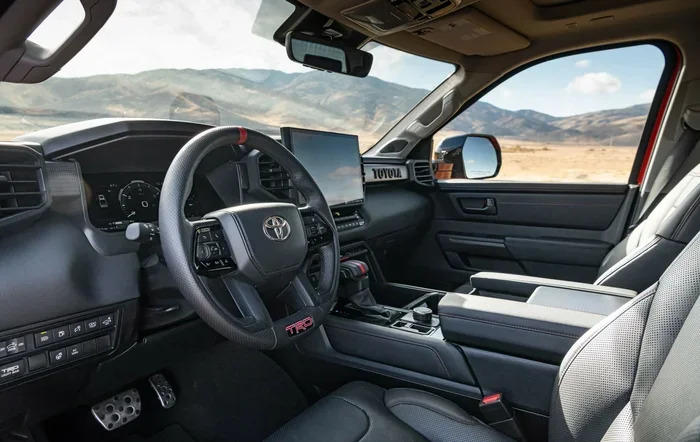
Visual guide about Toyota Tundra dashboard interior
Image source: motortrend.com
The light usually looks like a wrench or says “Maintenance Required.” It may also show a mileage count. Your Tundra uses this system to keep you informed. Toyota built this feature to help owners stay on schedule. It is a smart design. It helps you avoid big repairs later.
You might see other lights too. Do not confuse them. If you see a red light, stop and check it. If you see a yellow light, pay attention. The maintenance light is usually yellow or orange. It is safe to drive. But you should plan your service soon.
Knowing the difference helps you react correctly. You do not want to panic over a simple reminder. You also do not want to ignore a real problem. Take a moment to look at your dashboard. Learn what each symbol means. This knowledge makes you a smarter driver.
How to Reset a Toyota Tundra Maintenance Light Step by Step
Now let us get to the main part. You want to know how to reset a Toyota Tundra maintenance light. The process is simple. We will break it down into clear steps. Follow along at your own pace.
Step 1: Prepare Your Vehicle
Start by parking your truck in a safe spot. Turn off the engine. Put the truck in park. Engage the parking brake. You want everything still and secure. This keeps you safe. It also helps the system reset properly.
Sit in the driver seat. Put your foot on the brake. You will need to turn the ignition on soon. But do not start the engine yet. Just get ready. Have your key fob in your hand. You may need it for some models.
Step 2: Turn On the Ignition
Insert your key or press the start button. Use the accessory mode or ignition on mode. Your dashboard lights should glow. The maintenance light will be on. That is normal. Do not start the engine. We just need power to the electronics.
If you have a push-button start, press it twice without your foot on the brake. This puts you in the right mode. Check your owner manual if you are unsure. Different years may work slightly differently.
Step 3: Navigate the Dashboard Menu
Look at your steering wheel or dashboard. You will see buttons for your trip meter or settings. On many Tundras, you use the trip button. Press and hold it. Watch the display. It may show your odometer or trip miles.
On newer models, you might use the arrow buttons. Navigate to the settings menu. Look for “Vehicle Settings” or “Maintenance.” Use the select button to enter. Take your time. Rushing can cause mistakes.
Step 4: Find the Reset Option
Once you are in the right menu, look for the reset function. It might say “Reset Maintenance” or “Oil Reset.” Select it. The screen may ask you to confirm. Press yes or hold the button again.
Some models require you to hold the button for several seconds. Watch the light. It should start to flash. Then it will turn off. You may see a checkmark or a confirmation message. This means you succeeded.
Step 5: Turn Off and Restart
Turn the ignition off. Wait a few seconds. Then start your engine. Look at the dashboard. The maintenance light should be gone. If it is still there, do not panic. We will talk about troubleshooting next.
Drive your truck for a few minutes. Make sure everything looks normal. The light should stay off. Your truck is now ready for the next interval. You did it.
Common Mistakes When Resetting the Light
Even simple tasks can go wrong. Here are some common mistakes to avoid. Learning these now saves you time later.
- Starting the engine too soon: Keep the engine off during the reset. Starting it can cancel the process.
- Wrong button presses: Press the correct buttons. Check your manual if you feel lost.
- Not confirming the reset: Some systems need a final confirmation. Do not skip this step.
- Ignoring other lights: If other lights appear, check them too. The maintenance light is not the only one.
- Forgetting to reset the mileage: Some trucks show the next due mileage. Make sure it updated.
Avoid these errors and you will have a smooth experience. Take your time. Read the steps again if needed. Practice makes perfect.
Tips for Keeping Your Tundra in Top Shape
Resetting the light is just one part of care. You also want to keep your truck running well. Here are some quick tips.
Follow the service schedule. Your owner manual has a plan. Use it. Change your oil on time. Check your filters. Look at your tires. Small tasks prevent big problems.
Use quality parts. Good oil and filters matter. They protect your engine. Cheap parts can cause wear. Invest in your truck.
Listen to your vehicle. Sounds and smells tell you things. If something feels off, check it. Early action saves money.
Keep records. Write down your service dates. Note what you changed. This helps you stay organized. It also helps if you sell the truck later.
Check your tires. Tire pressure affects fuel and safety. Check it monthly. Rotate your tires as recommended. This extends their life.
These habits keep your Tundra strong. A well-cared-for truck lasts longer. It also runs better. You will enjoy driving it more.
When to Seek Professional Help
Most of the time, you can reset the light yourself. But sometimes you need help. Here are some signs.
If the light comes back right away, something may be wrong. The reset might not have worked. Or there could be a sensor issue. Try the steps again. If it still fails, get help.
If other warning lights appear, pay attention. A check engine light or oil pressure light needs quick action. Do not ignore these. Visit a mechanic.
If you feel unsure, ask a pro. There is no shame in getting help. A technician can check your system. They can also do your service. This gives you peace of mind.
You can also ask a friend who knows trucks. Sometimes a second pair of eyes helps. Just make sure they know what they are doing. Safety comes first.
Quick Tips for a Smooth Reset
Here are some extra tips to make things easy.
- Read your manual: Your owner manual has model-specific steps. Keep it in your glove box.
- Use a flashlight: Dashboard buttons can be hard to see at night. A small light helps.
- Take notes: Write down the steps that work for your truck. You may need them later.
- Stay calm: If it does not work the first time, try again. Patience pays off.
- Check for updates: Some trucks need software updates. Ask your dealer if you are unsure.
These small tricks make a big difference. They help you stay prepared. You will handle the reset with confidence.
Comparing Reset Methods Across Tundra Generations
Not all Tundras are the same. Older models use different systems. Newer models have more digital menus. Here is a simple comparison.
| Generation | Reset Method | Difficulty |
|---|---|---|
| Older Models (Pre-2010) | Trip button hold while ignition on | Easy |
| Mid-Generation (2010-2019) | Trip button or steering wheel controls | Easy to Moderate |
| Newer Models (2020+) | Digital menu with arrow buttons | Moderate |
As you can see, the process changes over time. Newer trucks give you more options. Older trucks rely on simple buttons. Know your model. Then follow the right steps.
If you are not sure which generation you have, check the VIN. You can also look at the dashboard layout. Digital screens usually mean a newer system. Simple buttons usually mean an older system. This quick check helps you choose the right method.
Final Thoughts on Resetting Your Maintenance Light
You now know how to reset a Toyota Tundra maintenance light. It is a simple task. You do not need fancy tools. You just need to follow the steps. Take your time. Stay calm. Your truck will thank you.
Remember, this light is a helper. It reminds you to care for your vehicle. Resetting it keeps your dashboard clean. It also sets up the next reminder. This helps you stay on track.
Keep up with your regular service. Use quality parts. Listen to your truck. These habits build a long life for your Tundra. You will enjoy many miles ahead.
If you ever feel stuck, check your manual. Ask a friend. Or visit a pro. There is always help available. You are doing a great job taking care of your truck.
Frequently Asked Questions
How long does it take to reset the maintenance light on a Toyota Tundra?
It usually takes about two to five minutes. The exact time depends on your model year. Follow the steps slowly for best results.
Do I need any special tools to reset the light?
No, you do not need special tools. You only need your key fob and the buttons on your dashboard. Some models may use the steering wheel controls.
What if the maintenance light comes back on after I reset it?
If the light returns, the reset may not have worked. Try the steps again. If it still comes back, check for other issues or visit a mechanic.
Is it safe to drive with the maintenance light on?
Yes, it is usually safe. The light is a reminder, not an emergency warning. But you should plan your service soon to keep your truck healthy.
Can I reset the light before I change my oil?
You can, but it is better to reset it after service. Resetting before means the light will not remind you when the next change is due. Wait until you finish your maintenance.
Where can I find more help for my Toyota Tundra?
Check your owner manual for model-specific steps. You can also visit our guide on how to reset maintenance light on Toyota Tundra for detailed help. If needed, ask a trusted mechanic for support.