
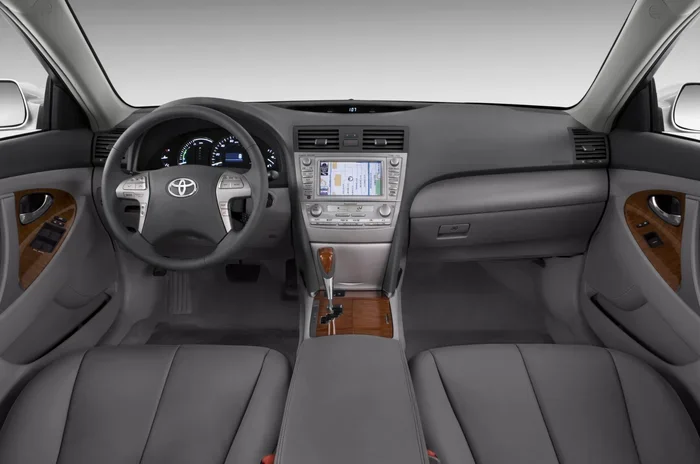

Resetting the maintenance light on your 2011 Toyota Camry is simple and saves you a trip to the shop. You can do this quickly after an oil change using just your ignition key and odometer button. This guide walks you through the exact steps to clear the indicator safely. Keep your dashboard clean and stay on top of your vehicle maintenance schedule.
Key Takeaways
- Simple Process: Resetting the light takes less than five minutes with no special tools.
- Ignition Key: You need to turn the key to the ON position without starting the engine.
- Odometer Button: Holding the trip meter button is the key step to entering reset mode.
- Oil Change Indicator: This light reminds you when it is time for routine engine oil service.
- Dashboard Clarity: Clearing the light helps you track future maintenance intervals accurately.
- Safety First: Ensure the vehicle is in Park and the parking brake is set before starting.
- Manual Backup: Always refer to your owner manual if the steps differ slightly for your trim.
📑 Table of Contents
Introduction
Owning a reliable sedan like the Toyota Camry means you expect it to run smoothly for years. However, even the toughest cars need regular care to stay in top shape. One of the most common tasks owners face is dealing with the maintenance required light on the dashboard. This little indicator can be annoying if you do not know how to turn it off.
Many people worry that this light signals a major problem. Usually, it is just a reminder for routine service. After you change your engine oil, you want that light gone. It helps you keep track of when the next service is due. Ignoring it might cause you to forget important vehicle maintenance tasks later on.
In this guide, we will show you exactly how to reset maintenance light on 2011 Toyota Camry models. You do not need to be a mechanic to do this. We will break down the steps into easy instructions. You will learn the tricks to clear the indicator safely. Let us get your dashboard looking clean again.
Understanding the Maintenance Light
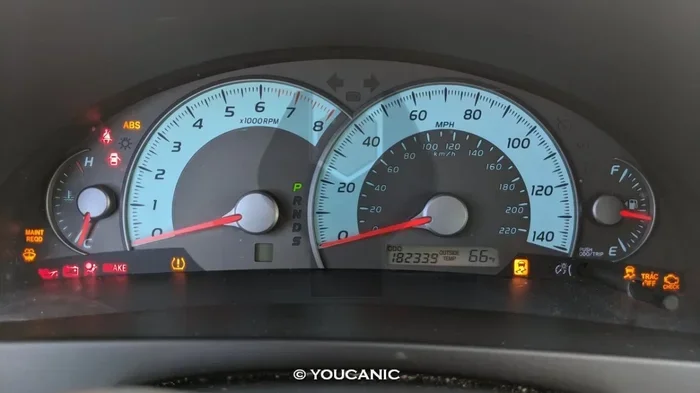
Visual guide about 2011 Toyota Camry dashboard
Image source: youcanic.com
Before you start pressing buttons, it helps to know what this light means. The maintenance required light is not the same as the check engine light. The check engine light warns about engine problems or emissions issues. The maintenance light is just a timer. It counts down the miles since your last service.
Toyota sets this light to come on every 5,000 miles or so. This is a general reminder for an oil change. Sometimes it might remind you about tire rotation or other checks. For the 2011 Toyota Camry, it is mostly linked to oil life. Knowing this helps you feel confident when you reset it.
You should always check your engine oil level before resetting the light. If the oil is low, top it off first. If the oil looks dirty, change it. Resetting the light without doing the service defeats the purpose. The light is there to protect your Toyota engine and keep it running well.
Why Does the Light Come On?
The car uses a simple algorithm to track mileage. It does not measure oil quality directly. Instead, it assumes you need service after a set distance. This is why the light pops up regularly. It is a nudge to keep up with your car maintenance schedule.
Is It Safe to Drive with the Light On?
Yes, it is generally safe to drive with this light on. It is not an emergency warning. However, you should plan your service soon. Driving too long without an oil change can harm your engine. Fresh oil reduces friction and heat in the engine system.
Preparing for the Reset
Gather everything you need before you start. You will not need many tools for this job. Mostly, you just need your hands and the keys. Here is a quick checklist to get ready.
- Ignition Key: Have your key fob or physical key ready.
- Owner Manual: Keep it nearby just in case.
- Parking Brake: Ensure it is engaged for safety.
- Gear Position: Make sure the car is in Park.
Safety is key when working around any vehicle dashboard. You do not want the car to roll or start moving. Set the parking brake firmly. Put the transmission in Park. This ensures the car stays still while you work on the settings.
You should also make sure the fuel tank is not empty. Sometimes low fuel can affect electronic systems. While it rarely matters for this reset, it is good practice. A stable car is easier to work with. If you need help with fuel doors, check out how to open gas tank on Toyota Rav 4 for similar mechanisms.
Step-by-Step Reset Instructions
Now comes the main part. Follow these steps carefully to reset maintenance light on 2011 Toyota Camry. Do not rush through them. Taking your time ensures you do not miss a step.
Step 1: Turn the Ignition
Insert your key into the ignition slot. Turn the key to the ON position. Do not start the engine yet. You want the electronics on, but the car off. The dashboard lights should illuminate. This confirms the system is active.
If you have a push-button start, press the start button twice without touching the brake. This puts the car in accessory mode. The dashboard will light up similarly. Make sure no warning lights are flashing except the one you want to reset.
Step 2: Locate the Trip Meter Button
Look at your instrument cluster. Find the button used to change the trip meter. It is usually on the left side of the steering wheel. This button toggles between odometer readings. You will use this button to access the reset menu.
Press the button briefly to see the trip options. You might see Trip A or Trip B. You do not need to select one specifically yet. Just know where the button is. Your finger should be ready to hold it down.
Step 3: Enter the Reset Mode
This is the critical step. Turn the key back to the OFF position. Wait a few seconds. Then, hold down the trip meter button. While holding the button, turn the key to ON again.
Keep holding the button down. You will see the maintenance light flash. It might show dashes or numbers. This means you have entered the reset mode. Do not let go of the button yet. The light needs to cycle through its settings.
Step 4: Confirm the Reset
Continue holding the button until the light stops flashing. Eventually, the light will turn off completely. You might see the odometer reset to zero or show new mileage. This confirms the maintenance light reset is complete.
Release the trip meter button. Turn the key back to OFF. Start the engine normally. Check the dashboard to ensure the light stays off. If it comes back on, you may need to repeat the steps.
Troubleshooting Common Issues
Sometimes the reset does not work on the first try. Do not worry. This happens often with older cars. Here are some common problems and how to fix them.
Light Comes Back On Immediately
If the light returns right after you reset it, you might have missed a step. Make sure you held the button long enough. The system needs time to register the command. Try the process again slowly. Ensure the key is fully in the ON position.
Button Not Responding
If the trip button feels stuck, check for debris. Dirt can get under the buttons over time. Clean around the button gently. If the dashboard is frozen, try disconnecting the battery. This resets the car computer entirely.
Other Dashboard Warnings
If other lights come on, stop and investigate. The check engine light is different from the maintenance light. If that appears, you might need a diagnostic scan. You can learn more about Toyota VIN decoding to understand your car specs at how to read Toyota VIN. Knowing your car details helps with troubleshooting.
After the Reset: Maintenance Tips
Resetting the light is just one part of car care. To keep your Toyota Camry running long, follow good habits. Regular maintenance prevents costly repairs later. Here are some tips to keep in mind.
Change Oil on Time
Stick to the schedule indicated by the light. Usually, this is every 5,000 miles. Use the right grade of engine oil. Synthetic oil often lasts longer than conventional oil. Check your owner manual for the recommended viscosity.
Check Tire Pressure
Tires affect fuel economy and safety. Check the pressure monthly. You can learn how to do this for similar models at how to check tire pressure on Toyota Corolla. Proper inflation extends tire life. It also helps your car handle better on the road.
Replace Wiper Blades
Visibility is crucial for safety. Worn wipers streak the windshield. Replace them when they get noisy. You can find guides on how to change wiper blades Toyota Camry to do this yourself. It is a cheap and easy fix.
Keep Records
Write down when you reset the light. Note the date and mileage. This helps you track future services. It also adds value to the car if you sell it. Buyers like seeing a well-documented service history.
When to Seek Professional Help
Most owners can reset the light themselves. However, some situations need a pro. If the light stays on after multiple tries, something else might be wrong. Electrical issues can mimic maintenance reminders.
If you see smoke or hear strange noises, stop driving. These are not maintenance light issues. They are mechanical problems. Take the car to a trusted mechanic. They can scan the computer for error codes.
You might also want a pro if you are uncomfortable with the steps. There is no shame in asking for help. A mechanic can reset the light and check your oil at the same time. They might spot other issues you missed. Getting Toyota service coupons can save you money on these visits. Check out how to get Toyota service coupons for deals.
Conclusion
Knowing how to reset maintenance light on 2011 Toyota Camry gives you control over your car care. It is a simple task that saves time and money. You do not need to visit a shop just for this indicator. With a few button presses, your dashboard is clean again.
Remember to actually perform the service the light recommends. The light is a helpful tool, not just a nuisance. Keep up with your oil changes and tire checks. Your Camry will thank you with reliable performance for years. Enjoy your drive and stay safe on the road.
Frequently Asked Questions
How often does the maintenance light come on?
The light usually comes on every 5,000 miles. This is a standard interval for most Toyota models. It reminds you to check your oil and filters.
Can I reset the light without changing the oil?
Yes, you can reset the light without changing the oil. However, it is not recommended. The light is there to remind you of necessary service. Ignoring it may harm your engine over time.
What if the reset steps do not work?
Try the steps again slowly and ensure you hold the button long enough. If it still fails, there might be an electrical issue. Consult a mechanic or check your owner manual for specific variations.
Is the maintenance light the same as the check engine light?
No, they are different. The maintenance light is a mileage reminder. The check engine light indicates a mechanical or emissions problem. Do not ignore the check engine light if it appears.
Do I need any tools to reset the light?
No special tools are needed for this process. You only need your ignition key and your finger to press the trip button. It is a very simple DIY task for any owner.
Will resetting the light affect my car warranty?
Resetting the maintenance light does not affect your warranty. It is a standard user function. Just ensure you keep records of actual maintenance performed to validate your warranty claims if needed.


