
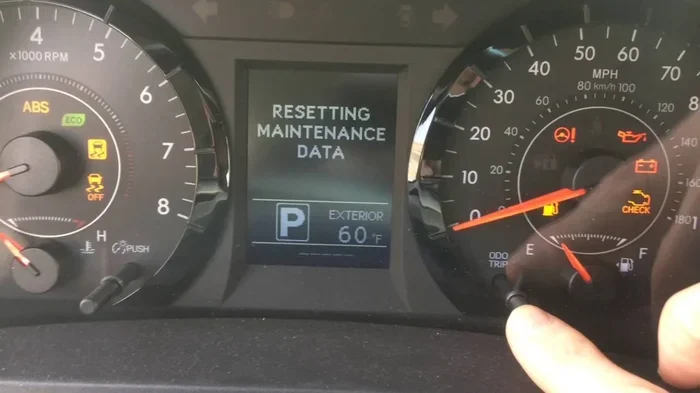
Resetting the maintenance light on your Toyota Sienna is simple and saves you a trip to the mechanic. This guide walks you through the exact steps for most model years. You will learn how to clear the reminder after an oil change. Follow these instructions to keep your dashboard clean and your mind at ease.
Key Takeaways
- Quick reset process: Most Toyota Sienna models use a simple button combination to clear the maintenance light.
- Model year matters: Steps vary slightly between older and newer Sienna generations, so check your year first.
- No tools needed: You only need the ignition key or start button and the dashboard controls.
- Oil change reminder: The light usually tracks oil life, so reset it right after service.
- Avoid confusion: Resetting the light does not fix actual problems, so watch for warning signs.
- Save time and money: Doing it yourself keeps your schedule on track without a dealer visit.
📑 Table of Contents
- How to Reset Maintenance Light on Toyota Sienna
- Why the Maintenance Light Comes On
- Before You Start the Reset
- How to Reset Maintenance Light on Toyota Sienna for 2020 and Newer
- How to Reset Maintenance Light on Toyota Sienna for 2010-2019
- Common Mistakes to Avoid
- Quick Tips for a Smooth Reset
- When the Light Means More Than a Reminder
- Keeping Your Sienna on a Healthy Schedule
- Final Thoughts on the Reset
How to Reset Maintenance Light on Toyota Sienna
Your Toyota Sienna works hard. It carries kids, gear, and weekend plans. Over time, the dashboard shows a small reminder. That reminder is the maintenance light. It usually pops up after a set number of miles or months. Many owners see it and worry. The good news is simple. You can clear it yourself in just a few minutes. This guide shows you exactly how to reset maintenance light on Toyota Sienna models. We keep the steps clear and direct. You will feel confident the moment you finish.
Think of the light as a friendly nudge. It does not mean your van broke. It just asks for a quick check. Most of the time, you just changed the oil. Once the service is done, the light stays on until you clear it. That is normal. The system remembers your last service date. When you reset it, the timer starts fresh. You get a clean dashboard and a clear mind. Let us walk through the process together.
Why the Maintenance Light Comes On
The maintenance light serves one main job. It tracks your oil life and service schedule. Toyota builds this feature into the van’s computer. The system counts miles and driving time. It also looks at engine conditions. When the count reaches a set point, the light turns on. You see a small wrench icon or a message on the dash. Some models show “Maintenance Required.” Others show “Oil Change Required.” The wording changes by year, but the meaning stays the same.
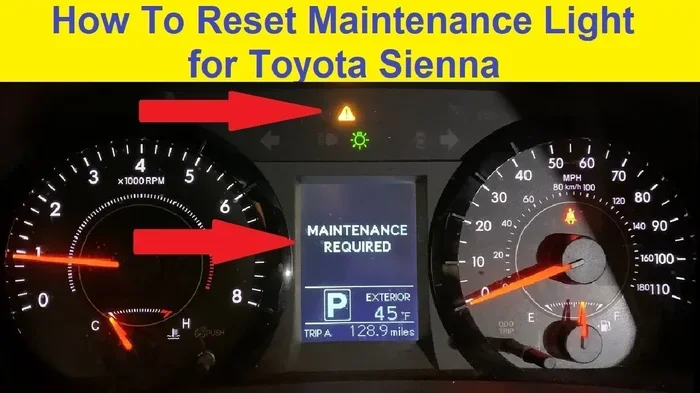
Visual guide about Toyota Sienna dashboard maintenance light
Image source: i.ytimg.com
Oil Life Tracking
Modern Toyotas use smart tracking. They do not just count miles. They also watch your driving habits. Short trips, heavy loads, and hot weather can speed up oil breakdown. The computer adjusts the reminder to match real use. That is why the light may appear before a strict mileage mark. It is a helpful feature. It keeps your engine healthy without guessing.
Service Schedule Reminders
Some Sienna models show more than one reminder. You may see a tire rotation note. You may see an inspection alert. These notes help you stay ahead of small issues. The main light, though, usually points to oil service. Once you handle the oil change, you can clear the rest. The van will then start a new count.
Before You Start the Reset
A few quick checks make the process smooth. You do not need special tools. You only need a clear view of the dash and a few minutes of quiet time. Make sure the van is parked safely. Turn off any accessories that distract you. Keep the key or start button ready. If you just finished an oil change, gather your receipt or notes. That way, you can confirm the service date if questions come up later.
Check Your Model Year
Toyota updated the Sienna over the years. The reset steps changed with the dashboard design. Older vans use a different button layout than newer ones. The 2020 and newer models use a touchscreen and steering wheel controls. The 2010 to 2019 models often use a simple odometer trick. Knowing your year helps you pick the right method. You can find the year on your registration, title, or the driver side door jamb.
Confirm the Service Is Done
Do not reset the light before the work is finished. The reminder exists for a reason. If the oil is still old, the light should stay on. Once the oil is fresh and the filter is new, you are ready. If a shop did the work, ask for a quick confirm. A simple “oil change complete” is enough. Then you can move to the reset steps.
How to Reset Maintenance Light on Toyota Sienna for 2020 and Newer
Newer Sienna vans use a hybrid-friendly dashboard. You will see a multi-information display. You also have steering wheel buttons. The process is clean and direct. Follow the order below and the light will clear.
Step-by-Step for 2020-2024 Models
Start with the van in park. Put the ignition in the “On” position. Do not start the engine if the steps ask for it, but keep the electronics active. Look at the steering wheel. Find the left side controls. You will see arrows and a “Home” button. Use the up and down arrows to scroll through the display. Find the “Settings” menu. Select it with the “OK” button.
Inside Settings, look for “Vehicle Settings” or “Maintenance.” The exact name varies a bit. Once you open the menu, find “Oil Maintenance” or “Reset Oil Maintenance.” Select it. The screen may ask you to confirm. Choose “Yes” or “Reset.” The display will show a checkmark or a success message. The wrench icon should disappear. If your model uses a touchscreen, tap the same menus on the screen. The flow is the same.
What to Do If the Light Stays On
Sometimes the light does not clear right away. This can happen if the reset was not confirmed. Go back to the menu and try again. Make sure you select “Reset” and not just “View.” If the screen shows an error, turn the van off. Wait a minute. Then try once more. A fresh start often fixes a stuck menu.
How to Reset Maintenance Light on Toyota Sienna for 2010-2019
Older Sienna models use a different approach. You will work with the odometer and trip buttons. The method is simple and reliable. Many owners learn it once and remember it forever.
The Odometer Reset Method
First, turn the ignition to “On.” Do not start the engine. Press the trip button until the odometer shows “Trip A.” Turn the ignition off. Hold the trip button down. While holding it, turn the ignition back to “On.” Keep holding the button. You will see the mileage flash. The maintenance light will blink. After a few seconds, the light turns off. Release the button. The reset is complete.
This method works on many Toyota models. It is the same basic idea you see when you learn how to reset the maintenance light on a Toyota. The van’s computer clears the reminder and starts a new count. You can drive right away. The dash will stay clean until the next service window.
Model Variations to Watch
Some 2010-2019 Sienna vans have a small twist. The trip button may feel stiff. Press it firmly but gently. If the display does not change, try the other trip setting. Some models use “Trip B” for certain resets. The owner’s manual can confirm the exact button. If you do not have the manual, the “Trip A” method works for most cases. Keep your touch steady and patient.
Common Mistakes to Avoid
A few small errors can make the reset feel harder than it is. Watch for these common traps. Avoiding them saves time and frustration.
- Resetting too early: Clear the light only after the oil change is complete.
- Wrong ignition position: Keep the electronics on, but do not crank the engine unless the steps require it.
- Skipping confirmation: Some menus need a final “Yes” tap. Miss it and the light stays on.
- Confusing the light with a warning: A maintenance reminder is not a check engine light. Do not ignore real warning signs.
- Rushing the button hold: The odometer method needs a steady hold. Let go too soon and the reset will not finish.
Quick Tips for a Smooth Reset
A calm approach makes the job easy. Here are a few practical tips that help every time.
- Park in a well-lit spot: Clear dash visibility helps you read the menus fast.
- Use a quiet moment: Turn off music and podcasts. Focus on the screen and buttons.
- Keep a service log: Write the date and mileage after each oil change. It helps you track the next reminder.
- Check tire pressure too: While you are at it, a quick tire check keeps your Sienna safe and efficient.
- Bookmark this guide: Save the steps for the next service. The light will come back, and you will be ready.
When the Light Means More Than a Reminder
Most of the time, the maintenance light is just a schedule note. Sometimes, though, you should look closer. If the light returns very soon after a reset, something may be off. If you see other symbols on the dash, pay attention. A check engine light, a temperature warning, or a brake alert needs a closer look. The maintenance light is a reminder, not a diagnosis. Use it as a guide, not a guess.
Signs You Should Visit a Pro
Watch for these signs. They suggest you need more than a reset.
- The light comes back after a short drive.
- You notice rough idling or strange noises.
- The oil pressure gauge looks low.
- You see leaks under the van.
- The engine feels sluggish or overheats.
If any of these show up, book a service visit. A quick inspection can prevent bigger trouble. Your Sienna is built to last, and early care keeps it that way.
Keeping Your Sienna on a Healthy Schedule
A reset is just one part of good care. The bigger picture is a steady service routine. Fresh oil protects the engine. Clean filters help airflow and fuel use. Tire care keeps you safe on wet roads. Brake checks protect your family on every trip. When you stay on schedule, the maintenance light becomes a helpful friend instead of a surprise.
Many owners ask how long a Toyota can keep running strong. The answer depends on care, driving habits, and parts quality. If you want a deeper look at durability, you can read about how many miles can a Toyota Camry last. The same basic principles apply to your Sienna. Regular oil changes, gentle driving, and timely fixes build long life.
You may also wonder about the cost of owning a Sienna. Price questions come up often, especially when you compare trims and options. If you want a quick sense of market value, check how much is a Toyota Corolla for a nearby reference point in the Toyota family. Different vehicles, yes, but the pricing logic is similar. You get the best value when you match the van to your needs and keep up with service.
Final Thoughts on the Reset
Now you know how to reset maintenance light on Toyota Sienna with confidence. The process is quick. The steps are clear. You do not need a dealer visit for this one. Just follow the method for your model year, confirm the oil change, and clear the reminder. Your dashboard will look clean again. More importantly, your service timer will start fresh. That keeps your next appointment on track.
Treat the light as a helpful cue. It reminds you to care for a van that carries your life. When you respond on time, you protect the engine and avoid stress. Keep a simple log. Check your tires. Listen to your van. And when the reminder returns, you will know exactly what to do.
Frequently Asked Questions
How do I reset the maintenance light on a 2023 Toyota Sienna?
Use the steering wheel controls to open Settings, then go to Vehicle Settings or Maintenance. Select Oil Maintenance and choose Reset. Confirm the reset, and the light should turn off.
Can I reset the maintenance light without an oil change?
You can, but you should not. The light is a service reminder, so clear it only after the oil change is complete. Resetting too early skips an important maintenance cue.
Why is my maintenance light still on after I reset it?
The reset may not have been confirmed, or the menu selection was wrong. Turn the van off, wait a moment, and try the steps again. If it still stays on, check your model year method.
Does the maintenance light mean something is broken?
Usually, no. It is a schedule reminder for oil service or routine checks. If you also see warning lights or strange noises, then have the van inspected.
How often does the maintenance light come on?
It depends on your driving and the model year. Many Sienna vans show the light around a standard service interval. The computer may adjust the timing based on your driving habits.
What is the difference between the maintenance light and the check engine light?
The maintenance light is a reminder for routine service. The check engine light points to a possible engine or emissions issue. Treat them differently, and do not ignore a check engine light.