
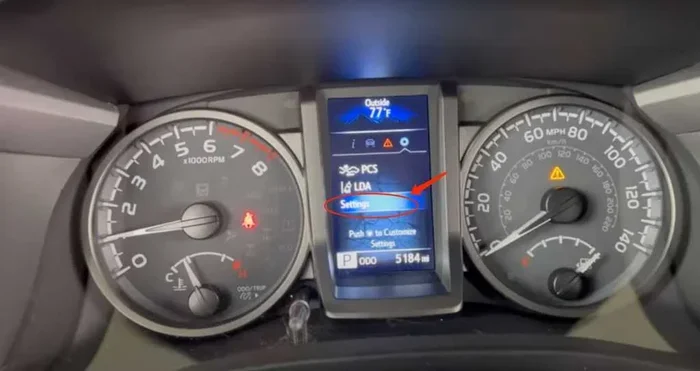
Resetting the maintenance light on a Toyota Tacoma is a simple process you can do at home. This guide walks you through the exact steps for different model years. You will save time and money by handling this task yourself. We also share tips to avoid common mistakes during the reset.
Key Takeaways
- Simple Process: You can reset the light using just the steering wheel controls or the odometer.
- Model Year Matters: Steps vary slightly between older and newer Toyota Tacoma trucks.
- Safety First: Always perform the reset when the vehicle is in park and safe.
- Oil Change Reminder: This light often tracks oil life, so reset it after service.
- Avoid Errors: Do not reset the light before actually completing the maintenance.
- Save Money: Doing it yourself avoids unnecessary trips to the mechanic.
- Dashboard Clarity: A reset keeps your instrument cluster free of confusing alerts.
📑 Table of Contents
- How to Reset the Maintenance Light on a Toyota Tacoma
- Understanding the Maintenance Reminder System
- Gathering What You Need Before Starting
- Steps for Older Toyota Tacoma Models
- Steps for Newer Toyota Tacoma Models
- Special Considerations for Hybrid or Specific Trims
- Common Mistakes to Avoid
- Quick Tips for Keeping Your Tacoma in Top Shape
- Final Thoughts on Resetting Your Maintenance Light
How to Reset the Maintenance Light on a Toyota Tacoma
Owning a Toyota Tacoma means you have a reliable truck. But even reliable trucks need regular care. When your dashboard lights up, it can feel stressful. The maintenance light is there to help you. It reminds you when your truck needs attention.
Many owners worry when this light appears. They think something is broken. Usually, it is just a reminder. You might be due for an oil change. Or maybe it is time for a tire rotation. Once you fix the issue, you need to clear the light. This guide shows you exactly how to reset the maintenance light on a Toyota Tacoma.
We will break down the steps for different model years. You do not need special tools for most models. You just need your key or smart key. We will also explain why this light matters. By the end, you will feel confident handling this task. Let us get started.
Understanding the Maintenance Reminder System
Before you reset anything, you should know what the light means. The Toyota Tacoma maintenance light is not an error code. It is a countdown timer. Your truck tracks mileage since the last reset. When it hits a certain point, the light turns on.

Visual guide about Toyota Tacoma dashboard maintenance light
Image source: cdn.shopify.com
This system helps you stay on schedule. Regular maintenance keeps your engine running well. It also protects your warranty. Ignoring the light can lead to bigger problems. So, understanding the reminder is key to good truck ownership.
Service Indicator vs. Warning Light
It is important to know the difference. A service indicator is yellow or amber. It says “Maintenance Required.” This is the one you can reset. A warning light is often red. It might mean low oil pressure or engine trouble. Do not reset a red warning light. That needs a mechanic.
The maintenance light usually looks like a wrench. Or it might say “MAINT REQD.” If you see this, check your schedule. If you just had service, you can clear it. If you have not done the work, do that first. Resetting without service defeats the purpose.
Why the Light Comes On
Your Tacoma tracks miles automatically. The computer counts every mile you drive. When you reach the set interval, the light pops up. This is often around 5,000 to 10,000 miles. It depends on your model year and settings.
Some trucks let you change the interval. Others use a fixed schedule. Check your owner’s manual for details. Knowing your schedule helps you plan ahead. It also helps you know when to expect the light.
Gathering What You Need Before Starting
You do not need much to reset maintenance light Toyota Tacoma. Most of the time, you just need the truck. But preparation helps the process go smoothly. Here is what you should have ready.
- Your Key or Smart Key: You need this to turn the truck on.
- Owner’s Manual: It helps if you have a unique model year.
- Pen and Paper: Write down any codes if needed.
- Safe Location: Park on level ground away from traffic.
Make sure the parking brake is on. You do not want the truck moving. Also, ensure the transmission is in Park. This keeps you safe during the reset. If you have a newer model, you might need the steering wheel controls. Have those ready to press.
If you are unsure about your model year, check the VIN. The VIN tells you the exact production date. This matters because steps can change. A 2010 Tacoma works differently than a 2024. We will cover the main methods below.
Steps for Older Toyota Tacoma Models
Older Tacomas use a simpler method. These models often use the odometer reset. This includes many trucks from the early 2000s to around 2015. If you have an older truck, this section is for you.
Using the Odometer Reset Method
This method is very straightforward. You use the trip meter buttons. Follow these steps carefully.
- Turn the Ignition Off: Make sure the truck is completely off.
- Press and Hold the Trip Button: Find the button on your dashboard. Hold it down.
- Turn the Ignition On: Keep holding the button. Turn the key to the “On” position. Do not start the engine.
- Watch the Display: The maintenance light should flash. It might turn off.
- Release the Button: Let go when the light resets.
- Turn the Truck Off: Switch the ignition off again.
- Start the Engine: Turn it back on to check. The light should be gone.
This process works for many Toyota Tacoma years. If the light stays on, try again. Make sure you hold the button the whole time. Timing is important here. Do not rush the steps.
Tips for Early Model Years
Some very old models might need a different trick. You might need to use the accelerator pedal. This is rare, but it happens. Check your manual if the odometer method fails. Also, ensure your battery is strong. A weak battery can cause glitches. If the light acts weird, check the battery first.
If you own a Toyota Tacoma maintenance light that keeps coming back, you might have a sensor issue. But this is uncommon. Most of the time, the reset works fine. Just be patient and follow the steps.
Steps for Newer Toyota Tacoma Models
Newer Tacomas have more digital controls. These models use the steering wheel or the multi-information display. This includes trucks from recent years. The process is a bit more digital. You will navigate menus on your screen.
Using the Steering Wheel Controls
Modern trucks let you control everything from the wheel. You do not need to reach for the dashboard. This makes it easier and safer. Here is how to do it.
- Turn the Ignition On: Press the start button or turn the key. Keep the engine off.
- Navigate to Settings: Use the arrows on your steering wheel. Find the settings menu on the display.
- Find Vehicle Settings: Look for “Vehicle” or “Maintenance.”
- Select Reset: Choose the option to reset the maintenance light.
- Confirm: Press the confirm button. The light should clear.
- Turn Off and Restart: Cycle the ignition to save the change.
This method is very clean. You see the options on the screen. It reduces confusion. If you have a touch screen, you might tap directly. Either way, the result is the same. The reset maintenance light Toyota Tacoma process is complete.
Navigating the Multi-Information Display
Some models use a central screen. You might need to scroll through tabs. Look for the wrench icon. Or look for text that says “Maintenance.” Once you find it, select reset. You might need to hold a button for a few seconds. Watch the screen for prompts.
Newer trucks also track oil life more closely. They might ask for confirmation. This prevents accidental resets. Read the prompts carefully. If you are unsure, cancel and try again. It is better to be slow than wrong.
Special Considerations for Hybrid or Specific Trims
Most Tacomas are gas trucks. But some special trims exist. Also, some owners confuse the Tacoma with other Toyota models. If you have a hybrid, the steps might differ. Hybrids often have more complex systems. Always check the manual for hybrid models.
If you drive a Toyota Tacoma with a turbo engine, the maintenance schedule might be different. Turbo engines need careful care. The light might come on more often. Reset it after you check the oil and filters. Do not ignore turbo-specific service items.
Some owners also ask about the Toyota Tundra maintenance light. The Tundra is a larger truck. The reset steps are similar but not always the same. If you have a Tundra, look for a specific guide. Using the wrong guide can cause confusion. Stick to the Tacoma instructions for your truck.
Common Mistakes to Avoid
Resetting the light is easy. But mistakes happen. Here are some common errors to watch for. Avoiding these saves you time and frustration.
- Resetting Too Soon: Do not reset before you do the service. This hides real problems.
- Wrong Ignition Position: Make sure the truck is in the right mode. Engine off but electronics on is usually best.
- Skipping Steps: Follow every step. Missing one can fail the reset.
- Ignoring Other Lights: Check for other dashboard warnings. Do not reset if a red light is on.
- Not Confirming: Some models need a final confirmation. Watch the screen for this.
Another mistake is rushing. Take your time. Read the steps twice if needed. If the light does not go off, do not panic. Try the steps again. Sometimes the system needs a second try.
What If the Light Stays On?
If the light stays on, check a few things. First, make sure you did the steps right. Second, check your battery. A low battery can cause issues. Third, look for other problems. The light might be stuck due to a sensor fault.
If nothing works, visit a mechanic. They can scan the truck. They can also force a reset if needed. But try the DIY steps first. Most of the time, it works. You just need patience.
Quick Tips for Keeping Your Tacoma in Top Shape
Resetting the light is just one part of care. Here are some quick tips to keep your truck healthy. These tips help you avoid frequent resets. They also improve your truck’s life.
- Follow the Schedule: Use the manual to plan service. Do not wait for the light every time.
- Use Quality Oil: Good oil protects your engine. It also keeps the system happy.
- Check Tires Regularly: Tire care is part of maintenance. Rotate them on schedule.
- Keep Records: Write down when you service the truck. This helps with resale value.
- Listen to Your Truck: Sounds and smells matter. They can warn you before the light does.
Good habits make ownership easier. You will spend less time worrying about lights. You will also save money on repairs. A well-maintained Tacoma lasts a long time. Many owners drive theirs for years without major issues.
Expert Insights on Maintenance Reminders
Experts say maintenance lights are helpful tools. They are not perfect, but they work well. They remind busy owners to take care of their vehicles. This is especially true for work trucks like the Tacoma.
Mechanics often see trucks that missed service. This causes avoidable wear. Using the reminder system helps prevent this. Resetting the light after service keeps the cycle going. It is a simple habit that pays off.
Also, keep your software updated. Modern trucks use computer systems. Updates can fix bugs. Sometimes a light glitch is a software issue. A dealer update might solve it. Ask your dealer at your next visit.
Final Thoughts on Resetting Your Maintenance Light
You now know how to reset the maintenance light on a Toyota Tacoma. It is a simple task that saves you a trip to the shop. You can do it in minutes with basic steps. Just remember to match the method to your model year.
Older trucks use the odometer button. Newer trucks use the steering wheel or screen. Both methods are easy once you know them. Always do the service first. Then reset the light. This keeps your truck running well.
Take pride in caring for your Tacoma. It is a tough truck that deserves good care. With these steps, you can keep your dashboard clear. You can also stay on top of your maintenance schedule. Safe driving and happy towing.
Frequently Asked Questions
How do I reset the maintenance light on a 2022 Toyota Tacoma?
For a 2022 model, use the steering wheel controls to navigate the settings menu. Find the maintenance option and select reset. Confirm the action and cycle the ignition to finish.
Why is my maintenance light on after an oil change?
The light stays on until you manually reset it. The truck does not know you changed the oil. Follow the reset steps to clear the reminder after your service.
Can I reset the maintenance light without starting the engine?
Yes, you usually only need the electronics on. Turn the ignition to the “On” position without cranking the engine. This is enough to access the reset mode.
Does resetting the light erase trouble codes?
No, resetting the maintenance light does not clear error codes. It only clears the service reminder. If you have a check engine light, you need a scanner to clear that.
How often does the maintenance light come on?
It depends on your mileage and settings. Most lights come on around 5,000 to 10,000 miles. Check your owner’s manual for the exact interval for your Tacoma.
What if the reset steps do not work?
Try the steps again slowly. Make sure you hold buttons for the right amount of time. If it still fails, check your battery or visit a mechanic for help.