Sharing your Amazon Prime benefits can save money and bring convenience to everyone in your home. When you share Amazon Prime membership with family, you unlock free shipping, streaming, and exclusive deals for multiple people. Setting up Amazon Household is simple, safe, and takes just a few minutes. This guide shows you exactly how to invite members, manage settings, and avoid common pitfalls.
Key Takeaways
- Simple Setup: Creating an Amazon Household takes only a few clicks and connects your accounts instantly.
- Cost Savings: Splitting one Prime subscription reduces monthly or annual expenses for everyone involved.
- Shared Benefits: Family members enjoy free shipping, Prime Video, and Prime Reading without extra fees.
- Privacy Controls: Each person keeps their own order history, payment methods, and personal recommendations separate.
- Age Limits: Teens and children can join with parental approval, making it ideal for households with young members.
- Manage Easily: You can add or remove members anytime through your account settings without hassle.
- Stay Within Limits: Amazon allows up to two adults and four teens or children per household for best results.
📑 Table of Contents
- Why You Should Share Amazon Prime Membership With Family
- Understanding Amazon Household and Its Rules
- Step-by-Step Guide to Set Up Amazon Household
- Managing Shared Payments and Benefits
- Common Issues and How to Fix Them
- Tips for Getting the Most Out of Shared Prime
- Final Thoughts on Sharing Amazon Prime With Family
Why You Should Share Amazon Prime Membership With Family
Saving money matters to every household. When you share Amazon Prime membership with family, you cut costs while keeping all the perks. One subscription covers multiple people. That means fewer bills and more value. You also get access to shared digital content. Prime Video lets everyone watch the same shows. Prime Reading gives each person free ebooks and magazines. These benefits add up fast.
Convenience plays a big role too. Family members can shop from one account without mixing up orders. You keep your payment methods private. Each person gets their own recommendations. This setup works well for couples, parents with teens, and even roommates who want to split expenses. The process is straightforward. You just need to follow a few simple steps.
Many people worry about complexity. They think sharing requires technical skills. That is not true. Amazon built the Household feature for everyday users. You can set it up in minutes. No coding. No extra hardware. Just a few clicks on your phone or computer. Once it is done, everyone enjoys the rewards.
Understanding Amazon Household and Its Rules
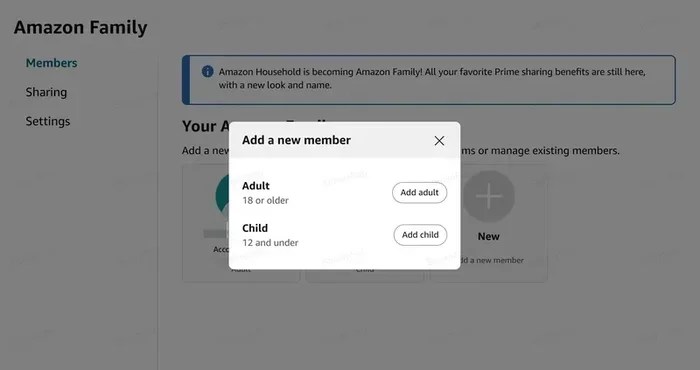
Amazon Household is the official way to share Amazon Prime membership with family. It connects two adult accounts and up to four teen or child profiles. Adults can share payment methods if they choose. Teens get limited purchasing power with approval. Children have no spending access. This structure keeps things organized and safe.
Visual guide about family sharing amazon prime
Image source: leawo.org
The system respects privacy. Your order history stays yours. Your wish list stays private. Recommendations do not mix. You only share the Prime benefits. That means free shipping, streaming, and reading perks. You do not share personal data unless you want to.
There are clear limits. You can only have two adults in one Household. If you need more adults, you must create a separate Household. Teens and children fill the remaining slots. This rule helps Amazon keep accounts secure. It also prevents abuse of the sharing system. Knowing these limits helps you plan better.
Who Can Join Your Household
Adults must have their own Amazon accounts. They cannot be part of another Household. Teens need parental consent. They receive their own login but cannot approve purchases without permission. Children use profiles managed by adults. They can access age-appropriate content and save items to wish lists.
Roommates or close relatives can join if they meet the rules. The feature works best for people who trust each other. You share financial benefits, so clear communication matters. Set expectations early. Agree on how to split costs. Talk about purchase approvals for teens. These steps keep the arrangement smooth.
What Gets Shared and What Stays Private
Shared items include Prime shipping, Prime Video, Prime Reading, and Prime Gaming. Each person can use these perks on their own devices. Payment methods can be shared if adults enable that option. You can turn it on or off anytime. Personal details stay separate. Addresses, contact info, and browsing history remain private.
Digital content has some overlap. Prime Video profiles let each person keep their own watch list. This feature prevents mix-ups. You can still watch together without losing your personal settings. Prime Reading gives each account its own borrowed titles. No one loses access to their favorites.
Step-by-Step Guide to Set Up Amazon Household
Setting up your Household is easy. You just need to follow a clear path. This process helps you share Amazon Prime membership with family without confusion. Start on the Amazon website or app. Go to your account settings. Look for the Household section. Click to create a new Household. The system will guide you through each step.
First, invite the second adult. They will receive an email or link. They must accept the invitation and sign in to their own Amazon account. Next, add teens or children. You can create profiles for them during this step. Assign ages and permissions. Review the sharing options. Choose whether to share payment methods. Save your settings. The Household is now active.
After setup, test the benefits. Ask a family member to place a small order. Check if Prime shipping appears. Open Prime Video and see if profiles load correctly. Try Prime Reading on a mobile device. These quick checks confirm everything works. If something looks wrong, go back to settings and adjust. Most issues come from missed steps or outdated account info.
Creating Your Amazon Household Account
Open your Amazon account page. Find the “Your Account” section. Scroll to “Amazon Household.” Click “Add Adult” or “Create Household.” Follow the prompts. Enter the email of the person you want to invite. Send the invitation. Wait for them to accept. The system links both accounts securely.
You can also start from the Prime benefits page. Some menus show a direct link to Household setup. This shortcut saves time. Pick the method that feels easiest for you. The result is the same. Two adult accounts connect under one Household. Prime benefits spread across both.
Adding Teens and Children to Your Household
Teens get their own login. You create a profile for them in the Household menu. Set an age range. Choose purchase approval settings. Teens can browse and add items to cart. They need your okay before buying. This keeps spending under control.
Children do not need email addresses. You add them as managed profiles. They can view content and save favorites. They cannot make purchases. This setup works well for young kids who share a tablet or TV. You keep the experience safe and simple.
Managing Shared Payments and Benefits
Payment sharing is optional. Adults can choose to link a single payment method or keep separate cards. Linked payments make group purchases easier. Separate payments keep finances independent. Pick the option that fits your family style. You can change this setting later.
Prime benefits spread automatically once the Household is active. Free shipping applies to eligible orders from any member. Prime Video works on multiple devices. Each person gets their own profile. Prime Reading lets everyone borrow titles. These perks do not require extra steps. They turn on by default.
Monitor usage to avoid surprises. Check order summaries regularly. Review teen purchase requests. Make sure payment methods are current. If a card expires, update it right away. This habit prevents declined orders and delivery delays.
Splitting Costs Fairly
Cost splitting works best with clear agreements. Decide how much each adult will pay. You can split evenly or adjust based on usage. Some families use a shared bank transfer. Others use payment apps. Keep records simple. A quick note or spreadsheet helps track contributions.
Talk about renewals too. Prime membership renews automatically. Make sure everyone knows the renewal date. Set a reminder. This avoids confusion when the charge hits. Fair planning keeps the arrangement happy and stress-free.
Handling Purchase Approvals for Teens
Teen approvals protect your budget. Set rules before shopping begins. Decide which items need approval. Some families approve everything. Others set a spending limit. Use the Amazon app to review requests quickly. Most approvals take seconds. This feature teaches teens responsibility while keeping control.
Review purchase history together once in a while. Discuss smart shopping habits. Point out deals and discounts. This turns the approval process into a learning moment. Teens appreciate the trust. Adults stay confident about spending.
Common Issues and How to Fix Them
Problems can happen, but most are easy to solve. A common issue is an invitation that does not arrive. Check the spam folder. Ask the other person to confirm their email. Resend the invite if needed. Another issue is a Household that will not link. This often happens when one account is already in another Household. Remove the old link first, then try again.
Shipping benefits may not show right away. Clear your browser cache. Sign out and sign back in. Check that both accounts are active Prime members. If one account lacks Prime, the benefits will not spread. Update payment info if orders fail. These quick fixes resolve most glitches.
Streaming problems can occur on shared devices. Make sure each person uses their own profile. Switch profiles if recommendations look mixed. Restart the app if videos buffer. These steps keep the viewing experience smooth.
Troubleshooting Invitation and Linking Problems
Start with the basics. Verify email addresses. Confirm both accounts are in good standing. Check for existing Household links. Remove old connections if they block new ones. Use a different browser if the page acts up. Try the mobile app as a backup. These actions solve most linking errors.
If the system still refuses to connect, contact Amazon support. Have your account details ready. Explain what you tried. Support teams can reset links and guide you through the process. Quick help prevents long delays.
Fixing Payment and Shipping Glitches
Payment issues often come from expired cards or mismatched billing info. Update your card details in the payment settings. Confirm the billing address matches your bank records. Test with a small order to verify everything works. Shipping glitches may appear if an item is not Prime eligible. Check the product page for the Prime badge. Use the filters to show only Prime items. This saves time and avoids frustration.
Tips for Getting the Most Out of Shared Prime
Shared Prime works best when everyone uses it wisely. Create a family wish list for gifts and bulk items. This keeps track of needs without cluttering personal lists. Use Prime Video profiles to organize shows by person. Set up parental controls for younger viewers. These small habits improve the experience.
Take advantage of free trials and promotions. Amazon often runs deals for new members or seasonal events. Share these finds with your Household. Combine Prime perks with other discounts when possible. Stack coupons, sales, and free shipping for maximum savings. The more you explore, the more value you get.
Review your Household settings every few months. People move. Teens grow older. Payment methods change. Update profiles and permissions as life shifts. A quick check keeps the system aligned with your current needs. This maintenance takes little time and prevents future headaches.
Optimizing Profiles and Parental Controls
Profiles make sharing smoother. Give each person a clear name. Choose avatars that help everyone recognize their space. Set content filters for kids. Limit mature titles if needed. Adjust shopping permissions for teens as they show responsibility. These settings create a safe and personalized environment.
Use the parent dashboard to monitor activity. Check recent requests. Review watch history if you want to discuss shows. Keep the conversation open. Teens and children respond better when rules feel fair and clear. This approach builds trust and keeps the Household running well.
Maximizing Value Across Devices
Prime works on phones, tablets, smart TVs, and computers. Log in on each device with the correct profile. Download Prime Video for offline viewing when traveling. Use the Kindle app for Prime Reading on the go. These options extend the benefits beyond your living room. The more devices you use, the more you get from one subscription.
Encourage family members to explore different features. One person might love movies. Another might prefer reading. A teen might enjoy gaming perks. Share what you find. Swap recommendations. This keeps everyone engaged and makes the membership feel richer.
Final Thoughts on Sharing Amazon Prime With Family
Learning how to share Amazon Prime membership with family is a smart move for many households. It reduces costs, simplifies shopping, and brings more entertainment to everyone. Amazon Household makes the process clean and secure. You keep privacy while sharing the best parts of Prime. Setup takes minutes. Management stays easy.
Start with a clear plan. Choose the right members. Set payment rules. Add teens and children with proper permissions. Test the benefits after setup. Fix small issues fast. Review settings often. These steps help you enjoy a smooth, lasting arrangement. When everyone knows how the system works, the value grows.
Take action today. Invite your family members. Explore the shared perks. Make the most of free shipping, streaming, and reading. A single Prime membership can do a lot when it works for the whole household.
Frequently Asked Questions
Can I share Amazon Prime with more than one adult?
You can only add two adults to one Amazon Household. If you need more adults, you must create a separate Household. Each adult needs their own Amazon account and cannot belong to another Household at the same time.
Do family members keep their own order history and recommendations?
Yes. Each person keeps private order history, wish lists, and personal recommendations. Only Prime benefits like shipping and streaming are shared. Personal data stays separate unless you choose to share payment methods.
Can teens make purchases on their own?
Teens can browse and add items to their cart, but purchases usually need adult approval. You can set spending limits and approve requests through the Amazon app. This helps control spending while giving teens some independence.
What happens if a family member leaves the Household?
When someone leaves, they lose access to the shared Prime benefits. Their personal account and data remain intact. You can remove a member anytime from the Household settings. The remaining members keep using their own Prime perks.
Will Prime Video profiles mix up if we share one account?
No. Prime Video uses separate profiles for each person. Everyone gets their own watch list and recommendations. This keeps content organized and prevents mix-ups, even when multiple people use the same device.
How do I split the cost of Amazon Prime with family?
You can agree on a fair split and use a payment app, bank transfer, or shared expense tracker. The Prime charge goes to the primary account, so clear communication matters. Many families split evenly, while others adjust based on usage.