

Resetting the maintenance light on your 2014 Toyota Camry is easy and takes just a few minutes. You do not need a mechanic for this simple task. This guide shows you exactly how to turn off maintenance light on Toyota Camry 2014 using your dashboard controls. Follow these steps to clear the indicator and keep your car running smoothly.
Your Toyota Camry is a reliable car. It gets you where you need to go every day. But sometimes, a small light pops up on your dashboard. This light can be annoying. You might wonder what is wrong with your engine. Usually, nothing is wrong. It is just a reminder for routine care.
Many owners ask how to turn off maintenance light on Toyota Camry 2014. This guide helps you do it fast. You do not need to pay a mechanic for this. It is a simple task you can do at home. We will walk you through every step. You will feel confident after reading this.
Understanding your dashboard is key. The maintenance light is not a warning light. It does not mean your engine is failing. It simply tracks your mileage. It reminds you to check your oil. Once you change your oil, you should reset the light. This keeps your dashboard clean and clear.
Key Takeaways
- Simple Process: You can reset the light using only the steering wheel buttons and odometer.
- No Tools Needed: This task requires no special tools or mechanical knowledge.
- Oil Change Reminder: The light reminds you to change your oil, not that something is broken.
- Safety First: Always perform the reset when the vehicle is safely parked.
- Model Specific: The 2014 Camry has a unique reset sequence compared to newer models.
- Regular Maintenance: Resetting the light does not replace actual oil changes.
- Save Money: Doing it yourself saves a trip to the service center.
📑 Table of Contents
Understanding the Maintenance Light
Before you reset anything, you need to know what the light means. The Toyota Camry 2014 maintenance indicator is a service reminder. It comes on after a set number of miles. Usually, it appears every 5,000 miles. This matches the recommended oil change interval.
Some people worry when they see this light. They think it means a breakdown is coming. That is not true. It is just a timer. Think of it like a phone reminder. You set it to remind you to do something. Once you do the task, you turn off the reminder.
Is It Safe to Drive?
Yes, it is safe to drive with this light on. The car will run normally. You do not need to panic. However, you should schedule an oil change soon. Old oil can hurt your engine over time. So, treat the light as a helpful nudge.
If you see other lights together, that is different. A red oil pressure light is serious. But the yellow maintenance light is just a reminder. Knowing the difference saves you stress. It also saves you money on unnecessary repairs.
Preparation Before Resetting
You need to get ready before you start. You do not need many tools. Actually, you need no tools at all. But you do need to be ready. Here is what you should check first.
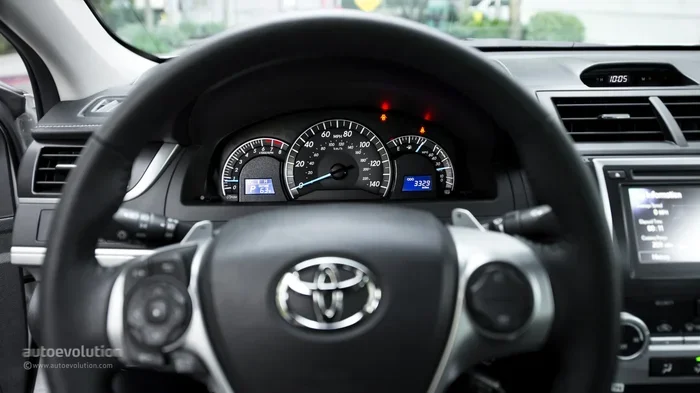
Visual guide about Toyota Camry 2014 dashboard gauge
Image source: s1.cdn.autoevolution.com
Make sure you have already changed your oil. Resetting the light without changing the oil is not wise. The light exists to protect your engine. If you reset it too soon, you might forget to change the oil later. So, complete your Toyota Camry oil change first.
Gather Your Information
You should know your current mileage. Write it down if you want. This helps you track when the light comes back on. You might also want your owner’s manual nearby. Sometimes specific models vary slightly. But for the 2014 Camry, the steps are standard.
Park your car on a flat surface. Turn off the engine. You need the ignition on for some steps, but safety comes first. Ensure the parking brake is engaged. This prevents the car from rolling while you work on the dashboard.
Step-by-Step Reset Guide
Now we get to the main part. This is the core answer to how to turn off maintenance light on Toyota Camry 2014. Follow these steps in order. Do not skip any steps. The process is straightforward but requires precision.
You will use the steering wheel buttons. Your 2014 Camry has controls on the right side of the wheel. These buttons control the dashboard display. You will navigate through menus using these buttons. It feels like using a small computer.
Initial Setup
First, turn the ignition to the ON position. Do not start the engine. You just need the electronics on. The dashboard lights should illuminate. If you have a push-button start, press the button twice without your foot on the brake.
Next, look for the trip meter button. It is usually on the steering wheel stalk or the wheel itself. Press it to cycle through the display options. You want to see the odometer reading. This is the total miles on your car.
Entering the Reset Mode
Press and hold the trip meter button. Keep holding it down. While holding it, turn the ignition to OFF. Then turn it back to ON quickly. You must time this correctly. The display should show zeros or special symbols.
If done right, the maintenance light will flash. This means you are in the reset mode. You are now telling the car’s computer to clear the old data. This is the critical moment in resetting Toyota Camry service light.
Completing the Reset
Keep holding the button until the light goes off. You might see the numbers reset to zero. The light should disappear from the dashboard. Once it is gone, you can release the button. Turn the ignition fully OFF.
Start the engine to verify the result. Look at your dashboard. The maintenance light should not return. If it stays off, you succeeded. You have successfully learned how to turn off maintenance light on Toyota Camry 2014.
Common Mistakes to Avoid
Even simple tasks can go wrong. You might make a small error during the process. Here are some common mistakes people make. Avoiding these ensures a smooth experience.
One big mistake is resetting too early. Do not reset the light before changing your oil. This defeats the purpose of the reminder. You might skip your next oil change. This can lead to engine wear over time.
- Wrong Ignition Position: Make sure the car is in ON mode, not OFF.
- Timing Issues: Turning the ignition too slowly can break the reset sequence.
- Wrong Button: Ensure you are pressing the trip meter button, not the hazard lights.
- Skipping Verification: Always start the engine to check if the light is gone.
Another mistake is confusing the lights. Do not mix up the maintenance light with a check engine light. The check engine light needs a diagnostic scan. The maintenance light just needs a reset. Knowing the difference is crucial for Toyota Camry dashboard indicators.
What If the Light Stays On?
Sometimes, the light does not turn off. You followed the steps, but it stays lit. Do not worry. This happens sometimes. There are a few reasons why this might occur.
First, you might not have held the button long enough. Try the process again. Hold the button for a few extra seconds. Sometimes the system needs a moment to process the command. Patience is key here.
Battery Issues
A weak car battery can cause electronic glitches. If your battery is old, the reset might fail. The dashboard computer needs stable power. If the voltage drops, the reset might not save. Check your battery health if problems persist.
You might also have a sensor issue. Rarely, the oil sensor sends a false signal. If the light comes back immediately after driving, see a mechanic. They can check the Toyota Camry maintenance reset codes. This ensures nothing is actually wrong.
Maintaining Your Camry After Reset
Resetting the light is just one part of care. You need to keep up with regular maintenance. Your Camry is built to last. But it needs love to stay that way. Regular oil changes are the most important task.
Use the right type of oil for your engine. Check your owner’s manual for the viscosity grade. Using the wrong oil can affect performance. It might also trigger the light sooner. Proper Toyota Camry engine care extends the life of your vehicle.
Other Important Checks
While you are at it, check other fluids. Brake fluid and coolant are vital. Inspect your tires for wear. Good tires keep you safe on the road. A well-maintained car holds its value better too.
If you plan to sell your car later, records matter. Keep a log of your oil changes. Show buyers that you took care of the car. This helps with resale value. It proves you knew how to turn off maintenance light on Toyota Camry 2014 and kept up with service.
Many owners also wonder about other Toyota models. The process is similar for many cars. If you have a Corolla or RAV4, the steps might differ slightly. You can find specific guides for those models online. For example, learning how to reset maintenance light on Toyota Corolla helps if you switch models.
Your 2014 Camry is a robust vehicle. It can handle high mileage with care. Some owners ask how many miles can a Toyota Camry last. With proper oil changes, they can go 200,000 miles or more. The maintenance light is your partner in reaching that goal.
Do not ignore other dashboard warnings. If you see a tire pressure light, check your air. If you see a battery light, check your alternator. Each light has a job. The maintenance light’s job is to remind you of service. Respect that job.
You might also want to update your car’s tech. Some owners look into how to update CarPlay Toyota old model. Modernizing your infotainment system can make driving more fun. But always prioritize mechanical health first. Oil changes come before software updates.
If you have keys issues, check your fob battery. A dead key fob battery can be annoying. Knowing how to change battery on Toyota key fob saves time. It is another small task that keeps your life smooth. Just like resetting the maintenance light, it is easy to do.
Take pride in your vehicle. Doing small tasks yourself builds confidence. You learn how your car works. You save money on labor costs. Most importantly, you ensure your safety on the road. A well-maintained Camry is a safe Camry.
Final Thoughts on Resetting
You now know the process inside and out. It is simple, fast, and free. You do not need to stress about that yellow light. You have the power to control your dashboard. Remember to change your oil on time.
Keep this guide handy for the future. You will need it again in 5,000 miles. Share it with friends who own Camrys. Helping others is always a good idea. Drive safely and enjoy your reliable Toyota.
Frequently Asked Questions
Why does my maintenance light come on?
The light comes on to remind you to change your oil. It tracks your mileage and turns on after about 5,000 miles. It is not a sign of engine failure.
Can I reset the light without changing oil?
You can, but you should not. The light is there to protect your engine. Resetting it without service might cause you to forget future oil changes.
Do I need special tools to reset the light?
No, you do not need any tools. You only need your steering wheel buttons and ignition key. It is a purely electronic process.
What is the difference between maintenance and check engine lights?
The maintenance light is a service reminder. The check engine light indicates a potential mechanical problem. The check engine light requires a diagnostic scan.
Will resetting the light affect my warranty?
No, resetting the reminder light does not affect your warranty. It is a standard owner task. Just keep records of your actual oil changes for proof.
What if the light comes back on immediately?
If it returns right away, you might not have completed the reset sequence correctly. Try the steps again. If it persists, consult a mechanic to check for sensor issues.