
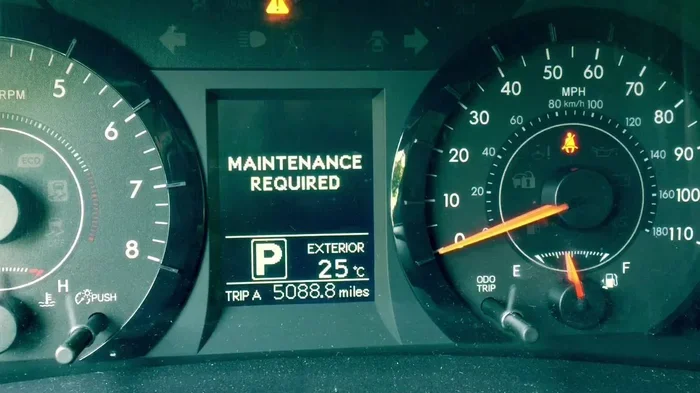
Quick Summary: Seeing a dashboard light can be stressful. This guide shows you exactly how to turn off the maintenance light on a Toyota. You will save time and avoid confusion. Follow our simple steps to reset your car today.
Dashboard lights can be confusing. You might see a small wrench icon or a message saying maintenance required. It is natural to worry. But often, this light is just a reminder. It tells you that your car needs routine care. It does not always mean something is broken. Knowing how to turn off the maintenance light on a Toyota helps you stay calm. It also keeps your dashboard clean.
Toyota cars are known for lasting a long time. They work hard for their owners. Because they work so hard, they need regular checkups. The light is a helpful nudge. It reminds you to change oil or check tires. Once you take care of the task, you can clear the light. This guide will walk you through the process. We will cover many popular models. You will learn simple tricks to reset the system.
Let us dive into the details. You do not need to be a mechanic. You just need to follow a few steps. We will make this easy for you. By the end, you will feel confident. You will know how to handle that little light. Let us get started on clearing your dashboard.
Key Takeaways
- Know the difference: Maintenance lights are not engine failure warnings.
- Press the right buttons: Most resets happen in the dashboard menu.
- Turn the ignition on: You need power to access the settings.
- Hold the reset button: Some models need a long press to clear codes.
- Check your oil: Always verify fluid levels before resetting.
- Use your manual: Specific steps vary by Toyota model year.
- Drive normally: The light may return if the issue persists.
📑 Table of Contents
Understanding the Toyota Maintenance Light
Before you reset anything, you need to know what the light means. Toyota uses this light for many reasons. Sometimes it is just time for an oil change. Other times, it might signal a check engine issue. It is important to tell them apart. The maintenance light is usually yellow or orange. It often looks like a wrench. The check engine light is also yellow but looks like an engine.
Think of the maintenance light as a calendar reminder. Your car tracks how many miles you drive. It knows when you last changed the oil. When the miles add up, the light turns on. This is a smart feature. It helps you keep your car in good shape. Ignoring it can lead to bigger problems later. But seeing it does not mean panic.
You should check your oil level first. Use the dipstick under the hood. If the oil is low, add more. If the oil looks dirty, plan a change. Once you handle the maintenance task, you can reset the light. This ensures your car is actually ready. Resetting without doing the work is not a good idea. Your car needs care to run well.
Why the Light Turns On
There are a few common reasons for this light. The most common reason is oil life. Toyota systems track oil quality. They count down the percentage of oil life. When it hits zero, the light comes on. Another reason is multi-point inspection. The car might need a tire rotation or filter change. These are normal wear items.
Sometimes the light comes on after a battery jump. If the battery died, the car might lose its memory. The system might think service is due. This is common after a Toyota Prius jump start. You just need to reset the clock in the system. It is a small glitch that is easy to fix. You do not need a mechanic for this.
Weather can also play a role. Extreme heat or cold affects oil. Your car might adjust its schedule. This is just the car being smart. It wants to protect the engine. Listening to these reminders helps your car last longer. It saves you money on repairs too.
Maintenance Light vs Check Engine Light
People often mix these two up. They look similar on some dashboards. But they mean different things. The maintenance light is a reminder. The check engine light is a warning. A warning means something is wrong right now. A reminder means something is due soon.
If you see a check engine light, stop and check. It could be a loose gas cap. It could be a sensor issue. You might need to reset engine light Toyota systems after a fix. That is a different process. The maintenance light is softer. It is just asking for attention. You can usually drive safely with a maintenance light. Just plan your service soon.
Knowing the difference saves stress. You will not call a tow truck for a reminder. You will just schedule an oil change. Then you can clear the light yourself. This knowledge makes you a smarter car owner. It helps you manage your vehicle better.
Preparing to Reset the Light
You need to get ready before you touch any buttons. Safety is always first. Park your car on a flat surface. Turn off the engine. Make sure the car is in park. Engage the parking brake. This keeps the car from moving. You will be pressing buttons on the dash. You do not want the car rolling.
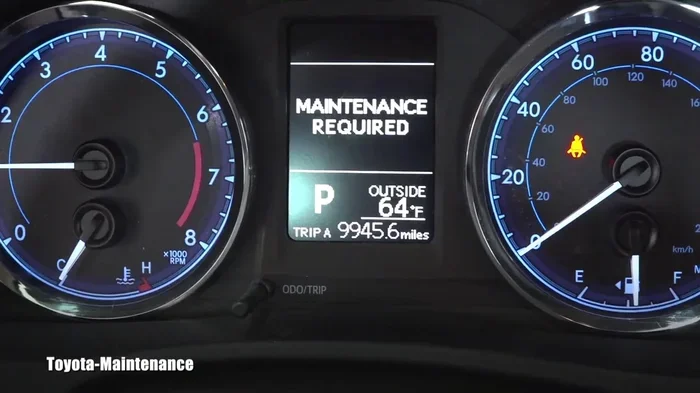
Visual guide about Toyota dashboard maintenance light
Image source: i.ytimg.com
Gather what you need. You usually only need your finger. No tools are required for most resets. But have your owner manual nearby. Different models have different menus. The manual shows the exact buttons for your car. It is a helpful reference. You can also find info online for your model.
Check your fuel level too. Some resets require the car to be on. You might need the engine running. Make sure you have enough gas. You do not want to stall during the process. A full tank is best. It lets you focus on the buttons. You can finish the reset without worry.
Gathering Your Tools and Info
You might not need tools. But having them helps. Keep a rag for your hands. You might touch the steering wheel. Keep your manual in the glove box. It is good to have it there. You can also use your phone. Search for your model year online. Many owners share tips online.
Know your model year. A 2026 model is different from a 2015 model. Newer cars have touchscreens. Older cars have physical buttons. The process changes slightly. Knowing your year helps you find the right steps. It makes the job faster. You will not get lost in the menu.
Take a photo of the light. This helps if you need to show a mechanic. You can show them the icon. It confirms what you saw. It is a good habit to keep records. You can track when the light came on. This helps with future service visits.
Step-by-Step Reset for Common Models
Now let us look at specific cars. Toyota makes many popular models. Each one has a slightly different way to reset. We will cover the most common ones. You can find your car in this list. Follow the steps that match your vehicle. This is the core of how to turn off the maintenance light on a Toyota.
Toyota Camry Reset Steps
The Camry is a very popular sedan. Many people drive this car. The reset process is straightforward. First, turn the car on. You do not need to drive. Just turn the ignition to the on position. Look for the dashboard menu. You will see a settings gear icon.
Press the menu button on the steering wheel. Navigate to the vehicle settings. Look for the maintenance section. You will see the oil life percentage. Select the reset option. Confirm the reset when asked. The light should go off. If you have a newer Camry, you might use the touchscreen. The steps are similar in the menu.
Some older Camrys use a trip button. Turn the car off. Hold the trip reset button. Turn the car on while holding the button. Keep holding it until the light flashes. This clears the code. It is a simple trick. Many Camry owners use this method. It works well for most years.
If you need more details, check out how to reset Toyota Camry maintenance required light. This resource gives extra tips for specific years. It helps if your menu looks different. You can find the exact path for your dash.
Toyota Corolla Reset Steps
The Corolla is another top seller. It is small and efficient. The reset is similar to the Camry. Turn the ignition on. Find the dashboard controls. Look for the wrench icon. Press and hold the reset button. You might need to hold it for ten seconds.
Watch the display screen. The oil life will drop to zero. This means the reset is done. The light will turn off. For touchscreen models, go to settings. Find the vehicle maintenance menu. Select reset oil life. Confirm your choice. The system will clear the reminder.
Corollas are simple cars. They do not have many complex menus. This makes the reset easy. You can do it in your driveway. It takes less than a minute. You will be back on the road quickly. No stress is needed for this task.
For more help, see how to reset maintenance light on 2026 Toyota Corolla. This guide covers the newest models. It ensures you have the latest info. New screens can be tricky. This guide helps you navigate them.
Toyota 4Runner Reset Steps
The 4Runner is a rugged SUV. It goes off-road often. The maintenance light might come on after rough trips. Resetting it is easy too. Turn the car on. Press the trip meter button. Hold it down firmly. Turn the ignition to off. Then turn it back on while holding.
Keep holding until the light resets. You will see the numbers flash. This indicates the system is clearing. Let go of the button. The light should be gone. If it stays on, try again. Make sure you hold long enough. Sometimes it needs a few seconds more.
The 4Runner has a strong engine. It needs good oil care. Resetting the light keeps your records straight. It helps you track your service history. This is good for resale value too. A well-documented car sells better. You show buyers you cared for it.
You can also learn how to clear maintenance light on Toyota 4Runner for more options. This covers different methods. Some owners prefer the menu way. Others like the button way. Choose what works for you. Both ways are effective.
Toyota Highlander Reset Steps
The Highlander is a family SUV. It carries lots of passengers. The reset process is user-friendly. Start the engine. Look for the vehicle info button. Press it to scroll through menus. Find the maintenance reminder. Select the reset option.
You might need to enter a code. Some models ask for a PIN. The PIN is often in the manual. It is usually a simple number. Enter it to unlock the reset. Then confirm the action. The light will disappear. This adds security to the system. It stops accidental resets.
For the latest models, check how to reset maintenance light on Toyota Highlander 2026. New tech changes the steps. Touchscreens are common now. You swipe and tap to reset. It feels like using a phone. It is very intuitive once you try it.
Toyota RAV4 Reset Steps
The RAV4 is a compact SUV. It is great for city driving. The reset is simple. Turn the car on. Press the dashboard settings. Find the oil maintenance section. Press and hold the reset button. The light will blink. Release the button. The light turns off.
Some RAV4s have a multi-info display. This screen shows lots of data. You can scroll to find the maintenance tab. Tap reset there. It is very clear on the screen. You see the percentage change. It goes back to 100 percent. This confirms the reset worked.
If you have trouble, look up how to turn off maintenance light on Toyota. General guides cover many models. They give you a broad overview. You can adapt the steps to your RAV4. Most Toyota systems are similar. Learning one helps you learn others.
Troubleshooting Common Issues
Sometimes the light does not go off. This can be frustrating. Do not worry. There are reasons for this. You might have missed a step. Or the system needs more time. Let us look at common problems. You can fix them easily.
Light Stays On After Reset
If the light stays on, check your ignition. Make sure the car is fully on. Some resets need the engine running. If the engine is off, the reset might not save. Turn the car on and try again. Hold the buttons longer this time. Ten seconds is usually enough.
Another reason is a hard fault. The car might detect a real issue. The maintenance light can sometimes signal check engine codes. If the light comes back fast, check the engine. Look for other warning lights. You might need a scanner. This tells you if there is a real problem.
Battery issues can cause this too. A weak battery affects the computer. The system might not reset properly. Check your battery health. If it is old, replace it. You can learn how to change the battery on a Toyota key. A good battery helps all electronics. This includes the dashboard lights.
Reset Button Not Working
If the button does not respond, check the screen. Touchscreens can freeze. Restart the infotainment system. Turn the car off and on. This refreshes the software. Try the reset again. The screen should work better now.
Physical buttons can get stuck. Dirt or debris might block them. Clean around the buttons. Press them firmly. Make sure they click. If a button is broken, you might need repair. But this is rare. Most buttons work fine. Cleaning them often helps.
Sometimes the menu is hidden. You might need to press a specific combo. Consult your manual for shortcuts. Some cars use a long press on the home button. Others use the steering wheel controls. Finding the right combo solves the issue. You just need to know the trick.
Expert Tips and Best Practices
Experts have some good advice. They want you to keep your car healthy. Resetting the light is just one part. Taking care of the car is the main goal. Here are some tips to follow. They help you avoid future problems.
Regular Maintenance Schedule
Follow the schedule in your manual. Toyota gives a clear plan. It tells you when to change oil. It tells you when to check brakes. Stick to this plan. It keeps your warranty valid. It also keeps your car running smooth. Do not skip services.
Use good quality oil. Toyota recommends specific types. Use the right viscosity. This protects your engine. It also helps the maintenance system. The computer tracks oil quality. Good oil lasts longer. This means fewer resets for you. It saves money in the long run.
Check your tires regularly. Tire pressure affects fuel economy. It also affects safety. Many Toyotas have a tire pressure light. You might need to reset tire pressure light Toyota Camry systems. Keep your tires inflated. This prevents other dashboard lights. It is good car care.
When to See a Mechanic
Know when to call a pro. If the light is red, stop driving. Red means danger. Yellow means caution. If you see a red light, pull over. Call for help. Do not ignore red lights. They signal serious issues.
If you hear strange noises, see a mechanic. Noises can mean wear. Squealing might mean brakes. Grinding might mean transmission. These are not maintenance lights. They are physical signs. Listen to your car. It tells you when it needs help.
If the light comes on right after service, tell the shop. They might have forgotten to reset it. A good shop resets it for you. They should do this after every visit. If they did not, ask them. It is part of their job. You should not have to do it yourself after a service.
Conclusion
You now know how to turn off the maintenance light on a Toyota. It is a simple process. You just need to follow the steps. Different models have different buttons. But the idea is the same. Reset the system after service. This keeps your dashboard clean.
Remember to do the actual maintenance first. Change the oil or check the tires. Then reset the light. This ensures your car is truly ready. It keeps your engine healthy. It also saves you stress. You will drive with confidence.
Keep this guide handy. You might need it again. Cars are complex machines. But their reminders are simple. You can handle them. You are a capable car owner. Enjoy your Toyota and keep it running well.
Frequently Asked Questions
Why is my Toyota maintenance light on?
The light usually means your oil life is low. It can also signal a scheduled service like a tire rotation. It is a reminder, not always a breakdown warning. Check your oil first.
Can I drive with the maintenance light on?
Yes, you can usually drive safely. The light is a reminder for routine care. However, you should schedule service soon. Ignoring it for too long can hurt your engine.
Do I need a tool to reset the light?
Most of the time, you do not need tools. You just use the dashboard buttons or touchscreen. Some older models might need a trip button. Your fingers are usually enough.
Will the light come back after I reset it?
It should not if you did the service. If it comes back quickly, you might have a real issue. Check for other warning lights. You might need a mechanic to look at it.
Does resetting the light erase my service history?
No, resetting the light just clears the reminder. It does not erase your car’s history. You should keep your own records of oil changes. This helps with resale value.
What if I have a hybrid Toyota?
Hybrids like the Prius work similarly. The maintenance light tracks oil and service. You can reset it using the dashboard menu. Check your hybrid manual for specific steps.