
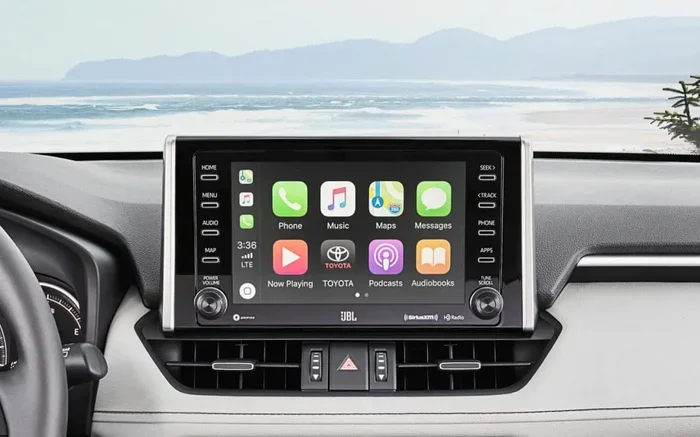
Toyota Entune is the infotainment system that powers your dashboard screens, apps, and connectivity. It blends music, navigation, and smartphone integration into one easy-to-use platform. Whether you want hands-free calls or real-time traffic updates, Entune keeps you connected on the road. Understanding how it works helps you get the most out of every drive.
Key Takeaways
- Toyota Entune is the official infotainment system for many Toyota models.
- It supports smartphone pairing, navigation, music streaming, and vehicle apps.
- Different versions exist, so features vary by model year and trim level.
- Setup is simple and usually takes just a few minutes.
- Regular updates keep your system fast, safe, and full of new features.
- Troubleshooting often starts with a restart, cable check, or app refresh.
- Learning the basics helps you drive safer and enjoy more convenience.
📑 Table of Contents
How Toyota Entune Works in Modern Cars
Toyota Entune is the software that runs on your car screen. It connects your phone, radio, and car settings into one place. You can play music, make calls, and check maps without fumbling with your phone. The system uses buttons, touch controls, or voice commands depending on your model. Many drivers ask what is Entune in Toyota because it shows up in so many vehicles. The short answer is that it is the bridge between your car and your digital life. It keeps important tools within easy reach while you drive.
The system works with both wired and wireless connections. You can plug in a phone with a cable or link it through Bluetooth. Once paired, your contacts, playlists, and messages appear on the screen. Some versions also support apps that run directly on the car display. This makes daily driving feel smoother and more organized. You do not need to juggle separate devices. Everything sits in one dashboard hub.
Entune also shares data with your car. It can show fuel range, tire pressure, and maintenance alerts alongside your media. That mix of info helps you stay aware without checking multiple screens. The design aims for quick glances and simple taps. Safety matters, so the layout keeps critical controls easy to find. If you understand the basics, you can use the system with less distraction.
Core Components of the System
The main parts include the display, the audio controls, and the connection module. The display shows maps, media, and settings. The audio controls manage volume, balance, and speaker output. The connection module handles phone pairing and data flow. Together, these parts create a smooth user experience. You interact with them through touch, knobs, or voice depending on your trim.
What Is Entune in Toyota and Why It Matters

Visual guide about Toyota Entune infotainment system
Image source: lh3.googleusercontent.com
People often wonder what is Entune in Toyota and why it appears on so many dashboards. The reason is simple. Drivers want easy access to music, maps, and calls without clutter. Entune answers that need by combining common tools into one interface. It also supports Toyota apps that help with parking, fuel, and service info. That makes the car feel more helpful in daily use.
The system matters because it affects how you interact with your vehicle. A clear interface reduces stress during short trips and long commutes. You can find a song faster. You can start navigation with fewer steps. You can answer a call without digging through pockets. These small wins add up over time. A good infotainment system should feel calm, not confusing.
Entune also helps Toyota keep its tech consistent across models. You may see similar menus in a sedan, SUV, or truck. That consistency makes it easier to learn a new vehicle. If you already know one Toyota screen, you can guess where things live in another. That familiarity saves time and reduces frustration. It is one reason many buyers appreciate the brand.
Benefits for Daily Driving
The biggest wins are convenience, clarity, and connection. You get quick access to your favorite audio sources. You can see turn-by-turn directions without pulling out your phone. You can keep both hands on the wheel while using voice commands. These benefits support safer habits and a smoother ride. The system is built to simplify routine tasks.
Key Features You Should Know
Entune includes several tools that make driving easier. The exact list depends on your model year and trim, but many versions share core features. Knowing these tools helps you use the system with confidence. You can explore each feature at your own pace. There is no need to master everything on day one.
- Smartphone integration for calls, messages, and media
- Navigation with route guidance and traffic info
- Audio controls for radio, Bluetooth, and streaming apps
- Vehicle apps for service reminders, fuel range, and settings
- Voice commands for hands-free control
- App updates that add new functions over time
Smartphone Pairing and Connectivity
Pairing your phone is usually the first step. You can connect through Bluetooth or a cable, depending on your model. After pairing, your contacts and music libraries may appear on the screen. Some versions support projection apps that mirror your phone interface. This lets you use familiar controls without holding your device. A clean pairing process makes the whole system feel more useful.
Navigation and Traffic Tools
Navigation is one of the most valued features. You can search for addresses, save favorites, and review route options. Some models show traffic flow and suggest faster paths. That helps you avoid delays during busy hours. You can also plan stops for fuel or food in some versions. Good navigation reduces guesswork and keeps trips organized.
Music, Apps, and Media
Music and media options are a major part of the experience. You can switch between radio, Bluetooth audio, and streaming services. Some models support app-based playback through your phone. Others include built-in music sources. The goal is simple: give you fast access to what you want to hear. A good media setup makes every drive more enjoyable.
How to Set Up Entune Step by Step
Getting started is usually quick. You do not need special tools or advanced tech skills. Follow the basic steps below and you should be ready in minutes. If your model differs slightly, the on-screen prompts will guide you.
- Turn on the vehicle and activate the screen.
- Open the setup or settings menu.
- Choose phone pairing or Bluetooth options.
- Follow the prompts to match your phone.
- Confirm the connection and test audio or calls.
- Adjust volume, favorites, and navigation preferences.
Tips for a Smooth First Setup
Keep your phone close during pairing. Make sure Bluetooth is on and visible. If you use a cable, try a good-quality cord that supports data. Charge your phone before starting if possible. These small steps reduce connection problems. A calm setup makes the system feel friendly right away.
Customizing Your Screen
You can often rearrange shortcuts and favorites. Put the tools you use most in easy reach. Set your preferred audio source as a default if the system allows it. Save frequent destinations for faster navigation. These tweaks save time later. A personalized screen feels more useful every day.
Common Entune Issues and Easy Fixes
Even a solid system can act up sometimes. The good news is that many problems have simple fixes. You do not always need a dealer visit. Start with the basics and work upward. Most issues come from pairing, cables, or software glitches.
- No phone connection: check Bluetooth, restart both devices, and try again
- No sound: verify volume, source selection, and cable seating
- Frozen screen: restart the system or the vehicle
- Slow response: close unused apps and check for updates
- Map errors: refresh navigation data and confirm signal strength
When to Restart the System
A restart often clears small glitches. Turn the vehicle off, wait a moment, and start it again. If the screen stays stuck, check the manual for a soft reset option. Many systems recover after a fresh start. This is the easiest first step before chasing bigger fixes.
Keeping Software Current
Updates can improve speed, safety, and features. Some updates come through the car settings. Others may need a dealer visit or a phone app. Check for notices regularly so you do not miss improvements. A current system usually feels smoother and more reliable.
Is Entune Worth Using Every Day
Yes, for many drivers it becomes part of the routine. It brings together the tools you use most in one place. You can listen, navigate, and communicate with less hassle. That matters on busy mornings and long road trips. The system is not flashy for the sake of flash. It is built to be practical.
The value also depends on your habits. If you drive often and use maps or music, Entune helps a lot. If you prefer a very simple car setup, you may use only a few features. Either way, the system gives you options. You can keep it basic or explore more advanced tools over time.
Who Benefits Most
Busy commuters, families, and road-trip drivers often get the most use out of it. People who make hands-free calls appreciate the safety angle. Drivers who rely on navigation enjoy the route support. Music fans like having quick access to playlists. The system fits many lifestyles without demanding much effort.
Final Thoughts on Toyota Entune
Understanding what is Entune in Toyota makes the car feel more approachable. It is the digital hub that supports your audio, maps, and phone connection. Once you learn the basics, the screen becomes a helpful tool instead of a mystery. Take a few minutes to pair your phone, set favorites, and try voice commands. Small habits make the system work better for you.
If you want a more connected drive, Entune gives you a strong starting point. It keeps everyday tasks close at hand and reduces distractions. That is the real goal of a good infotainment system. Use it well, keep it updated, and enjoy the extra convenience on every trip.
Frequently Asked Questions
What is Entune in Toyota cars?
Toyota Entune is the infotainment system that runs on the dashboard screen. It connects your phone, audio, navigation, and vehicle apps in one place. The goal is to make daily driving easier and more organized.
How do I connect my phone to Entune?
You can usually pair your phone through Bluetooth or a data cable, depending on your model. Open the settings menu, choose the pairing option, and follow the on-screen prompts. After pairing, your contacts and media may appear on the screen.
Does Entune support navigation?
Many Entune systems include navigation with route guidance and search tools. Some versions also show traffic information and route options. The exact features depend on your model year and trim level.
Why is my Entune screen frozen?
A frozen screen often clears after a restart of the system or the vehicle. Check for simple issues like loose cables or a temporary software glitch. If the problem continues, consult your owner manual for a reset option.
Can I update Entune software?
Yes, many systems can receive updates that improve features and performance. Some updates are available through the car settings, while others may need dealer support. Checking for updates regularly helps keep the system running well.
Is Entune available in all Toyota models?
Not every Toyota uses the same system, and feature sets can vary by model and year. Some vehicles have newer versions with more apps and connectivity options. Your owner manual or model details can confirm what your car includes.