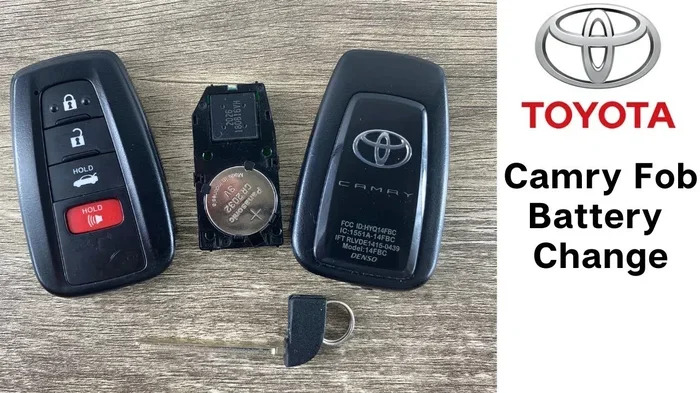
Changing the battery in your Toyota Camry key fob is a simple task that saves you time and money. You do not need to visit a dealership for this small fix. Our guide shows you exactly how to change battery in Toyota Camry key fob without stress. You will learn the right battery type and the safe opening method. Get your key working again in just a few minutes.
Key Takeaways
- Identify your key type: Know if you have a standard key or a smart key to find the right battery.
- Use the correct battery: Most Toyota Camry fobs use a CR2032 or CR1632 battery.
- Open carefully: Use a small flat tool to pry the case without breaking the plastic.
- Match the polarity: Ensure the positive side of the battery faces the right direction.
- Test before closing: Check that the buttons work before snapping the case shut.
- Avoid force: Gentle pressure prevents damage to the internal circuit board.
- Save money: Doing this yourself costs less than a dealer visit.
📑 Table of Contents
- Why You Need to Change Battery in Toyota Camry Key Fob
- Signs Your Key Fob Battery Is Dying
- Tools You Need to Change Battery in Toyota Camry Key Fob
- Step-by-Step Guide on How to Change Battery in Toyota Camry Key Fob
- Choosing the Right Battery for Your Camry
- Troubleshooting Tips After Changing Battery
- Common Mistakes to Avoid
- Expert Insights on Key Fob Maintenance
- Conclusion
Why You Need to Change Battery in Toyota Camry Key Fob
Your key fob is a small but vital part of your car. It locks and unlocks your doors. It also starts the engine in many models. When the battery dies, you feel stuck. You might worry about being locked out. But this is a common issue. Every car owner faces this sooner or later. The good news is that it is easy to fix.
You do not need to call a locksmith. You do not need to tow your car to a shop. Changing the battery is a simple DIY task. It takes less than ten minutes. You only need a few tools. This saves you money on labor costs. It also gives you peace of mind. You will know how to handle this issue anytime it happens.
Many people ignore the warning signs. They wait until the key stops working completely. This causes unnecessary stress. Look for signs like reduced range. If you have to walk closer to the car, the battery is weak. Sometimes the lights on the fob dim. Catching this early makes the process smoother. You can prepare your new battery before the old one dies.
Toyota Camry owners often ask about this. The Camry is a reliable car. But the key fob battery is not permanent. It lasts for several years. However, it will eventually run out. Knowing how to change battery in Toyota Camry key fob is a useful skill. It keeps you independent. It also ensures you are never stranded.
Signs Your Key Fob Battery Is Dying
How do you know it is time for a new battery? There are clear warning signs. Do not wait for a total failure. Watch for these clues. They tell you the battery is losing power.
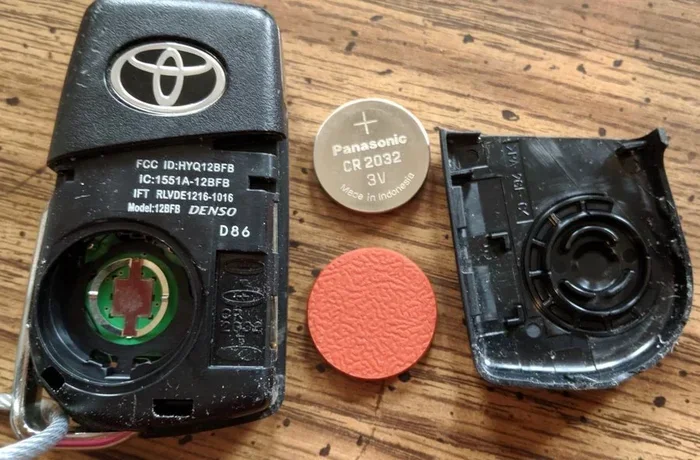
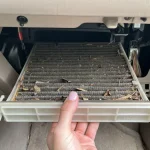
Visual guide about Toyota Camry key fob battery
Image source: assets.howtune.com
Reduced Signal Range
The first sign is distance. Normally, you can press the button from far away. The car responds immediately. When the battery weakens, the range drops. You might need to stand right next to the door. Sometimes you have to press the button multiple times. This is a clear sign of low power.
Inconsistent Button Response
Sometimes the buttons feel unresponsive. You press the unlock button. Nothing happens. You try again. Then it works. This inconsistency is frustrating. It often means the battery is nearly dead. The circuit cannot send a strong signal. Replacing the battery fixes this issue.
Dashboard Warnings
Some modern Camry models show warnings. The dashboard might display a key icon. It could say “Key Battery Low.” Do not ignore this message. It is the car telling you something is wrong. Check your key fob immediately. This prevents you from getting locked out later.
Tools You Need to Change Battery in Toyota Camry Key Fob
You do not need many tools. Most items are likely in your home. Keeping these ready makes the job faster. Here is what you need.
- New Battery: Check your owner’s manual for the size. Usually, it is a CR2032.
- Small Flathead Screwdriver: Or a coin works well too.
- Soft Cloth: To protect the key from scratches.
- Good Lighting: You need to see small parts clearly.
Some key fobs have a mechanical key inside. You might need to remove this first. It slides out of the plastic case. Be gentle with the small metal key. Do not drop it. Losing small parts is common during this process. Work on a clean table. A white cloth helps you see small pieces.
You can buy the battery at any store. Electronics shops sell them. Grocery stores often have them too. Online stores are another option. Make sure you buy the right type. Using the wrong battery causes issues. It might not fit the holder. It could also leak power. Always check the model number.
Step-by-Step Guide on How to Change Battery in Toyota Camry Key Fob
This is the core part of the process. Follow these steps carefully. Changing the battery is straightforward if you take your time. Rushing can break the plastic clips. Here is how to do it safely.
Step 1: Remove the Mechanical Key
Many Toyota key fobs have a hidden key. Look for a small button or slider. Press it to release the metal key. Pull the key out gently. This exposes the seam where the fob opens. Some models require you to insert the key into a slot. This slot is usually on the side. Use the key to pry the case open.
Step 2: Open the Key Fob Case
Now you need to split the case. Use your small screwdriver or coin. Insert it into the seam. Twist gently to pop the clips. You will hear a click. Do this around the edges. Work slowly. The plastic is brittle. Too much force breaks the housing. Once the clips release, separate the two halves.
Step 3: Locate and Remove the Old Battery
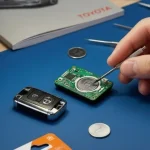
Look inside the case. You will see a small circular battery. Note which side is facing up. Usually, the positive side is visible. Use your tool to push the battery out. Some holders have a small tab. Lift the tab to release the battery. Do not touch the circuit board with bare hands. Oils from skin can damage it.
Step 4: Insert the New Battery
Take your new battery. Check the polarity again. Match the positive side to the marking. Place it firmly in the holder. Ensure it sits flat. It should not wiggle. A loose battery causes connection issues. Press it down gently. Make sure it is secure.
Step 5: Close the Case and Test
Snap the two halves back together. Align the clips first. Then press around the edges. You should hear clicks. Ensure the case is sealed tight. No gaps should remain. Before putting the mechanical key back, test the fob. Stand near your car. Press the buttons. The lights should flash. The car should respond. If it works, slide the key back in.
If you need more details on opening the case, check out how to open key fob Toyota for specific model variations.
Choosing the Right Battery for Your Camry
Not all batteries are the same. Using the correct one is crucial. Most Toyota Camry key fobs use a lithium coin cell. The most common type is CR2032. Some older models might use CR1632. Check your owner’s manual to be sure. You can also look at the old battery. The model number is printed on it.
Here is a quick comparison of common batteries.
| Battery Type | Common Use | Voltage |
|---|---|---|
| CR2032 | Most modern Toyota fobs | 3V |
| CR1632 | Older Toyota models | 3V |
| CR2025 | Some specific fobs | 3V |
CR2032 is the standard choice. It is widely available. It lasts a long time. CR1632 is thinner. It fits older designs. Do not force a thicker battery into a thin slot. It can damage the contacts. Voltage is the same for all these types. They are all 3 volts. The size is the main difference.
Brand matters too. Choose a reputable brand. Cheap batteries might die quickly. They could also leak. Leakage ruins the key fob. Stick to known names like Panasonic or Energizer. They offer better reliability. You want the battery to last for years. This reduces how often you do this task.
If you are unsure about the battery type, read our guide on how to change the battery in a Toyota key fob for more specifics.
Troubleshooting Tips After Changing Battery
Sometimes the key works immediately. Other times, you might face issues. Do not panic. Here are common problems and fixes.
Key Not Working After Replacement
Check the battery orientation. Did you put it in backwards? This is the most common mistake. Remove the battery and flip it. Try the buttons again. Also, check the contacts. Are they dirty? Clean them with a dry cloth. Rust or dirt blocks the power.
Car Does Not Recognize Key
Some smart keys need reprogramming. If the car does not start, the key might be unpaired. This is rare after a battery change. But it happens. You might need to sync the key. Sit in the car with the key. Press the start button with the key held close. Consult your manual for sync steps. For advanced issues, see how to reprogram a Toyota keyless fob.
Buttons Feel Stiff
The case might not be closed properly. Open it again. Check the alignment. Ensure no wires are pinched. The buttons need to move freely. If the plastic is warped, it might block the buttons. Press firmly until the case snaps shut.
Common Mistakes to Avoid
Even simple tasks have pitfalls. Avoid these errors to save time.
- Forcing the case: Plastic clips break easily. Use gentle pressure.
- Wrong battery size: Measure the old battery. Do not guess.
- Ignoring polarity: Positive and negative sides matter. Check the markings.
- Dropping small parts: Work over a tray or cloth. Small screws get lost easily.
- Touching circuit boards: Oils from skin cause corrosion. Handle with care.
Patience is key. Rushing leads to mistakes. Take your time with each step. If something feels stuck, stop. Check what is blocking it. Do not push harder. This is how plastic breaks. A careful approach ensures success.
Expert Insights on Key Fob Maintenance
Experts suggest regular checks. Do not wait for failure. Inspect your key fob once a year. Check the battery life if possible. Some fobs have indicators. Keep a spare battery in your car. This is a good safety habit. If the key dies in a parking lot, you are ready.
Also, keep the key dry. Water damages electronics. If it gets wet, dry it immediately. Do not use heat to dry it. Air dry is best. Avoid dropping the key. Hard impacts crack the internal board. Use a key cover for protection. It adds a layer of safety. This extends the life of the fob.
If you drive a different Toyota model, the steps are similar. For example, learning how to change battery in Toyota Highlander key fob follows a similar process. The principles remain the same across the brand.
Conclusion
Now you know how to change battery in Toyota Camry key fob easily. This simple task keeps your car accessible. It saves you from expensive dealer visits. You only need a few minutes and the right battery. Follow the steps we shared. Be gentle with the plastic case. Test the key before finishing.
Your Toyota Camry is a reliable vehicle. Keeping the key working ensures you enjoy it fully. Do not let a dead battery stop your day. Take control of this small maintenance task. You will feel proud of fixing it yourself. Keep this guide handy for the future. Your car will thank you.
Frequently Asked Questions
What battery does a Toyota Camry key fob use?
Most Toyota Camry key fobs use a CR2032 lithium battery. Some older models might use a CR1632. Always check your owner’s manual or the old battery to confirm the exact type before buying a replacement.
Can I change the key fob battery myself?
Yes, you can easily change it yourself. It is a simple process that requires minimal tools like a small screwdriver or a coin. You do not need special technical skills to complete this task successfully.
How long does a Toyota key fob battery last?
Typically, a key fob battery lasts between 3 to 5 years. The lifespan depends on how often you use the buttons. Frequent use drains the battery faster than occasional use.
What do I do if my key fob still does not work after changing the battery?
Check the battery orientation first. If it is correct, clean the contacts gently. If it still fails, you might need to reprogram the key. Consult your vehicle’s manual for syncing instructions.
Is it expensive to replace a Toyota key fob battery?
No, it is very affordable. A new battery usually costs a few dollars at any electronics or grocery store. Doing it yourself saves you the labor cost of a dealership visit.
Where can I buy a replacement battery for my Camry key?
You can buy replacement batteries at most electronics stores, supermarkets, or online retailers. Look for reputable brands to ensure long-lasting performance for your key fob.