Replacing your Toyota Corolla key fob battery is simple and takes just a few minutes. You only need a small flathead screwdriver, a new CR2032 battery, and careful hands to open the casing without damage. This guide walks you through every step so you can restore your remote start and unlock functions fast.
Key Takeaways
- Right battery matters: Most Toyota Corolla key fobs use a CR2032 coin cell, but always verify your specific model before buying.
- Gentle opening prevents damage: Use a plastic pry tool or thin flathead screwdriver to split the fob casing without scratching or breaking clips.
- Correct polarity is critical: Match the positive and negative sides exactly as marked inside the compartment to avoid circuit issues.
- Test before reassembly: Press the lock and unlock buttons after inserting the new battery to confirm the remote works properly.
- Keep spares handy: Store a backup battery in your glove box or wallet to handle sudden key fob failures on the go.
- Clean contacts improve reliability: Wipe the battery terminals with a dry cloth to remove dust and prevent intermittent signal loss.
- Reprogramming is rarely needed: Most Corolla fobs keep their pairing after a battery swap, but you can learn how to reprogram a Toyota keyless fob if buttons stop responding.
📑 Table of Contents
- How to Change Battery in Toyota Corolla Key Fob Without Stress
- Gather the Right Tools and Battery Before You Start
- Learn How to Open Key Fob Toyota Style Safely
- Swap the Dead Cell and Match Polarity Exactly
- Test the Buttons and Reassemble the Case
- Troubleshoot When the Fob Still Acts Up
- Keep Your Key Fob Reliable With Simple Habits
- Final Thoughts on How to Change Battery in Toyota Corolla Key Fob
How to Change Battery in Toyota Corolla Key Fob Without Stress
Your Toyota Corolla key fob suddenly stops locking the doors. You press the buttons, but nothing happens. The little light stays dark. This usually means the battery is dead. The good news is that you can fix this at home in minutes. You do not need a mechanic. You do not need expensive tools. You just need a fresh coin cell and a careful touch.
Many drivers worry about breaking the plastic casing or losing tiny screws. That fear stops them from trying. But the process is straightforward. The fob is designed to be opened. The battery is easy to swap. Once you know the steps, you can handle it yourself every time. This guide shows you exactly what to do. You will learn which battery to buy, how to open the case safely, and how to test everything before you finish.
We will also cover common mistakes and quick tips. You will see what to avoid and what to keep in your car for emergencies. By the end, you will feel confident handling this small repair on your own. Let us get started.
Gather the Right Tools and Battery Before You Start
Preparation makes the job smooth. You do not want to stop halfway to search for a screwdriver or guess the battery size. Take a minute to collect everything first. This saves time and reduces frustration.
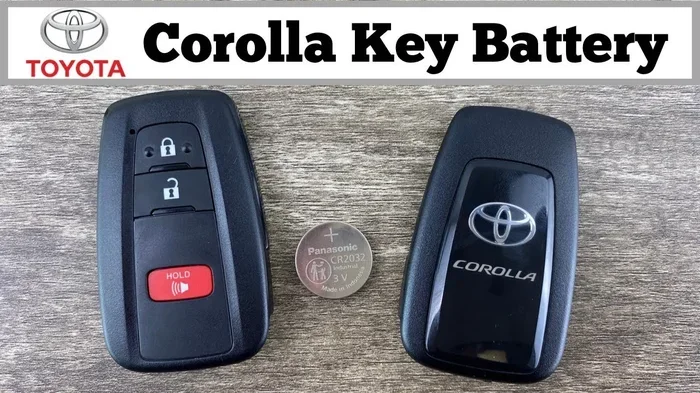
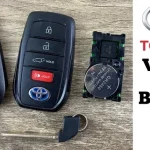
Visual guide about Toyota Corolla key fob battery
Image source: i.ytimg.com
Check Your Key Fob Model First
Toyota has used several fob designs over the years. Some have a physical key blade that slides out. Others are all plastic with a small button. The battery compartment may sit in different spots. Look at your fob closely. Note any seams, slots, or small release tabs. This helps you pick the right opening method.
Pick the Correct Coin Cell Battery
Most Toyota Corolla key fobs use a CR2032 battery. This is a flat, silver coin cell. It is widely available at auto parts stores, pharmacies, and online shops. Some older or special edition fobs may use a different size. Always check the old battery before you remove it. Match the numbers exactly. Using the wrong size can cause poor contact or quick failure.
Choose Safe Opening Tools
You need something thin and gentle. A small flathead screwdriver works well. A plastic pry tool is even better because it reduces scratch risk. Avoid metal knives or sharp objects. They can gouge the plastic or slip and hurt your hand. Keep a soft cloth nearby. It protects the surface while you work.
Quick Tips for Prep
- Work on a clean, flat table with good lighting.
- Place a small towel down to catch any tiny parts.
- Keep the new battery in its packaging until you are ready.
- Take a photo of the old battery orientation before removal.
Learn How to Open Key Fob Toyota Style Safely
Opening the fob is the part that makes people nervous. The plastic clips can feel fragile. But if you move slowly and use the right spot, the case opens cleanly. The goal is to separate the two halves without cracking the shell or damaging the internal circuit.
Find the Seam and Start Gentle Pressure
Run your finger along the edge of the fob. You will feel a thin line where the top and bottom meet. This is your opening point. Insert the tip of your flathead screwdriver or plastic pry tool into the seam. Push in just a little. You should feel a slight give. Do not force it. Let the tool do the work.
Pry in Small Sections
Move the tool a few millimeters at a time. Listen for soft clicks as the clips release. Switch sides often. Work around the edge in a slow circle. This keeps the pressure even. If you pry one spot too hard, you risk bending the plastic. Patience pays off here.
Handle the Physical Key Blade Carefully
Some Corolla fobs have a sliding key blade. Pull it out before opening if your model allows it. The blade can block your tool or snap if you twist the case the wrong way. Once the blade is out, you have more room to maneuver. Keep the blade safe so you do not lose it.
Common Mistakes When Opening
- Pushing too hard and cracking the outer shell.
- Using a sharp metal edge that scratches the finish.
- Forcing the case while the key blade is still locked in.
- Rushing and skipping around the seam evenly.
If you want a more detailed walkthrough on splitting the case without damage, you can read our guide on how to open key fob Toyota for extra visual cues and model-specific notes.
Swap the Dead Cell and Match Polarity Exactly
Once the case opens, you will see the battery sitting in a small socket. It may be held by a light clip or a thin metal tab. The battery usually slides out with a gentle push. Take your time. Do not yank it. You want to keep the contacts clean and straight.
Remove the Old Battery Carefully
Look at how the old cell sits. Note which side faces up. The top of the battery often has a plus sign. The bottom may show a minus sign. The fob compartment usually has matching marks. Take a quick picture with your phone. This removes guesswork later.
Clean the Contacts Before Installing the New One
Dust and oils can build up over time. They weaken the connection. Use a dry, lint-free cloth to wipe the metal tabs and the battery seat. Do not use water or liquid cleaners. Moisture can cause corrosion. A quick dry wipe is enough for most cases.
Insert the New Battery With the Right Orientation
Place the new CR2032 cell into the socket. Match the plus and minus sides exactly as you noted. The battery should sit flat and snug. If it feels loose, check the orientation again. A reversed battery will not power the circuit properly. It may also cause the fob to behave oddly.
Press and Secure the Battery
Some fobs have a small retaining clip. Gently press it back into place. Others rely on a tight fit. Make sure the cell does not shift when you tilt the board. A secure fit prevents intermittent signal loss. You want steady contact every time you press a button.
Test the Buttons and Reassemble the Case
Before you snap the shell back together, test the fob. This step saves you from opening it again if something is wrong. It takes only a few seconds. It gives you peace of mind.
Check Lock and Unlock Functions
Point the fob at your car. Press the lock button. Then press the unlock button. Watch for the door lights or listen for the chime. If your Corolla has a remote start feature, try that too. The buttons should feel crisp and responsive. If nothing happens, remove the battery and check the polarity again.
Watch for Weak Signal Signs
Sometimes the battery is in place, but the connection is poor. You may notice the range feels shorter. The buttons may work only when you hold the fob at a certain angle. This usually means a contact issue. Press the battery gently to seat it better. Wipe the terminals again if needed.
Close the Case Evenly
Line up the two halves carefully. Start at one edge and press around the seam. You should hear soft clicks as the clips engage. Work slowly. Do not slam the case shut. Even pressure keeps the shell straight and protects the internal board.
Confirm a Tight Seal
Run your fingers along the edge. Make sure no gap remains. Check that the key blade slides smoothly if your model has one. A clean closure means the fob is ready for daily use. You should not feel any wobble or loose plastic.
Troubleshoot When the Fob Still Acts Up
Most battery swaps work the first time. But sometimes the fob still misbehaves. Do not panic. A few simple checks usually solve the problem. You can handle these fixes at home.
Recheck Battery Placement and Clean Contacts Again
Remove the battery once more. Look for bent metal tabs or debris. Straighten anything that looks off. Clean the contacts again with a dry cloth. Reinsert the cell with the correct polarity. Test the buttons again. Many issues disappear after a second careful attempt.
Verify You Are Within Range
Stand closer to the car during testing. Walls, metal objects, and other electronics can weaken the signal. Move to an open space. Try the buttons again. If they work up close but not from far away, the battery may be aging or the antenna in the fob may be weak.
Consider Reprogramming If Buttons Stay Dead
In rare cases, the fob loses its pairing after a battery change. This is uncommon, but it happens. If the car does not respond at all, you may need to reset the connection. Our article on how to reprogram a Toyota keyless fob explains the basic steps for many models. Follow the instructions for your specific year and trim.
When to Seek Professional Help
- The plastic shell is cracked and the board is exposed.
- The battery contacts are bent or broken.
- The fob still fails after multiple correct battery swaps.
- You suspect water damage inside the casing.
A dealership or qualified locksmith can replace the fob or repair the circuit. This is usually a last resort. Most owners never need it.
Keep Your Key Fob Reliable With Simple Habits
A fresh battery is only part of long-term reliability. Small habits help your fob last longer and work better. You can build these into your routine without extra effort.
Store Spare Batteries in Easy Places
Keep one or two CR2032 cells in your glove box or center console. You can also carry one in a wallet or purse. A backup saves you when the battery dies in a parking lot or on a trip. Label the package with the date you bought it. Fresh batteries hold power longer.
Avoid Extreme Heat and Moisture
Leaving the fob on a hot dashboard or in direct sun can shorten battery life. Moisture from rain or spills can corrode the contacts. Store the key in a cool, dry place when you are not using it. If it gets wet, dry it gently and let it air out before using it again.
Handle Buttons and Case With Care
Press the buttons firmly but not aggressively. Dropping the fob on hard pavement can crack the shell or loosen the battery. If you notice a crack, tape it temporarily and plan a replacement. A small crack can let dust in and cause erratic behavior.
Quick Tips for Long-Term Care
- Replace the battery before it fully dies if you notice shorter range.
- Wipe the fob with a dry cloth every few months to remove oils and dust.
- Keep the key blade clean and slide it gently to avoid wear.
- Check the battery date if you buy in bulk and rotate stock.
Final Thoughts on How to Change Battery in Toyota Corolla Key Fob
Changing the battery in your Toyota Corolla key fob is a small job with a big payoff. You regain remote locking, unlocking, and any extra features your model offers. You also save time and avoid a trip to the shop for a simple fix. The process is gentle, quick, and repeatable. Once you do it once, you will feel comfortable doing it again whenever needed.
Remember the basics. Use the right coin cell. Open the case slowly. Match the polarity. Test before you close the shell. Keep a spare battery nearby. These steps keep your key fob dependable day after day. If you ever run into a stubborn case or a fob that still will not respond, check the contacts again or review a model-specific guide. Most issues are easy to solve with a calm approach and a careful hand.
Your Corolla is built for everyday reliability. Your key fob should be too. With a few minutes of attention, you can keep it working smoothly and avoid the hassle of a dead remote. Stay prepared, stay patient, and keep driving with confidence.
Frequently Asked Questions
What battery does a Toyota Corolla key fob use?
Most Toyota Corolla key fobs use a CR2032 coin cell battery. Always check the old battery or your owner’s manual to confirm the exact size before buying a replacement.
How do I open my Toyota Corolla key fob without breaking it?
Insert a thin flathead screwdriver or plastic pry tool into the seam and work around the edge in small sections. Apply gentle, even pressure and avoid forcing one spot to prevent cracks.
Do I need to reprogram the key fob after changing the battery?
Usually no. Most Corolla fobs keep their pairing after a battery swap. If the buttons do not work after a correct install, you may need to reprogram the fob using your car’s reset steps.
Why is my key fob still not working after I changed the battery?
The battery may be reversed, loose, or dirty. Clean the contacts, reseat the cell with the correct polarity, and test the buttons again. If it still fails, check range or consider reprogramming.
Can I use any CR2032 battery for my Toyota key fob?
You can use most standard CR2032 cells, but choose a reputable brand for reliable power. Avoid used or damaged cells, and always match the size and voltage marked on your original battery.
How often should I replace the battery in a Toyota Corolla key fob?
Battery life varies with use, but many last one to three years. Replace it when you notice shorter range, unresponsive buttons, or a dim indicator light to avoid being stranded.