

Replacing a dead key fob battery is quick and easy. You only need a small screwdriver and a new CR2032 battery. This guide shows you exactly how to open the case, swap the cell, and test your remote. Follow these simple steps to get back on the road fast.
Key Takeaways
- Simple tools needed: You only need a small flathead screwdriver and a fresh CR2032 battery.
- Quick process: The whole task takes about five minutes with no special skills.
- Correct battery type: Most Toyota remotes use a standard CR2032 coin cell battery.
- Safe opening method: Gently pry the case apart to avoid cracking the plastic shell.
- Proper battery orientation: Match the positive side up just like the old cell.
- Test before reassembly: Press the buttons to confirm the remote works before snapping the case closed.
- Keep a spare: Store an extra battery in your glove box for future emergencies.
📑 Table of Contents
- How to Replace a Toyota Key Fob Battery Step by Step Guide
- What You Need Before You Begin
- Step by Step Guide to Open the Case
- How to Install the New CR2032 Battery
- Test Your Remote Before You Finish
- Quick Tips for a Smooth Replacement
- Common Mistakes to Avoid
- Expert Insights on Key Fob Care
- When to Call for Help
- Final Thoughts on How to Replace a Toyota Key Fob Battery
How to Replace a Toyota Key Fob Battery Step by Step Guide
Your key fob stops working at the worst possible time. You stand in the driveway and press the lock button. Nothing happens. The car stays silent. This common problem usually points to one simple fix. The small battery inside the remote has run out of power. You do not need a mechanic for this job. You can handle it yourself in just a few minutes.
Many drivers worry about breaking the plastic case. That fear keeps them from trying. The good news is that the process is straightforward. You only need a basic tool and a new coin cell. This guide walks you through each step. You will learn how to open the shell safely. You will see how to swap the old cell. You will also learn how to test the remote before you finish.
Let us start with the tools you need. Then we will move through the steps in order. You will find clear tips and common mistakes to avoid. By the end, you will feel confident about the job.
What You Need Before You Begin
Preparation makes the task smooth. You do not need a long list of items. Gather these simple supplies first.
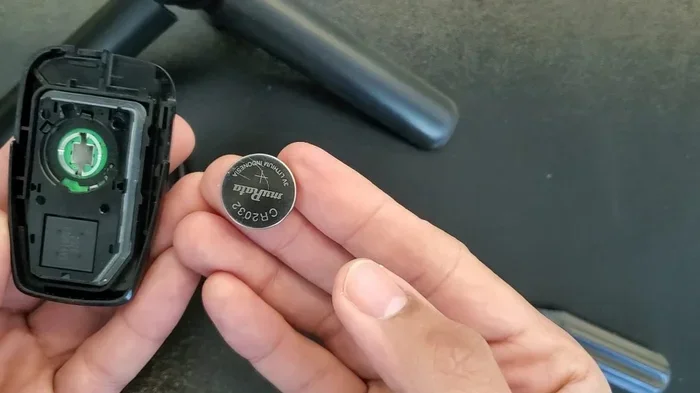
Visual guide about Toyota key fob battery replacement
Image source: lost-car-keys-replacement.com
- Small flathead screwdriver: A tiny blade works best for prying the case.
- New CR2032 battery: This is the standard coin cell for most Toyota remotes.
- Clean surface: Work on a table or counter with good light.
- Soft cloth: Place the remote on a cloth to prevent scratches.
- Small container: Keep the tiny screws or parts in one safe spot.
You can find the CR2032 battery at most hardware stores. You can also grab one at a grocery store or pharmacy. They cost very little. Keep a pack in your home so you are ready next time.
Some Toyota remotes have a small metal key inside. This key may slide out before you open the case. Other models use a simple push button to release the blade. Check your remote first. Knowing the layout helps you avoid force.
Check Your Remote Type
Toyota makes a few different remote styles. Some are round. Some are rectangular. Some have a built in key blade. Some do not. The battery location stays similar across most models. You will usually find the seam along the edge. That seam is your starting point.
Look at the back of the remote. Search for a small slot or groove. This groove often hides the seam. Run your finger along the edge. You will feel where the two halves meet. This simple check saves time later.
Step by Step Guide to Open the Case
Now you are ready to open the remote. Take your time. Rushing can crack the plastic. Follow these steps in order.
Find the Seam and Start Prying
Place the remote on your soft cloth. Hold it steady with one hand. Insert the tip of your small screwdriver into the seam. Start near the top or side edge. Gently twist the blade to create a small gap. Do not force it. The plastic should give way slowly.
Work around the edge in small steps. Move the screwdriver a little at a time. Listen for a soft click. That sound means the clips are releasing. Keep the pressure light. The goal is to separate the halves without damage.
Remove the Old Battery
Once the case opens, you will see the battery. It sits flat against the circuit board. Note the side that faces up. Take a quick photo with your phone if you want a reminder. This small step helps during reassembly.
Use your finger or the edge of the screwdriver to lift the old cell. Coin cells are smooth and can slip. Hold the remote steady. Slide the battery out gently. Place the old cell aside for proper disposal later.
How to Install the New CR2032 Battery
This part is simple. The key is correct placement. A wrong orientation will stop the remote from working.
Match the Polarity Correctly
Look at the new battery. One side has a plus sign. That side usually faces up. Check the compartment for a small mark. It may show a plus or minus symbol. Match the new cell to that mark.
Set the battery into the slot. Press it down lightly until it sits flat. It should not rock or tilt. A stable battery keeps the circuit closed. This small detail matters a lot.
Close the Case Carefully
Bring the two halves back together. Line up the edges first. Then press around the seam. Start at one corner and move slowly across. You should hear soft clicks as the clips lock.
Run your finger along the edge. Check for gaps. A tight seal keeps dust and moisture out. If a clip feels stuck, open it and try again. Forcing the case can break the latch. Patience pays off here.
Test Your Remote Before You Finish
Do not assume the job is done. Test the remote right away. This quick check confirms the battery sits correctly.
Press the Buttons and Check Range
Stand near your car. Press the lock button. Then press the unlock button. Watch for a response. The lights should flash. The horn may chirp. The mirrors may fold if your model has that feature.
If nothing happens, remove the case again. Check the battery orientation. Make sure the cell touches both contacts. Sometimes a loose battery causes a silent failure. Reposition it and test again.
Try the Built In Key Blade
Some remotes store a physical key inside. Slide the blade out if your model has one. Use it to unlock the driver door. This step confirms the key mechanism still works. It also helps when the remote battery is dead in the future.
Keep the key blade clean and smooth. A sticky lock can make entry harder. A quick wipe with a dry cloth helps.
Quick Tips for a Smooth Replacement
These small habits make the job easier. They also help you avoid common issues.
- Work in good light: Bright light helps you see the seam and battery marks.
- Use a phone photo: Snap a picture before you remove the old cell.
- Keep the remote steady: A stable hand prevents slips and cracks.
- Buy quality batteries: A trusted brand lasts longer and fits better.
- Store spares at home: A backup battery saves time later.
- Clean the contacts: A soft brush removes dust from the circuit board.
A clean compartment improves contact. Dust can block power flow. If the remote acts weak, check for debris. A quick clean often solves the issue.
Common Mistakes to Avoid
Small errors can cause frustration. Learn these pitfalls before you start.
- Forcing the case open: Heavy pressure can crack the shell or bend the clips.
- Wrong battery side up: Reversed polarity stops the remote from working.
- Losing tiny parts: Buttons or clips can fly away if you work too fast.
- Ignoring the key blade: Some drivers forget to slide the blade out first.
- Skipping the test step: Closing the case too soon hides a bad fit.
- Using a worn tool: A dull screwdriver can slip and scratch the case.
Avoid these mistakes and the job stays simple. Take your time. Check each step before moving on.
Expert Insights on Key Fob Care
A fresh battery usually lasts a long time. How long depends on use. Frequent locking and unlocking drains power faster. Leaving the remote near a phone or radio can also affect battery life. Keep the fob in a cool, dry place when you can.
Some drivers notice a weak signal before the remote stops completely. That sign often means the battery is low. Replace it early to avoid being locked out. A proactive swap is easier than a last minute fix.
If your remote still fails after a new battery, look at the contacts. Corrosion or dirt can block power. Clean the metal pads gently. If the issue continues, the circuit board may need service. In that case, a dealership or locksmith can help.
When to Call for Help
Most battery swaps are simple. Some situations need extra care.
- Cracked case: A broken shell may let dust in. Replace the remote if cracks are deep.
- Water damage: Moisture can ruin the circuit. Dry it quickly and test carefully.
- Repeated failure: A new battery should fix the issue. If not, seek professional help.
- Lost key blade: Some models require a dealer to program a new remote.
Knowing these limits saves time. You can handle the battery swap. You do not need to force a repair that needs a specialist.
Final Thoughts on How to Replace a Toyota Key Fob Battery
This task is one of the easiest car care jobs you can do at home. You only need a small tool and a fresh CR2032 battery. The steps are simple. Open the case gently. Swap the old cell. Match the polarity. Close the shell. Test the buttons. That is all it takes.
A working remote makes daily life smoother. You avoid lockouts. You save time. You also avoid a trip to the shop for a minor issue. Keep a spare battery in your home. Take a quick photo before you open the case. Work slowly and check your work. These habits make the process even easier.
Now you know exactly what to do the next time your remote goes quiet. Follow this guide and you will be back in action fast. A small battery change can make a big difference.
Frequently Asked Questions
How long does a Toyota key fob battery last?
A CR2032 battery usually lasts two to four years with normal use. Heavy daily use can shorten that time. Replace it when the signal gets weak.
What battery does a Toyota key fob use?
Most Toyota remotes use a standard CR2032 coin cell battery. Some older models may use a different size. Check the compartment before you buy.
Can I replace the battery without a screwdriver?
Yes, in many cases you can use a small coin or a thin blade. A tiny flathead screwdriver still works best for a clean pry.
What if my remote still does not work after the battery change?
Check the battery orientation and clean the metal contacts. If the remote still fails, the circuit board may need service.
Do I need to reprogram the key fob after changing the battery?
No, a simple battery swap does not erase programming. Your remote should work right away after the new cell is installed.
Where can I buy a replacement CR2032 battery?
You can find CR2032 batteries at hardware stores, grocery stores, pharmacies, and online shops. They are cheap and easy to stock up on.