
Resetting the maintenance light on your Toyota Corolla is simple and saves you a trip to the shop. You can do it yourself in just a few minutes with basic steps. This guide covers every model year so you get the right method fast. Stop ignoring that dashboard reminder and take control of your car care today.
Owning a Toyota Corolla means you expect reliable daily driving. But that trusty dashboard will still flash a maintenance light when it needs attention. Many drivers feel stuck when that little icon appears. You might wonder if you need a mechanic or a special tool. The good news is simple. You can handle this task yourself.
This guide walks you through the exact steps. You will learn how to reset a maintenance light on a Toyota Corolla without stress. We cover the most common methods for different model years. You will also learn what triggers the light and how to avoid common mistakes. By the end, you will feel confident the next time that reminder pops up.
Key Takeaways
- Quick process: You can reset the light in under five minutes with no special tools.
- Model matters: The steps change slightly between older and newer Toyota Corolla years.
- Safety first: Always park on level ground and keep your foot on the brake during the reset.
- Oil change reminder: The maintenance light usually tracks oil life, so reset it after service.
- Dashboard menu: Newer models use a hidden menu with arrow keys and a select button.
- Reset button: Older models often use a physical trip meter reset button.
- Verify success: Turn the car off and back on to confirm the light stays off.
📑 Table of Contents
- Why the Maintenance Light Appears on Your Toyota Corolla
- Before You Start the Reset Process
- How to Reset a Maintenance Light on a Toyota Corolla Using the Trip Meter Method
- How to Reset a Maintenance Light on a Toyota Corolla Using the Dashboard Menu
- Model Year Differences That Affect the Reset
- Common Mistakes When You Reset the Maintenance Light on a Toyota Corolla
- Expert Insights for a Stress-Free Reset
- Final Thoughts on the Reset Process
Why the Maintenance Light Appears on Your Toyota Corolla
The maintenance light is not a warning about a broken part. It is a reminder system. Toyota designed it to keep you on track with routine service. Most of the time, it simply counts miles or engine hours. When the set interval passes, the light turns on. This helps you stay ahead of oil changes and basic checks.
You should not ignore this reminder for too long. Fresh oil protects your engine. Clean filters keep your car running smoothly. The light is basically a helpful nudge. It asks you to check your service schedule. Once you complete the service, you can clear the reminder. That is when you need to reset the maintenance light on your Toyota Corolla.
Common Triggers for the Light
Several things can turn on this reminder. The most common trigger is an oil change interval. Your car may track miles since the last reset. Some models also watch engine operating time. Cold weather, short trips, and heavy traffic can affect the schedule too. The system tries to match real driving conditions.
Other service reminders may join the mix. You might see messages about tire rotation, air filters, or brake checks. These messages often appear in the same dashboard area. They can feel confusing at first. The key is to read the screen carefully. Then you can match the message to the right service task.
What the Light Does Not Mean
Many drivers worry that the light signals a major problem. That fear is normal, but it is usually wrong. A maintenance reminder is not the same as a check engine light. It does not mean your engine is failing. It does not mean your brakes are gone. It is mostly a planning tool.
Still, you should pay attention to your car. If you notice strange noises, leaks, or poor performance, get those checked. The maintenance light should not be your only guide. Use it as a schedule helper, not a full diagnostic system. That mindset keeps you calm and informed.
Before You Start the Reset Process
A little preparation makes the job smoother. You do not need fancy equipment. You do need a clear workspace and a few minutes of focus. Start by making sure your car is in a safe spot. A flat driveway or quiet street works best. Keep the parking brake ready if your model uses one.

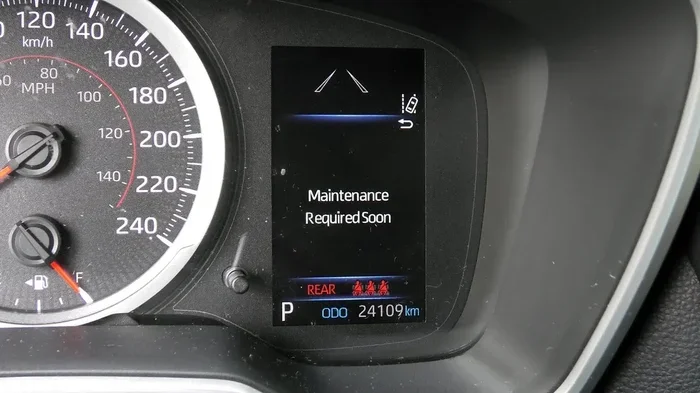
Visual guide about Toyota Corolla dashboard maintenance light
Image source: i.ytimg.com
Next, check your current service status. Ask yourself if you already changed the oil or completed the needed task. If the service is still pending, reset the light too early. That can hide a real reminder. The best time to reset the maintenance light on a Toyota Corolla is right after you finish the service.
Gather What You Need
You will usually need only your keys and your attention. Some models ask you to use the steering wheel controls. Others ask you to use a small reset button near the dashboard. Keep your owner manual nearby if you have it. That manual can confirm the exact button layout for your car.
A phone can help too. You may want to take a quick photo of your dashboard before you begin. That helps if you need to compare screens later. It also helps you remember which menu options you saw. Small details matter when you navigate a hidden dashboard menu.
Choose the Right Method for Your Model
Not every Corolla uses the same reset path. Older models often rely on a trip meter button. Newer models often use a digital settings menu. Some cars blend both methods. The safest plan is to identify your general model year first. Then follow the matching steps below.
If you are unsure, do not guess too fast. Look for a small gear icon, a wrench icon, or a vehicle settings menu. Those clues point you toward the right path. You can also check whether your dashboard has a select button. That button often plays a big role in the reset process.
How to Reset a Maintenance Light on a Toyota Corolla Using the Trip Meter Method
This method works well for many older Corolla models. It is straightforward and does not dig into deep menu settings. You mainly use the trip meter button and the ignition cycle. The steps are simple, but you must stay patient. Rushing can make the screen skip past the reset mode.
Start with the car completely off. Make sure the parking brake is set if your car has one. Press and hold the trip meter reset button. You usually find this button on the dashboard or near the speedometer. Keep holding it while you turn the key to the on position. Do not start the engine yet.
Watch the Display Closely
The dashboard should show a special screen or flashing symbols. You may see the maintenance icon blink. You may also see a number counter or a service indicator. Keep holding the button during this part. The display often needs a few seconds to enter reset mode.
Once the light starts flashing, you can release the button briefly. Then press it again to confirm the reset. Some models ask you to hold it longer to clear the reminder. The exact timing varies, so watch the screen carefully. If the light stops flashing and turns off, you likely succeeded.
Finish the Cycle Correctly
Turn the ignition all the way off after the reset. Wait a moment before you restart the car. This pause helps the system save the new setting. Then start the engine and check the dashboard. The maintenance light should stay off if you completed the steps correctly.
If the light returns immediately, repeat the process once more. Stay calm and follow the same timing. A missed pause or a hurried button press can interrupt the reset. The trick is steady hands and attention to the display. After one or two tries, most drivers see the light disappear.
How to Reset a Maintenance Light on a Toyota Corolla Using the Dashboard Menu
Many newer Corolla models use a menu-based approach. This method feels a little more modern. You navigate through the vehicle settings with arrow keys or steering wheel controls. It may look complex at first, but it is still very manageable. You just move through a few screens instead of holding one button.
Begin by turning the car on without starting the engine if possible. If your model does not have that option, simply run the dashboard power. Use the arrow buttons to open the vehicle settings menu. Look for a section related to maintenance, oil, or vehicle info. The wording changes by model year, so scan the menu labels slowly.
Find the Maintenance Reset Option
Once you open the right section, search for a reset choice. You might see an oil reset option or a service reminder setting. Select that option with the center button or select key. The screen may ask you to confirm the action. Confirm it carefully so you do not cancel the reset by mistake.
Some vehicles show a progress bar or countdown during the reset. Others simply return to the main screen after you confirm. Either result is normal. The goal is to clear the reminder flag in the system. When the screen goes back to the usual display, you are close to finishing.
Verify the Reset on Newer Models
Turn the car off and back on again. This step matters because some menus save changes only after a full restart. Check the dashboard for any remaining maintenance messages. If the screen stays clean, the reset worked. If a message lingers, revisit the menu and check for a second confirmation step.
Newer cars sometimes split reminders into different categories. One message may cover oil, while another covers inspection items. If you see more than one reminder, repeat the process for each one. That keeps the dashboard accurate and prevents confusion later. A clean display makes daily driving less distracting.
Model Year Differences That Affect the Reset
Toyota has made many Corolla generations over the years. That means the reset steps are not identical everywhere. A 2009 Corolla may behave differently from a 2023 Corolla. The basic idea stays the same, but the controls change. Knowing your general generation helps you avoid wasted time.
Older cars often lean on physical buttons. You may use the trip meter reset, the odometer button, or a small dashboard switch. The screen may be simple, so the visuals give fewer clues. You rely more on timing and button holds. That is why patience matters so much on older models.
Newer cars usually lean on digital menus. You may use steering wheel controls, touch buttons, or a small selector knob. The dashboard may show more text and icons. That extra detail can help, but it can also feel busy. The best approach is to move slowly and read each screen before you press anything.
Quick Comparison of Common Approaches
Below is a simple comparison to help you choose the right path. This table is not a full service manual, but it gives a useful overview. Use it as a starting point before you try the reset.
| Model Type | Common Reset Method | Main Control | Best For |
|---|---|---|---|
| Older Corolla | Trip meter reset cycle | Physical button hold | Simple dashboards |
| Newer Corolla | Vehicle settings menu | Arrow/select keys | Digital displays |
| Mixed style | Button plus menu combo | Both methods | Transitional models |
This overview keeps things clear. If your car feels like an older style, try the button method first. If your dashboard looks more digital, try the menu method first. Either way, the process should feel quick once you find the right path.
Common Mistakes When You Reset the Maintenance Light on a Toyota Corolla
Even a simple task can go sideways if you miss a detail. The most common mistake is resetting too early. If you clear the light before the service is done, the reminder no longer helps you. That can lead to skipped oil changes or delayed inspections. Always finish the service first.
Another common mistake is rushing the button timing. Some drivers press and release too quickly. Others hold too long and miss the confirmation screen. The reset often depends on a narrow window. Slow, deliberate movements work better than fast guessing.
Small Oversights That Cause Trouble
People also forget to turn the car off and back on. That restart step is important because the system may not save the change right away. Others forget to check for multiple reminders. One light may disappear while another stays active. A full dashboard check avoids that surprise.
Some drivers also confuse the maintenance light with other warning lights. A red warning light may need immediate attention. A maintenance reminder usually does not. If you are ever unsure, read the message text carefully. If the car warns you about pressure, temperature, or engine faults, treat that differently from a routine service reminder.
Quick Tips for a Smooth Reset
Keep these simple habits in mind:
- Do the service first: Change the oil or complete the needed check before you clear the reminder.
- Read the screen: Look for wording like oil, maintenance, or vehicle settings.
- Stay steady: Hold buttons calmly and watch for flashing symbols.
- Restart the car: Power cycling helps confirm the reset stuck.
- Check again: Look over the full dashboard before you drive away.
These small habits save time and frustration. They also make the process feel less technical. You are not hacking the car. You are simply clearing a service reminder the way Toyota intended.
Expert Insights for a Stress-Free Reset
Think of the maintenance light as a calendar alert, not a crisis alarm. That shift in mindset makes the whole task easier. You are not fixing a breakdown. You are updating a reminder after routine care. Once you see it that way, the reset feels ordinary and manageable.
Another helpful insight is to create a personal habit. When you finish an oil change, reset the light right away. Write the date and mileage on your service record too. That way, you know exactly when the next reminder should appear. A simple note on your phone or in a notebook can prevent confusion later.
If your car has a digital menu, explore it once when you are not in a rush. Find the maintenance section before the light turns on. That preview makes the real reset much faster. You will already know which buttons to use and what the screen looks like. Familiarity is a great time saver.
When to Get Extra Help
Most owners can handle this task without help. Still, there are times when a professional makes sense. If the light keeps returning after a correct reset, something may be off. If you see other warning lights at the same time, get the car checked. If the dashboard behaves strangely, a technician can inspect the system.
You may also want help if your model uses a more complex service menu. Some vehicles hide settings deeper than expected. If you feel unsure, a quick look at the owner manual or a trusted service center can clear things up. There is no shame in asking for guidance when a car feature feels confusing.
Final Thoughts on the Reset Process
Learning how to reset a maintenance light on a Toyota Corolla gives you more control over your car care. The process is usually quick. It does not require advanced mechanical skill. It mostly needs patience, attention, and the right method for your model year. Once you know the steps, you can handle the reminder with confidence.
Remember to complete the service first. Then follow the button method or the menu method that fits your car. Restart the vehicle and confirm the light stays off. Keep your approach simple and steady. That is the best way to make the reset clean and reliable.
Your Toyota Corolla is built to be practical and dependable. A maintenance reminder should not feel like a mystery. With a little practice, you can clear that light in minutes and get back to driving. The next time the dashboard asks for attention, you will know exactly what to do.
Frequently Asked Questions
How long does it take to reset the maintenance light on a Toyota Corolla?
It usually takes only a few minutes once you know the right steps. The exact time depends on your model year and the method you use. Most drivers finish the process quickly with a button hold or a short menu navigation.
Do I need any tools to reset the maintenance light on a Toyota Corolla?
In most cases, you do not need special tools. You mainly need your keys and access to the dashboard controls. Some models use a trip meter button, while others use steering wheel or menu controls.
Can I reset the maintenance light before I change the oil?
You can, but it is better to reset it after the service. The light is meant to remind you about upcoming care. If you clear it too early, you may lose track of the next service interval.
What if the maintenance light comes back after I reset it?
Try the reset steps again and make sure you completed the final restart correctly. If the light keeps returning, check whether another reminder is still active. If the problem continues, a service shop can help inspect the system.
Is the maintenance light the same as the check engine light?
No, they usually mean different things. The maintenance light is mostly a service reminder. The check engine light can point to a fault that needs diagnosis. If you see a check engine light, do not assume it is just a routine reminder.
Do all Toyota Corolla models use the same reset method?
No, the method can vary by model year and dashboard style. Older models often use a button-based reset. Newer models often use a digital settings menu. Check your dashboard layout to pick the best method.