
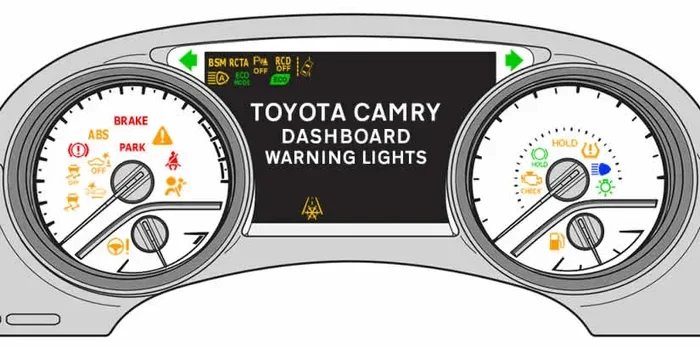
Resetting the maintenance light on your Toyota Camry is a simple task you can do at home. This guide walks you through the exact steps for different model years so you can clear the oil life reminder fast. You will save time and money by avoiding a trip to the mechanic for this basic service. We also share helpful tips to keep your vehicle in top shape.
Key Takeaways
- Know your model year: The reset steps vary between older and newer Toyota Camry models.
- Gather simple tools: You only need your key fob and sometimes a small screwdriver for the odometer button.
- Follow the exact sequence: Pressing the right buttons in the right order prevents errors and frustration.
- Verify the reset: Always turn the ignition off and on again to confirm the light stays off.
- Keep records: Write down the date and mileage when you change oil to track future service.
- Check other lights: A reset does not fix engine problems, so watch for warning lights that stay on.
- Stay safe: Perform the reset in a parked car with the engine off or in accessory mode only.
📑 Table of Contents
- How to Reset a Maintenance Light on a Toyota Camry
- Understanding the Maintenance Light on Your Camry
- Gathering What You Need Before You Start
- Step by Step Guide for Older Toyota Camry Models
- Step by Step Guide for Newer Toyota Camry Models
- Common Mistakes and How to Avoid Them
- Verifying the Reset and Keeping Your Camry Healthy
- Final Thoughts on Resetting Your Camry Maintenance Light
How to Reset a Maintenance Light on a Toyota Camry
Owning a Toyota Camry brings peace of mind. This car is known for reliability and long life on the road. But even the best cars need regular care. The maintenance light reminds you when it is time for an oil change or routine service. Seeing that light pop up can feel annoying. You might wonder if you need a mechanic to fix it. The good news is that you can handle this yourself. Learning how to reset a maintenance light on a Toyota Camry saves you time and keeps your day moving.
This guide breaks down the process into clear steps. We cover different model years because Toyota changes the dashboard layout over time. You will find simple instructions that match your car. We also share tips to avoid common mistakes. By the end, you will feel confident and ready to clear that reminder light. Let us dive in and get your Camry back to its clean, quiet state.
Understanding the Maintenance Light on Your Camry
The maintenance light serves one simple purpose. It tracks your mileage and reminds you when service is due. Most Camry models use this light for oil change intervals. The light does not mean your car is broken. It is just a friendly nudge from the car computer. Ignoring it for too long can lead to poor engine performance. Fresh oil keeps your engine parts moving smoothly. It also helps your car burn fuel efficiently.
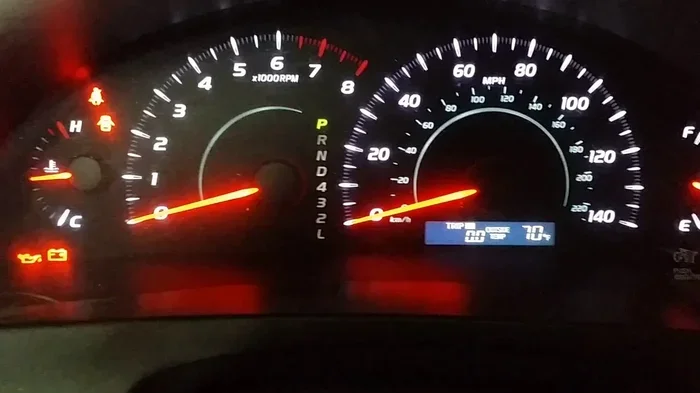
Visual guide about Toyota Camry dashboard maintenance light
Image source: i.ytimg.com
Toyota designs the light to be easy to clear once you complete the service. The system resets the counter so it can start tracking again. You do not need special tools for most models. A few button presses do the job. Some older models use a small trip button near the speedometer. Newer models use the steering wheel controls or the dashboard menu. Knowing which system your car has makes the process much faster.
Why the Light Comes On
The light turns on based on a set mileage schedule. Toyota usually sets the interval around five thousand to ten thousand miles. The exact number depends on your model year and engine type. Synthetic oil often allows longer intervals. Your driving habits also play a role. Short trips and heavy traffic can make the oil break down faster. The car computer tracks these factors and shows the reminder when needed.
What the Light Does Not Mean
Many drivers worry when they see the maintenance light. It is important to know the difference between a reminder and a warning. A reminder light is planned. A warning light means something needs attention right now. If your check engine light stays on, you should get that checked first. The maintenance light is just a schedule tracker. Clearing it after an oil change is perfectly normal.
Gathering What You Need Before You Start
You do not need a big toolbox for this job. The process is quick and clean. Still, having the right items ready helps you avoid pauses. Here is what you should keep nearby before you begin.
- Your key or key fob: You need this to turn the car to accessory mode.
- A small flat tool: Some older Camry models require a tiny screwdriver to press the odometer reset button.
- Your owner manual: This book shows the exact button layout for your specific model.
- A pen and paper: Write down your mileage and the date of your oil change.
- Fresh oil and filter: Complete the service first so the reset matches the new oil life.
Set aside ten minutes for the whole task. Park your car on a flat surface. Make sure the parking brake is on. You want the car quiet and still while you work through the steps. This simple setup prevents mistakes and keeps the process smooth.
Quick Tips Before You Begin
Check your model year first. You can find this on your registration, insurance card, or the VIN plate on the dashboard. The reset method changes around the 2007 and 2018 model years. Newer Camry cars often use a digital menu. Older ones use physical buttons. Knowing this upfront saves you from pressing the wrong controls.
Step by Step Guide for Older Toyota Camry Models
Many Camry cars built before 2018 use a simple button method. These models have an odometer reset button near the speedometer. You can clear the light in a few clear moves. Follow this sequence carefully and you will see the light go away.
The Button Reset Method
Turn the car off completely. Sit in the driver seat and close the door. Press and hold the odometer reset button. This button is usually small and located on the dashboard cluster. While holding the button, turn the key to the accessory position. Do not start the engine. You should see the maintenance light flash or change.
Keep holding the button for about ten to fifteen seconds. The light may blink or display a wrench icon. Release the button once the light resets or the display shows a new oil life percentage. Turn the key off. Wait a few seconds. Start the car normally and check the dashboard. The maintenance light should stay off now.
What to Do If the Light Stays On
Sometimes the light does not clear on the first try. This happens if you release the button too early. Repeat the steps and hold the button a little longer. Make sure you turn the key to the right position. The car must be in accessory mode, not fully running. If the light still stays on, check your manual for model-specific details. A small variation in button location can change the timing.
Step by Step Guide for Newer Toyota Camry Models
Newer Camry models use a screen-based menu. These cars have a multi-information display above the speedometer or within the dashboard. The reset path moves through a few menu layers. The process is still easy once you know the route.
Using the Steering Wheel Controls
Turn the car on or set it to accessory mode. Look at the steering wheel for the arrow buttons or menu controls. Use these buttons to scroll through the display options. Find the vehicle settings or maintenance menu. The exact label may say Vehicle, Settings, or Maintenance. Select that option with the confirm button.
Look for the oil maintenance or oil life section. You should see a reset option next to the current percentage. Press and hold the confirm button or follow the on-screen prompt. The display will ask you to confirm the reset. Choose yes or hold the button until the percentage returns to one hundred percent. The maintenance light should clear after this step.
Using the Dashboard Menu Buttons
Some Camry models use physical buttons on the dashboard cluster. These buttons sit near the display screen. Turn the car to accessory mode. Press the menu button to open the settings list. Scroll until you find the maintenance or oil reset item. Press the select or confirm button to enter that menu.
Choose the reset option. Hold the button if the screen asks for a long press. Watch the oil life number move back to full. Exit the menu and turn the car off. Restart the engine and verify the light is gone. This method works well for models with a mix of buttons and a small screen.
Quick Tips for Screen Based Resets
Take your time with the menu. Rushing can lead to selecting the wrong item. If your screen freezes or does not respond, turn the car off and try again. Keep the steering wheel buttons dry and clean. Dirt or moisture can make the controls feel sticky. A quick wipe with a soft cloth helps the buttons respond better.
Common Mistakes and How to Avoid Them
Even a simple reset can go sideways if you miss a detail. Here are the most common errors and easy ways to prevent them.
- Resetting before the oil change: Always change the oil first. Resetting too early leaves old oil in the engine and shortens the next interval.
- Using the wrong button: Older and newer Camry models use different controls. Check your dashboard layout before you start.
- Releasing the button too soon: Hold the button for the full time the system needs. A short press often fails to register the reset.
- Starting the engine too early: Keep the car in accessory mode during the reset. Running the engine can interrupt the process on some models.
- Skipping the verification step: Turn the car off and back on to confirm the light stays off. This quick check saves a second attempt later.
Expert Insights From seasoned DIY Mechanics
Experienced car owners suggest writing down your service details. Note the date, mileage, and oil type you used. This habit makes the next reset easier and helps you track your maintenance schedule. Many Camry owners also set a phone reminder for the next oil change. A simple calendar alert keeps you ahead of the light.
Another helpful tip is to check your oil level after the change. Pull the dipstick and wipe it clean. Insert it back and pull it out again to read the level. This quick check confirms the job is complete. A proper oil change plus a clean reset gives you the best starting point for the next miles.
Verifying the Reset and Keeping Your Camry Healthy
After you finish the reset, take a moment to verify everything. Turn the ignition off. Wait a few seconds. Turn it back on and watch the dashboard. The maintenance light should not appear. If your Camry shows an oil life percentage, it should read near one hundred percent or a fresh service value. This quick check confirms the system accepted the reset.
A successful reset is only one part of good car care. Keep up with regular oil changes and filter replacements. Use the oil grade recommended in your owner manual. Check your tire pressure once a month. Clean air filters and healthy fluids help your Camry run smoothly for years. These small habits protect your engine and improve fuel economy.
Key Takeaways for Long Term Care
Treat the maintenance light as a helpful tool, not a hassle. Reset it after each service and keep a simple record. Watch for other dashboard lights that may signal real issues. If something feels off with your engine, do not ignore it. A little attention now prevents bigger problems later. Your Camry will reward you with steady performance and a long service life.
Final Thoughts on Resetting Your Camry Maintenance Light
Learning how to reset a maintenance light on a Toyota Camry is a small skill that pays off again and again. The process is simple, fast, and free when you do it yourself. Older models use a button hold method. Newer models use a menu on the screen or steering wheel controls. Either way, the steps are straightforward once you know your car layout. Always complete the oil change first, then reset the light, and verify the result. With this habit, you stay on top of your service schedule and keep your Camry running strong.
Frequently Asked Questions
How do I reset the maintenance light on a 2018 Toyota Camry?
Turn the car to accessory mode and use the steering wheel or dashboard menu to open the vehicle settings. Select the maintenance or oil life option and choose reset. Hold the confirm button until the oil life returns to one hundred percent. Turn the car off and restart to verify the light is gone.
Why is my Toyota Camry maintenance light still on after I reset it?
The light may stay on if the reset was incomplete or the oil change was not finished. Repeat the reset steps and hold the button or menu option for a few seconds longer. Make sure the car is in accessory mode during the process. If the light still remains, check for other warning lights that may need service.
Do I need to reset the maintenance light after an oil change on a Camry?
Yes, resetting the light after an oil change keeps the service schedule accurate. The system tracks mileage and oil life, so a reset tells the car that fresh oil is now in the engine. This helps you stay on track for the next service interval. It also prevents the reminder from showing up too soon.
Can I reset the maintenance light without a mechanic on a Toyota Camry?
Yes, you can reset the light yourself with basic steps with no special tools. Most Camry models only need the key and a few button presses. The process takes just a few minutes in your driveway. Always follow the steps for your specific model year to avoid mistakes.
What is the difference between the maintenance light and the check engine light on a Camry?
The maintenance light is a service reminder for routine care like oil changes. The check engine light signals a possible engine or emissions issue that needs diagnosis. A maintenance light is planned and safe to reset after service. A check engine light should be checked by a professional if it stays on.
How often does the maintenance light come on for a Toyota Camry?
The light usually appears around five thousand to ten thousand miles, depending on your model year and oil type. Synthetic oil often allows longer intervals between service. Your driving style also affects how quickly the light shows up. Short trips and stop-and-go traffic can shorten the interval.