
Resetting the maintenance required light on your Toyota Rav4 is quick and easy. You only need to follow a few dashboard button steps to clear the service reminder. This guide shows you exactly how to reset maintenance required light on Toyota Rav4 without any tools. Keep reading to save time and avoid unnecessary dealership visits.
Owning a Toyota Rav4 means you value reliability and everyday practicality. But nothing is more annoying than seeing a glowing reminder on your dashboard when you just want to drive. The good news is that you can handle this yourself in just a few minutes. In this guide, we will walk you through exactly how to reset maintenance required light on Toyota Rav4 so you can get back to your routine.
Many drivers worry that a dashboard warning means something is broken. Often, it is just a service reminder designed to keep you on schedule. Toyota uses this light to track oil changes, tire rotations, and other routine checks. Once you complete your service, you can clear the message and start the counter again. We will keep everything simple, clear, and easy to follow.
Key Takeaways
- Simple dashboard process: You can reset the light using the odometer and trip buttons.
- No special tools needed: The reset takes under two minutes and requires no extra equipment.
- Clear service reminders: The light resets your oil change and routine service tracking.
- Model variations exist: Some Rav4 years use slightly different button combinations.
- Safety first: Perform the reset while parked with the engine off or idling carefully.
- Keep records: Always log your service dates after clearing the reminder light.
- Consult your manual: Your owner manual provides the exact steps for your specific year.
📑 Table of Contents
- Understanding the Maintenance Required Light
- Preparation Before You Start the Reset
- Step-by-Step Guide to Reset the Light
- Model Variations and Common Differences
- Troubleshooting When the Light Stays On
- Helpful Tips for Toyota Owners
- Common Mistakes to Avoid
- Key Takeaways for a Smooth Reset
- Final Thoughts on Resetting the Light
Understanding the Maintenance Required Light
Before you start pressing buttons, it helps to know what this light actually means. The maintenance required indicator is not the same as a serious engine warning. It is a mileage-based reminder that tells you it is time for routine care. Toyota programs this feature to help owners stay on top of basic service intervals.
What Triggers the Reminder
The light usually appears after a set number of miles or months. Common triggers include oil change intervals, filter checks, and general inspections. Your Rav4 keeps track of this internally and flashes the message when the counter reaches zero. You do not need to panic when it turns on. Think of it as a friendly nudge rather than a breakdown alert.
Why You Should Reset It Properly
Clearing the light the right way keeps your service tracking accurate. If you skip the reset, the reminder may return too soon or confuse your next maintenance schedule. A proper reset also helps you stay organized if you like to handle basic car care yourself. It is a small step that saves time later.
Preparation Before You Start the Reset
A little preparation makes the process smooth and stress-free. You do not need fancy tools, but you should be ready before you touch the dashboard controls. Here is what to check first.

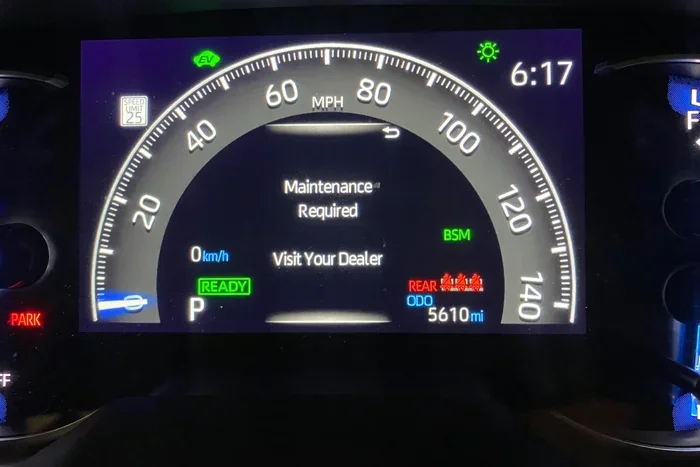
Visual guide about Toyota Rav4 dashboard maintenance light
Image source: i.ytimg.com
Park Safely and Set the Scene
Always park on level ground and set the parking brake. Make sure the vehicle is in park and the engine is off before you begin. You want a calm environment so you can focus on the dashboard screen and buttons. This simple habit also keeps you safe while you work.
Confirm Your Service Is Done
Only reset the light after you complete the actual service. If you still need an oil change or tire rotation, clear the reminder later. Resetting too early can hide a real maintenance need. It is best to finish the work first, then clear the dashboard message.
Step-by-Step Guide to Reset the Light
This is the core of the process. The steps are straightforward, and most Rav4 models follow a similar pattern. Take your time and follow each step carefully.
Turn the Ignition On
Insert your key and turn the ignition to the on position. If your Rav4 has a push-button start, press the start button without stepping on the brake. You want the dashboard lights on, but the engine does not need to be running. This powers the display so you can access the reset menu.
Access the Dashboard Menu
Use the odometer or trip button to move through the display options. Hold the button briefly until the maintenance screen appears. Different model years may show slightly different wording, but the goal is the same. Look for a service menu or maintenance indicator option.
Select the Reset Option
Once you see the maintenance screen, press and hold the designated button. The display should show a reset prompt or a flashing confirmation. Keep holding until the light clears or the counter resets to zero. If your model asks for confirmation, select yes and wait for the screen to update.
Verify the Light Is Gone
Turn the ignition off and then back on again. Check the dashboard to make sure the maintenance message no longer appears. If it is still there, repeat the steps slowly and make sure you held the button long enough. A quick second try usually solves the issue.
Model Variations and Common Differences
Not every Rav4 is exactly the same. Small differences can change which buttons you use or how the menu looks. Knowing these variations helps you avoid frustration.
Older Models vs Newer Models
Earlier Rav4 years often use a simple odometer reset method. Newer models may include a touchscreen or a more detailed service menu. The basic idea stays the same, but the path to the reset screen can differ. If one method does not work, try the alternate button sequence for your year.
Hybrid and Standard Versions
Hybrid Rav4 vehicles sometimes group service reminders with other dashboard settings. Standard gas models usually follow the classic button-hold method. Either way, the reset is still a dashboard function and does not require special hybrid tools. Just follow the on-screen prompts and stay patient.
Troubleshooting When the Light Stays On
Sometimes the light does not clear on the first try. That can feel annoying, but it is usually a simple fix. Here are the most common reasons and what to do about them.
Button Timing Issues
If you release the button too soon, the reset may not register. Try holding it for a few seconds longer and watch the screen closely. A steady hold is often the difference between success and a repeated reminder.
Menu Selection Mistakes
You may have selected the wrong menu option. Go back through the display and confirm you are in the maintenance or service section. Some screens look similar, so double-check the wording before you confirm.
Unfinished Service Tracking
If the system thinks service is still pending, it may block the reset. Make sure your maintenance task is actually complete. If needed, perform a basic inspection and then retry the reset process.
Helpful Tips for Toyota Owners
A smooth reset is nice, but good habits make car ownership even easier. These small tips help you stay organized and keep your Rav4 in great shape.
Keep a Simple Service Log
Write down the date, mileage, and type of service after each reset. A small notebook or phone note works well. This record helps you plan future maintenance and track what you have already done. It also makes the reset process feel more purposeful.
Watch for Other Dashboard Messages
The maintenance light is only one of many dashboard indicators. Learn the difference between routine reminders and urgent warning lights. If you see something unfamiliar, check your manual or ask a trusted mechanic. Staying informed helps you react calmly instead of guessing.
Use Reliable Resources for Other Toyota Tasks
If you ever need help with related Toyota ownership tasks, good guides can save you time. For example, you may want to learn how to replace Toyota Rav4 key battery when your remote starts acting up. You might also find it useful to explore how to remote start Toyota Rav4 2024 if your model supports that feature. These small skills make daily ownership easier and more convenient.
Expert Insight
Many experienced Toyota owners say the best habit is to reset the light immediately after service. That way, the reminder always reflects your real maintenance schedule. It also prevents confusion if you share the vehicle with family members. A quick reset today can save a lot of dashboard stress later.
Common Mistakes to Avoid
Even a simple reset can go sideways if you rush. Avoid these common mistakes and you will likely get it right the first time.
Resetting Before Service
Do not clear the light just to make it disappear. If the service is still overdue, the reminder is doing its job. Finish the maintenance first, then reset the system.
Confusing Warning Lights with Reminders
A maintenance reminder is not the same as a check engine light or oil pressure warning. If another warning appears alongside the maintenance message, pay attention to the more serious indicator first. Safety always comes before a routine reset.
Skipping the Verification Step
Always turn the vehicle back on and confirm the light is gone. Skipping this step can leave you wondering whether the reset worked. A few extra seconds of checking saves confusion later.
Key Takeaways for a Smooth Reset
Here is a quick recap to keep in mind before you head out to your car.
- Stay calm: The maintenance light is usually a routine reminder, not an emergency.
- Follow the button sequence: A steady hold on the correct button usually clears the message.
- Verify the result: Turn the ignition back on and confirm the light is off.
- Know your model: Older and newer Rav4s may use slightly different menus.
- Track your service: A simple log keeps your maintenance schedule clear.
Final Thoughts on Resetting the Light
Learning how to reset maintenance required light on Toyota Rav4 is one of those small skills that makes car ownership feel easier. The process is quick, practical, and doable at home. Once you know the steps, you can handle routine reminders without waiting for a dealership visit. Just remember to complete the actual service first and verify the reset afterward.
Your Rav4 is built to be dependable, and keeping up with simple reminders helps it stay that way. Treat the maintenance light as a helpful tool rather than a nuisance. With a little patience and the right button sequence, you can clear the message and keep your dashboard clean. Drive with confidence, stay on top of your service schedule, and enjoy the ride.
Frequently Asked Questions
How do I reset maintenance required light on Toyota Rav4?
Turn the ignition on, use the odometer or trip button to reach the maintenance menu, and hold the reset button until the light clears. Then turn the vehicle off and back on to confirm the message is gone.
Why does my Toyota Rav4 show a maintenance required light?
This light is a mileage-based reminder for routine service such as an oil change or inspection. It is designed to help you stay on schedule rather than signal a serious problem.
Can I reset the maintenance light without doing the service?
You can, but it is better to complete the service first. Resetting too early may hide a real maintenance need and confuse your future service schedule.
What if the maintenance light does not reset on the first try?
Hold the button a little longer and make sure you are in the correct menu. Then turn the ignition off and back on to check whether the message cleared.
Does the reset process differ for newer Toyota Rav4 models?
It can. Some newer models use a touchscreen service menu, while older models rely on the odometer and trip buttons. The basic idea is the same, but the path to the reset screen may vary.
Should I worry if the maintenance light comes back soon after resetting?
If it returns quickly, your service may still be incomplete or the reset may not have registered fully. Check your recent maintenance and try the reset steps again carefully.