

Replacing the battery in your Toyota key fob is easier than you think and can save you a trip to the dealership. Most key fobs use a standard CR2032 battery that you can swap in minutes with a small screwdriver or coin. This guide covers everything you need to know about how to replace battery in a Toyota key fob safely and quickly. You will learn the right tools, common mistakes to avoid, and how to test your key fob after the swap. Follow these simple steps and get back to locking, unlocking, and starting your car without hassle.
Key Takeaways
- Simple process: You can replace the battery in most Toyota key fobs at home in under ten minutes.
- Common battery type: Most models use a CR2032 coin cell battery, but some older fobs may use different sizes.
- Basic tools needed: A small flathead screwdriver, a coin, or a plastic pry tool is usually enough.
- Watch for clips: Key fobs have small plastic clips, so pry carefully to avoid cracking the case.
- Test before reassembly: Check that the buttons work before snapping the case back together.
- Reset may be needed: Some cars require a quick key fob reset after battery replacement.
- Keep spares: Store a fresh battery in your glove box so you are ready for the next swap.
📑 Table of Contents
- Why You Should Learn How To Replace Battery In A Toyota Key Fob
- Signs Your Toyota Key Fob Battery Needs Replacing
- Tools and Battery Type You Will Need
- Step-By-Step Guide: How To Replace Battery In A Toyota Key Fob
- Common Mistakes To Avoid When Changing Your Key Fob Battery
- Quick Tips and Expert Insights for a Smooth Swap
- How To Reset or Reconnect Your Key Fob After Battery Replacement
- FAQ: How To Replace Battery In A Toyota Key Fob
- Final Thoughts on How To Replace Battery In A Toyota Key Fob
Why You Should Learn How To Replace Battery In A Toyota Key Fob
Your Toyota key fob is one of those small things you use every day without thinking about it. You press a button and the doors unlock. You press another and the trunk pops open. It just works. Then one day, the range starts dropping. You have to walk closer to the car. Sometimes the buttons feel sluggish. That is usually the first sign that the battery is running low.
Learning how to replace battery in a Toyota key fob is a handy skill that saves time and money. You do not need to wait for an appointment or pay a dealer to do a simple swap. Most key fobs are built to let owners change the battery easily. With a few basic tools and a careful hand, you can handle this task at your kitchen table in a few minutes.
This guide walks you through the whole process in plain language. We will cover the tools you need, the step-by-step method, common mistakes, and how to test everything when you are done. If you have ever stared at a tiny key fob and wondered where to start, this article is for you.
Signs Your Toyota Key Fob Battery Needs Replacing
Before you open anything, it helps to know whether the battery is truly the problem. Key fobs do not usually fail all at once. They give you little warning signs first. Here are the most common clues.
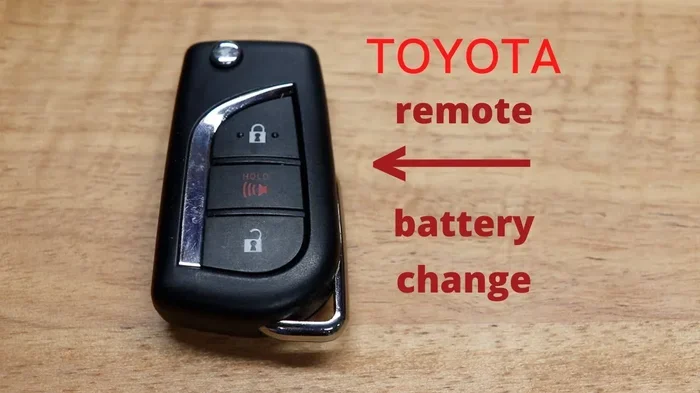
Visual guide about Toyota key fob battery replacement
Image source: i.ytimg.com
Weak Range and Unreliable Signals
If you have to stand right next to your car for the fob to work, the battery is probably tired. A fresh battery sends a strong signal. A weak battery struggles to reach the car’s receiver. You might notice the unlock button works only when you are close. That is a classic sign.
Buttons That Feel Slow or Unresponsive
You press the lock button and nothing happens the first time. You press again and it finally responds. This can happen when the battery cannot deliver enough power quickly. It is frustrating, but it is also a clear hint that the battery is near the end of its life.
Dashboard Warnings or Starting Issues
Some Toyota models show a small key icon warning on the dashboard when the fob battery is low. In push-to-start cars, a weak fob can make the engine harder to start. You might have to hold the fob against a special spot in the car to get it to recognize the key. That is another strong clue.
Quick Tip: Rule Out Other Problems First
Before you change the battery, make sure the issue is not something else. Check that the car battery is healthy. Make sure the fob is not damaged from a drop or splash of water. If the fob is cracked or wet, a new battery will not fix it. But if the fob looks fine and the symptoms match a low battery, replacing it is the right move.
Tools and Battery Type You Will Need
One of the best parts about how to replace battery in a Toyota key fob is that you do not need fancy equipment. A few simple tools are enough for most models. Let’s go over what to gather before you start.
Common Battery Sizes
Most Toyota key fobs use a CR2032 battery. This is a flat, round coin cell battery you can find at almost any store. Some older or special fobs may use a different size, such as CR2025 or CR1632. The safest move is to check your current battery or look at your owner’s manual. If you are unsure, remove the old battery and match the numbers on the label.
Basic Tools
You usually need one or two small tools. Here is a simple list.
- Small flathead screwdriver or a precision screwdriver
- A coin, like a quarter, which can work as a gentle pry tool
- Plastic pry tool or an old guitar pick for safe opening
- New battery that matches your fob’s size
- Soft cloth to protect the fob while you work
Avoid using large metal tools. They can scratch the case or bend small plastic parts. A gentle tool is better than a strong one. The goal is to open the fob without forcing it.
Optional But Helpful Items
A small flashlight can help you see tiny clips and battery slots. Tweezers can be useful if the battery is hard to grab. A clean, flat surface also makes the job easier. Some people like to work over a towel so small parts do not slide away.
Step-By-Step Guide: How To Replace Battery In A Toyota Key Fob
Now for the main event. This is the part where you actually open the fob and swap the battery. The process is straightforward, but it helps to go slowly and stay patient. Different fob designs can vary a little, so use this as a general guide and adjust based on your model.
Step 1: Prepare Your Workspace
Start with a clean, well-lit area. A table is ideal. Make sure you have your new battery, tools, and a soft cloth ready. If your fob has a key blade, remove it if needed. Some fobs open more easily when the metal key is out. Take a moment to look at the fob and notice any small grooves or release points.
Step 2: Open the Key Fob Carefully
Most Toyota key fobs have a small seam around the edge. This is where the two halves meet. Insert your small screwdriver, coin, or plastic pry tool into the seam. Gently twist or slide it to separate the halves. Do not force it. You should feel a slight release before the case opens.
If your fob has screws, remove them first. Some models hide a screw under a small cover or behind the key blade area. Check carefully so you do not pry against a screw you could have removed by hand.
When the case begins to open, go around the edges slowly. Plastic clips hold many fobs together, and they can break if you rush. A little patience here saves a lot of trouble later.
Step 3: Remove the Old Battery
Once the fob is open, locate the battery. It usually sits in a small round slot. Note which side faces up before you take it out. In many fobs, the positive side faces upward, but this can vary. A quick look at the battery label or the inside of the case can help.
Use your finger, a plastic tool, or tweezers to lift the old battery out. Try not to use metal tools directly on the battery if you can avoid it. Set the old battery aside for proper disposal later.
Step 4: Install the New Battery
Place the new battery into the slot the same way the old one sat. Make sure it lies flat and fits snugly. The battery should not wiggle around. If it feels loose, double-check the size and orientation. A battery that is upside down will not power the fob correctly.
Press it gently into place if needed. Some fobs hold the battery with a small clip or spring. You should feel a firm fit, not a tight squeeze.
Step 5: Reassemble the Fob
Bring the two halves back together. Align them carefully before pressing them closed. Make sure any buttons, clips, or internal pieces are sitting properly. If something is crooked, the buttons may not work well after reassembly.
Press around the edges until the case snaps shut. If your fob had screws, replace them now. Tighten them gently. Over-tightening can strip small plastic threads, so stop once the screw feels secure.
Step 6: Test the Key Fob
Before you call the job done, test the fob. Stand near your car and press the lock and unlock buttons. If your fob has a trunk or panic button, test those too. You should get a quick, reliable response. If the car does not react right away, try a few more presses and check the battery placement.
If your Toyota uses a push-to-start system, try starting the car or placing the fob in the backup spot if needed. This helps confirm the fob is communicating properly with the vehicle.
Common Mistakes To Avoid When Changing Your Key Fob Battery
Even a simple job can go sideways if you rush. Here are the most common mistakes people make when learning how to replace battery in a Toyota key fob, and how to avoid them.
Forcing the Case Open
The biggest mistake is pushing too hard. Key fob cases are made with small clips and delicate seams. If you jam a screwdriver in too aggressively, you can crack the plastic. Use light pressure and work slowly around the edges.
Using the Wrong Battery
Not every coin cell battery is the same. A battery that is too thin or too thick may not fit properly. A different voltage can also cause problems. Always match the battery type listed on the old cell or in the manual.
Mixing Up Battery Orientation
It is easy to drop in the new battery upside down. That small mistake can make the fob seem dead even with a fresh battery. Before you close the case, check the positive and negative sides.
Losing Tiny Parts
Some fobs have tiny screws or clips that can bounce away when opened. Working over a towel or tray helps keep everything in one place. If a screw falls on the floor, it can be surprisingly hard to find.
Skipping the Test
It is tempting to snap the fob shut and assume it works. Always test first. If the buttons do not respond, you can reopen the fob and fix the issue without much trouble. Testing early saves time and prevents repeated disassembly.
Quick Tips and Expert Insights for a Smooth Swap
A few small habits can make the job easier and help your new battery last longer. Here are some practical tips from everyday experience.
Handle the Fob Gently
Key fobs take a lot of abuse in pockets and bags. Even so, the internal parts are small and sensitive. Treat the case carefully during opening and closing. Smooth handling reduces the chance of cracking a clip or misaligning a button.
Clean the Inside If Needed
If you see dust or tiny debris inside the fob, brush it out gently. Dirt can interfere with button movement or battery contact. A soft, dry brush or a quick puff of air can help. Avoid liquids, since they can damage electronics.
Check Button Feel After Reassembly
After the fob is closed, press each button a few times. They should feel crisp and return smoothly. If a button feels sticky or sunken, the case may not be aligned properly. Open it again and adjust before using it regularly.
Keep a Spare Battery Handy
A small spare battery in the glove box or center console can save you in a pinch. If your fob starts acting up, you can swap the battery right away instead of scrambling for a store trip. It is a simple backup plan that pays off.
Know When to Seek Help
If the fob still does not work after a correct battery replacement, the issue may be more than the battery. The fob could be damaged, or the car may need a key fob reset or reprogramming. In that case, checking your owner’s manual or speaking with a knowledgeable technician is a smart next step.
How To Reset or Reconnect Your Key Fob After Battery Replacement
Most of the time, a new battery works right away. But some Toyota models may need a quick reset or a moment to reconnect. This is usually easy to handle at home.
When a Reset May Be Needed
You might notice the car does not recognize the fob immediately after the swap. The buttons may work, but the car ignores the key. In that case, a simple reset can help the system re-sync. This is more common with push-to-start vehicles.
Simple Reconnection Steps
Try this first: stand close to the car with the fob and press the lock or unlock button a few times. Sometimes the car just needs a few seconds to recognize the fresh signal. If that does not work, check your manual for any model-specific reset steps. Some cars have a backup key slot or a special area where you place the fob during startup.
If your car has a maintenance light or other settings that seem unrelated, do not worry. Changing the key fob battery usually does not affect those systems. But if you ever need to handle dashboard reminders, you can look into a separate guide for that task, such as how to reset the maintenance light on a Toyota.
Expert Insight: Keep It Simple First
Do not assume the worst if the fob acts oddly at first. Start with the easiest checks. Make sure the battery is seated correctly. Make sure the case is fully closed. Test the fob near the car. Many issues are solved by one of these basic steps.
FAQ: How To Replace Battery In A Toyota Key Fob
What battery does a Toyota key fob usually use?
Most Toyota key fobs use a CR2032 battery, though some models may use a different coin cell size. Check the old battery or your owner’s manual to be sure before buying a replacement.
How long does it take to replace a Toyota key fob battery?
It usually takes just a few minutes once you have the right battery and tools. The actual swap is quick, but you should still go slowly to avoid damaging the case or losing small parts.
Can I replace the battery myself without special tools?
Yes, many people can do it with a small flathead screwdriver, a coin, or a plastic pry tool. Some fobs open very easily, while others need a bit more care. The job is simple if you take your time.
What should I do if my key fob still does not work after replacing the battery?
First, check that the battery is seated correctly and the case is fully closed. If it still fails, the fob may need a reset or reprogramming, or there may be another issue inside the fob or vehicle.
Do I need to reset my Toyota after changing the key fob battery?
Not always. Many fobs start working right away. If your car does not recognize the fob, a quick re-sync or manual reset may help. Check your owner’s manual for model-specific steps.
Where can I buy a replacement battery for my Toyota key fob?
You can usually find the right battery at hardware stores, pharmacies, supermarkets, or online. Look for the battery size printed on your current cell so you buy the correct type.
Final Thoughts on How To Replace Battery In A Toyota Key Fob
Changing a weak battery is one of the easiest ways to bring your key fob back to life. Once you know how to replace battery in a Toyota key fob, you can handle this small repair quickly at home and avoid unnecessary stress. The process is simple, the tools are basic, and the payoff is immediate when your buttons start responding again.
Take your time, use the right battery, and test the fob before you close everything up. A careful approach prevents most problems and keeps the fob in good shape. With a little practice, this becomes an easy maintenance task you can do whenever the battery starts to fade.
A fresh battery can make your key fob feel reliable again. So the next time your range drops or the buttons feel slow, do not wait. Grab a replacement battery, follow these steps, and get your Toyota key fob working smoothly again.