
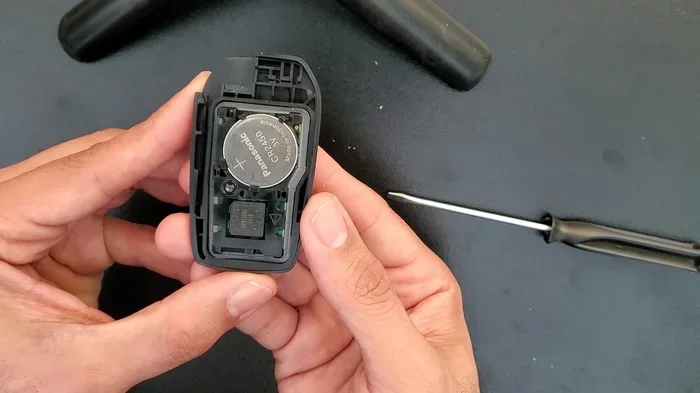
Replacing a dead battery in your Toyota key fob is a simple DIY task that takes less than five minutes. You only need a small flathead screwdriver and a CR2032 coin cell battery to get started. Most Toyota models use the same basic design, making the process nearly identical across the board. Follow this clear guide to replace your Toyota key battery without visiting a dealership.
How to replace battery in Toyota key fobs is one of the easiest car maintenance tasks you can handle at home. A dead key fob battery causes frustration, but it does not mean you need a costly dealership visit. You can fix this problem in minutes with a small screwdriver and a fresh coin cell battery. Most Toyota owners notice the issue when the remote starts working intermittently or stops responding completely. The good news is that the fix is straightforward and affordable.
This guide walks you through every step in plain language. You will learn which battery to buy, how to open the fob safely, and how to test the new battery before sealing everything back up. We also cover common mistakes, model differences, and quick troubleshooting tips. By the end, you will feel confident handling this task on your own.
Many drivers search for how to replace battery in Toyota key because they want a fast solution without extra fees. The process is simple, but a careful approach prevents damage to the plastic casing or the internal circuit board. Take your time, follow the steps below, and you will have a fully working remote again in no time.
Key Takeaways
- Quick Process: Replacing the battery takes about 3 to 5 minutes with basic tools.
- Correct Battery Type: Most Toyota key fobs require a CR2032 lithium coin cell battery.
- Gentle Handling: Use a plastic pry tool or flathead screwdriver to avoid cracking the casing.
- Exact Alignment: Match the positive and negative sides carefully before closing the fob.
- Test Before Closing: Press the lock and unlock buttons to confirm the new battery works.
- Model Variations: Some smart keys and proximity fobs have slightly different opening methods.
- Preventive Care: Keep spare batteries at home to avoid being locked out unexpectedly.
📑 Table of Contents
Understanding Your Toyota Key Fob
Before you begin, it helps to know what kind of key fob you own. Toyota uses several designs across different models and model years. The most common type is a standard remote key fob with lock and unlock buttons. Some newer vehicles use a smart proximity key or a foldable key blade design. Even with these variations, the battery replacement process stays very similar.
The main goal is to access the small coin cell battery inside the casing. That battery powers the wireless signal that talks to your car doors and alarm system. When the battery loses charge, the signal weakens and the buttons stop responding reliably. Replacing the cell restores the signal strength and brings back smooth operation.
Common Toyota Key Fob Types
Here are the most frequent designs you will encounter:
- Standard Remote Fob: A rectangular plastic case with separate lock and unlock buttons.
- Foldable Key Fob: A key blade that folds into the body, often found on newer sedans and SUVs.
- Smart Proximity Key: A larger fob that allows push-button start and keyless entry.
- Integrated Key Head: A design where the key blade also serves as part of the fob structure.
No matter which style you have, the battery compartment is usually accessible without special tools. A small flathead screwdriver or a plastic pry tool is enough for most cases. If you are unsure about your specific fob, you can check the battery compartment shape once you start opening it.
Battery Types and Specifications
Most Toyota key fobs use a CR2032 lithium coin cell battery. This is a common, widely available battery size used in many electronics. It provides a steady 3-volt output and fits neatly into the compact fob housing. Some older or specialty fobs may use a different cell, so it is smart to check the old battery before buying a replacement.
When shopping for a new battery, look for these details:
- Voltage: 3 volts for standard remote fobs.
- Size: CR2032 is the most common format.
- Quality: Choose a reputable brand for longer lifespan and reliable power.
- Pack Size: A multi-pack is useful since key fob batteries eventually need replacing again.
Using the correct battery matters because the wrong size can cause poor contact or fit issues. A quality cell also helps the remote work consistently for a longer period.
Tools and Supplies You Need
You do not need a full toolbox for this job. A few simple items are enough to complete the replacement safely and cleanly. Gathering everything first saves time and reduces the chance of dropping small parts.

Visual guide about Toyota key fob battery replacement
Image source: i.ytimg.com
Here is a practical checklist:
- New CR2032 battery or the correct cell for your fob.
- Small flathead screwdriver or a plastic pry tool.
- Tweezers for handling the tiny battery safely.
- A clean, flat surface with good lighting.
- Optional: A soft cloth to protect the fob during prying.
Using a plastic tool is a smart choice because it lowers the risk of scratching or cracking the casing. If you only have a metal screwdriver, use gentle pressure and avoid forcing the shell open. A little care goes a long way.
Step-by-Step Guide: How to Replace Battery in Toyota Key
Now let us walk through the replacement process. These steps apply to most Toyota key fobs and focus on safe handling. Work slowly, and you will avoid common mistakes.
Step 1: Identify the Seam and Opening Point
Look closely at the fob body. Most models have a small seam where the two halves meet. In many cases, there is also a tiny notch near the key blade or along the edge. That notch is the best place to start prying. If your fob has a foldable key, extend the blade first so you can see the seam more clearly.
Step 2: Open the Fob Carefully
Insert the flathead screwdriver or plastic tool into the seam. Apply light pressure to separate the two halves. You should hear a soft click as the internal clips release. Do not twist aggressively, because the plastic can crack if you push too hard. If the fob resists, check for another opening point along the edge.
Some models open more easily when you press a release area near the button panel. If your fob has a removable key blade, pulling the blade out sometimes reveals a hidden slot. Use that slot to gain better leverage.
Step 3: Remove the Old Battery
Once the casing opens, you will see the coin cell resting in its compartment. Note the battery orientation before removing it. The positive side usually faces up, but you should confirm the exact position in your fob. Use tweezers or your fingers to lift the old battery out gently. Avoid touching the circuit board unnecessarily.
Step 4: Insert the New Battery
Place the new CR2032 battery into the compartment with the correct orientation. Make sure it sits flat and makes firm contact with the terminals. If the battery feels loose, double-check the placement. A misaligned battery can cause weak signal performance or intermittent button response.
Here is a quick orientation reminder:
- Positive side: Usually faces upward toward the buttons.
- Negative side: Usually rests against the bottom contact.
- Fit: The battery should lie snugly without forcing it.
Step 5: Close the Fob and Test
Align the two halves of the casing and press them together until the clips snap back into place. Check the seam to make sure the shell is fully closed. Then press the lock and unlock buttons to test the remote. If the car responds from a normal distance, the replacement was successful.
If the buttons do not work right away, reopen the fob and verify the battery position. Sometimes a slightly shifted cell causes the issue. A quick adjustment usually solves it.
Tips for Different Toyota Models
While the basic process is similar, a few Toyota models have small differences worth noting. Being aware of these details helps you avoid confusion when the fob does not open exactly as expected.
Standard Sedans and Compact SUVs
Many sedans and smaller SUVs use a simple remote fob with a clear seam. These are usually the easiest to open. A small notch near the key blade or button edge gives you a good starting point. Once the shell is open, the battery compartment is straightforward to access.
Newer Smart Key Systems
Some newer Toyota vehicles use a smart key with a more compact layout. These fobs may have additional internal components, but the battery replacement still follows the same general idea. The main difference is that the casing may feel tighter. Use extra care when prying to avoid stressing the plastic.
Foldable Key Designs
Foldable key fobs often hide the seam until the blade is extended. Pull the key out first, then look for the slot or notch along the edge. After opening, the battery area is usually easy to reach. This design is common on many modern Toyota models, so it is worth recognizing early.
Common Mistakes to Avoid
Even a simple task can go wrong if you rush. Here are the most common errors and how to prevent them.
- Forcing the casing: Too much pressure can crack the plastic. Use gentle leverage instead.
- Wrong battery orientation: Check the positive and negative sides before closing the fob.
- Using the wrong battery size: Confirm the cell type before buying a replacement.
- Dropping small parts: Work over a clean tray or cloth to keep pieces from getting lost.
- Skipping the test step: Always test the buttons before sealing the fob completely.
- Ignoring corrosion: If the old battery leaked, clean the compartment carefully before inserting the new one.
Avoiding these mistakes keeps the repair smooth and protects your key fob from unnecessary damage.
Quick Troubleshooting After Replacement
Sometimes the new battery is installed correctly, but the remote still acts up. A few quick checks can solve the problem.
Start by confirming the battery is fresh and not damaged during storage. Then verify that it sits flat and touches both contacts. If the fob still does not work, inspect the inside of the casing for debris or bent contacts. A small amount of dust can interfere with the connection.
You should also test the remote at a reasonable distance from the car. If the signal works only when the fob is very close, the battery may not be seated correctly. Reopen the fob and adjust the cell if needed.
When to Seek Professional Help
Most battery replacements are simple, but there are times when extra help makes sense. If the fob casing is cracked, the buttons feel stuck, or the remote still fails after a correct battery install, it may have a deeper issue. In that case, a dealership or locksmith can inspect the electronics and confirm whether the fob needs repair or replacement.
If you want a more detailed walkthrough for your exact model, you can also review our guide on how to replace the battery in a Toyota key fob. It covers model-specific notes that may help if your fob has a unique layout.
Key Fob Maintenance and Battery Life
A key fob battery does not last forever, but good habits can extend its useful life. The battery usually lasts several years, depending on usage and signal frequency. If you press the buttons often or carry the fob near electronics that interfere with the signal, the battery may wear faster.
To help the battery last longer, try these habits:
- Avoid unnecessary button presses: Each press uses a small burst of power.
- Keep the fob dry and clean: Moisture and dirt can affect contacts over time.
- Store it away from heat: Extreme temperatures can shorten battery life.
- Replace before total failure: If the range starts dropping, change the battery early to avoid being stranded.
A little attention now and then keeps the fob reliable and reduces the chance of a surprise dead battery.
Expert Insights and Final Advice
Experienced car owners know that simple maintenance tasks often save time and money. Replacing a key fob battery is one of those tasks. The parts are cheap, the process is quick, and the result is immediate when done correctly. The most important thing is to stay calm and work carefully.
If you are doing this for the first time, take a moment to compare the old battery and the new one before closing the fob. That small check prevents orientation mistakes. It also helps to keep the old battery aside until you confirm the new one works. Once everything tests well, you can dispose of the old cell properly.
For owners who want a broader look at Toyota key fob care, our article on how to change the battery in a Toyota key fob offers additional practical notes. If you are specifically looking for the how to replace car key battery Toyota method for your model, the same core steps usually apply.
Conclusion
Learning how to replace battery in Toyota key fobs is a practical skill that every Toyota owner can use. The process is quick, inexpensive, and manageable with basic tools. With the right battery and a careful approach, you can restore your remote function in just a few minutes. Remember to check the battery orientation, test the buttons, and avoid forcing the casing.
Keep a spare CR2032 battery at home so you are ready when the next replacement comes around. A small bit of preparation can save you from stress later. Now that you know the steps, you can handle this common issue confidently and get back to using your key fob without interruption.
Frequently Asked Questions
What battery does a Toyota key fob use?
Most Toyota key fobs use a CR2032 lithium coin cell battery. Some models may use a different cell, so it is best to check the old battery before buying a replacement.
How long does it take to replace a Toyota key battery?
The replacement usually takes about 3 to 5 minutes once you have the right battery and a small screwdriver. The process is quick if you work carefully and avoid forcing the casing.
Can I replace the battery myself without tools?
You can sometimes open the fob with your fingers if there is a visible notch or release slot. However, a small flathead screwdriver or plastic pry tool makes the job easier and safer.
What should I do if the key fob still does not work after replacing the battery?
Check the battery orientation and make sure it sits flat against the contacts. If it still fails, inspect the inside for debris or damaged contacts, and retest the remote at a normal distance.
Is CR2032 the only battery size for Toyota keys?
CR2032 is the most common size, but a few fobs may use a different coin cell. Always verify the battery number printed on the old cell or check your fob’s requirements before purchasing.
Where can I buy a replacement Toyota key battery?
You can find CR2032 batteries at electronics stores, auto parts shops, supermarkets, and online retailers. A multi-pack is often a smart choice since key fob batteries need replacing every few years.